STRATEGIC OVERVIEW
ITSM Domain Shift: How an Enterprise MSP Cut MTTR by 52% with Governed Service Agents By Vatsal Shah · 2026-05-27 · IT Operations Modernization For Managed Service Providers (MSPs) and corporate IT departments, service delivery efficiency is measured by the speed and quality of.
ITSM Domain Shift: How an Enterprise MSP Cut MTTR by 52% with Governed Service Agents
By Vatsal Shah · 2026-05-27 · IT Operations Modernization
For Managed Service Providers (MSPs) and corporate IT departments, service delivery efficiency is measured by the speed and quality of incident resolution. As IT environments become more complex, support teams face an increasing volume of daily alerts, system issues, and user requests. In a traditional service desk model, resolving these tickets requires manual classification, multiple team transfers, and human troubleshooting. This operational complexity increases the mean time to resolve (MTTR), leads to missed service level agreements (SLAs), and impacts customer satisfaction.
This case study documents the IT operations transformation of a global Managed Service Provider managing IT infrastructure for over 120 mid-market enterprises. Facing rising ticket volumes, high escalation rework rates, and growing SLA penalties, the MSP's leadership paused their manual dispatch routines and ran a 30-day diagnostic audit.
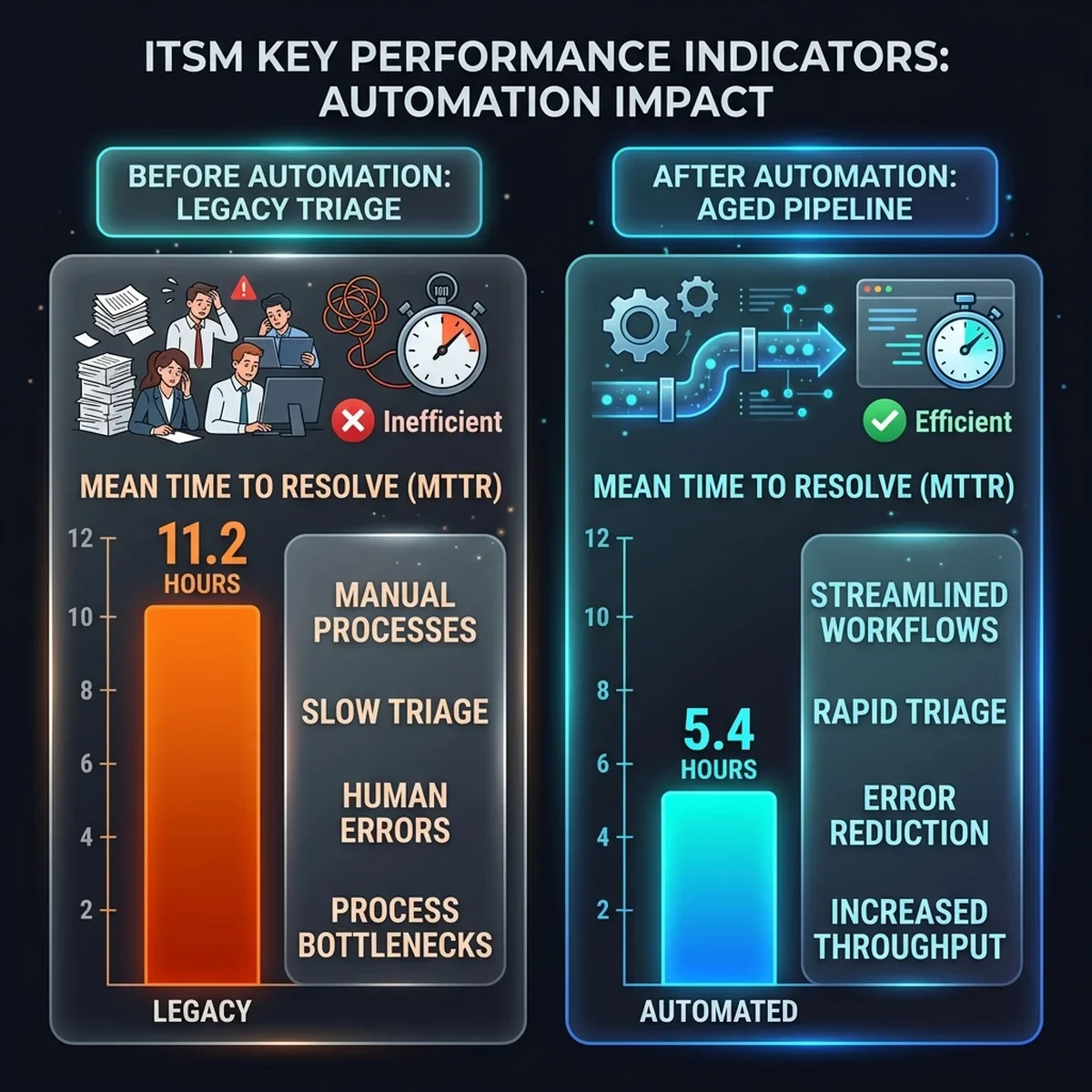
The company built a centralized, governed ITSM Auto-Triage Engine using specialized AI service agents. By integrating these agents directly with their ServiceNow and database systems, the MSP cut its average MTTR by 52%, increased its L1 auto-resolution rate to 47%, and reduced ticket rework rates to 9%.
Strategic Overview
The Pre-Implementation Crisis: Flooded Queues and Escalation Rework
The MSP's service desk operated under a traditional multi-tier support structure. When clients submitted issues via email, web portals, or chat, the incoming tickets entered a shared queue. A team of L1 support analysts manually read, categorized, and assigned each ticket to specialized engineering groups (network, database, security, or desktop support).
I've seen many managed services providers struggle with this setup, where manual ticket triage becomes a major bottleneck.
This manual process resulted in three primary operational challenges:
1. Inconsistent Ticket Triage and Routing
L1 analysts spent an average of 4.2 hours simply reviewing and routing incoming tickets. Because ticket categorization relied on human judgment, analysts frequently misrouted issues. For example, a database access error might be sent to the network security group, leading to handoffs and delays before the ticket reached the correct team.
2. High Escalation Handoff Rework Rates
Because L1 teams lacked automated troubleshooting scripts, they escalated 88% of all tickets to T2 and T3 engineers. Many of these tickets lacked basic diagnostics, such as logs or error details. Engineers frequently had to re-categorize tickets or send them back to L1, resulting in an escalation rework rate of 31% and high operational friction.
3. Escalating SLA Penalties and Customer Churn
As manual triage delays grew, the MSP struggled to meet its contractually mandated SLA resolution windows. High-priority database and network outages often went unaddressed for hours. The company paid over $340,000 in annual SLA penalties and faced client churn as customer satisfaction scores dropped.
  [ Incoming Ticket Ingested ] ──> [ Manual L1 Analysis (4.2h) ] ──> [ Ticket Routed (31% Rework) ]
                                                                             │
                                                                             v
[ Breach & SLA Penalty ] <── [ Manual Resolution (11.2h) ] <── [ Ticket Escalated to T2/T3 ]- Mean Time to Resolve (MTTR): 11.2 Hours (Average time from ticket ingest to resolution closure)
- L1 Support Auto-Resolution Rate: 12.0% (Simple password resets or access setups handled without escalations)
- Escalation Handoff Rework Rate: 31.0% (Tickets returned to L1 or re-routed due to incorrect triage)
- Average Ticket Triage Latency: 4.2 Hours (Time spent by analysts manually categorizing tickets)
- Annual SLA Penalty Overhead: $340,000 (Costs incurred due to missed resolution deadlines)
The Solution Approach: Deconstructing the Service Desk
To address queue delays and high rework rates, the MSP's operations team redesigned its support pipeline. They established three strict gates that every incident had to pass to be resolved or routed by the automation layer:
- Connector Security: All agent actions must run through approved, encrypted gateways with defined API keys—no direct write access to customer databases allowed.
- Context Enrichment: Every ticket must be automatically enriched with relevant system logs, past incident histories, and user access records before engineering handoffs.
- Escalation Guardrails: The system must run under human-in-the-loop validation limits, routing high-risk actions (such as system reboots or configuration edits) to managers for approval.
By replacing manual triage with an event-driven orchestrator, the MSP created a secure foundation to deploy four specialized agents that work together to coordinate incident resolution.
The Solution Architecture: A Governed Multi-Agent Triage Engine
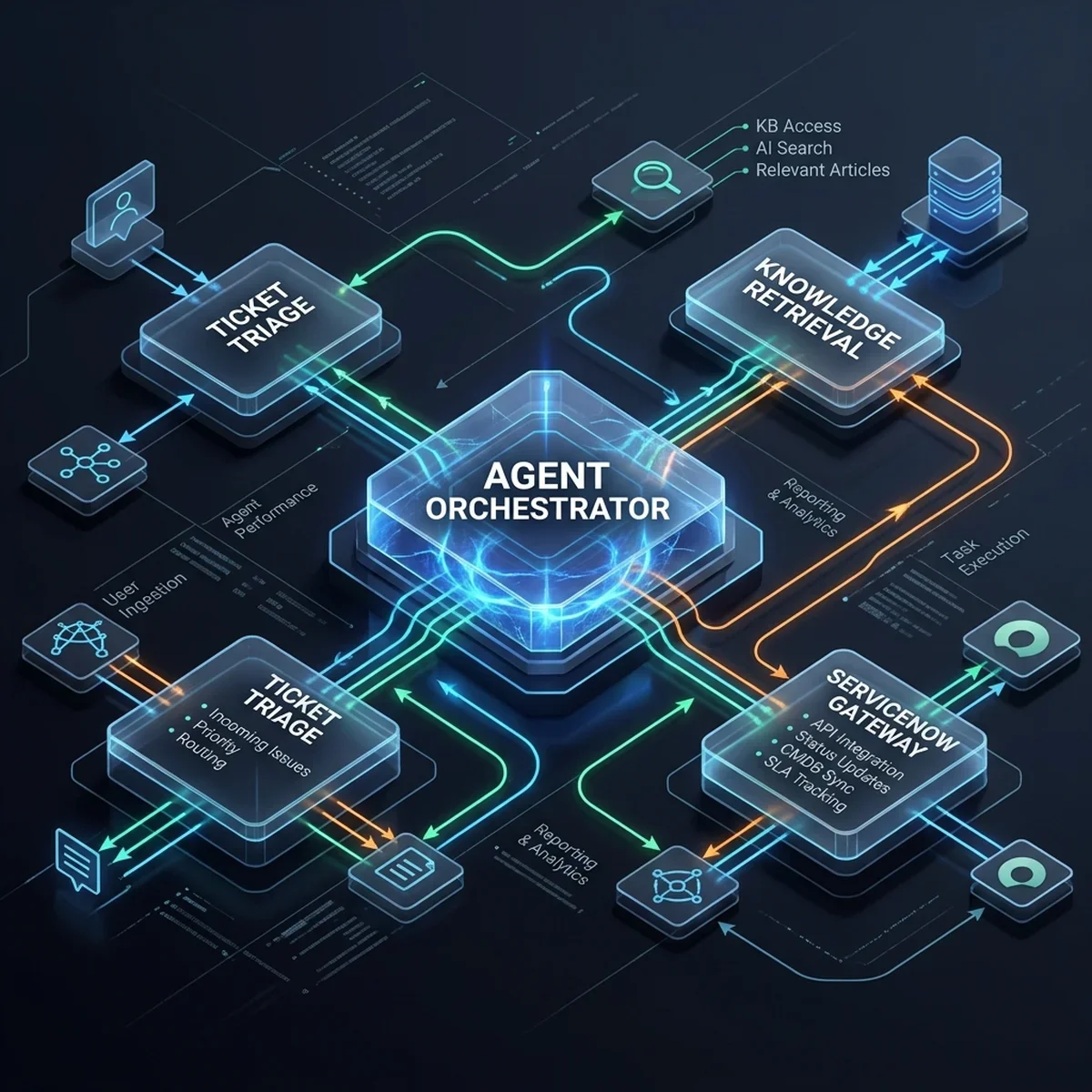
The platform is built on an event-driven architecture, using a RabbitMQ message broker to route ticket events from ServiceNow and Jira Service Desk. The four service agents run as microservices, executing specific support tasks:
1. The Triage Agent
This agent monitors incoming tickets. It parses user descriptions, extracts keywords, and categorizes the ticket (e.g., "Database Access," "Network Outage," "Software Install") in under 5 seconds, reducing routing errors.
2. The Solution Retrieval Agent
The Retrieval Agent queries internal knowledge bases (KB) and historical incident logs using semantic vector search. It identifies resolved tickets with similar descriptions and extracts the past resolution steps to suggest answers.
3. The Escalation Validator Agent
This agent evaluates suggested resolutions against client-specific SLA contracts and security rules. If an auto-resolution script is safe to execute, the agent signs off; if it poses operational risks, the agent routes the ticket to the engineering queue.
4. The Auto-Resolution Agent
The Auto-Resolution Agent executes approved L1 troubleshooting workflows. It runs secure API commands to reset user passwords, modify permissions, adjust cloud allocations, or restart services.
Technical Flow: From Ticket Ingest to Governed Auto-Resolution
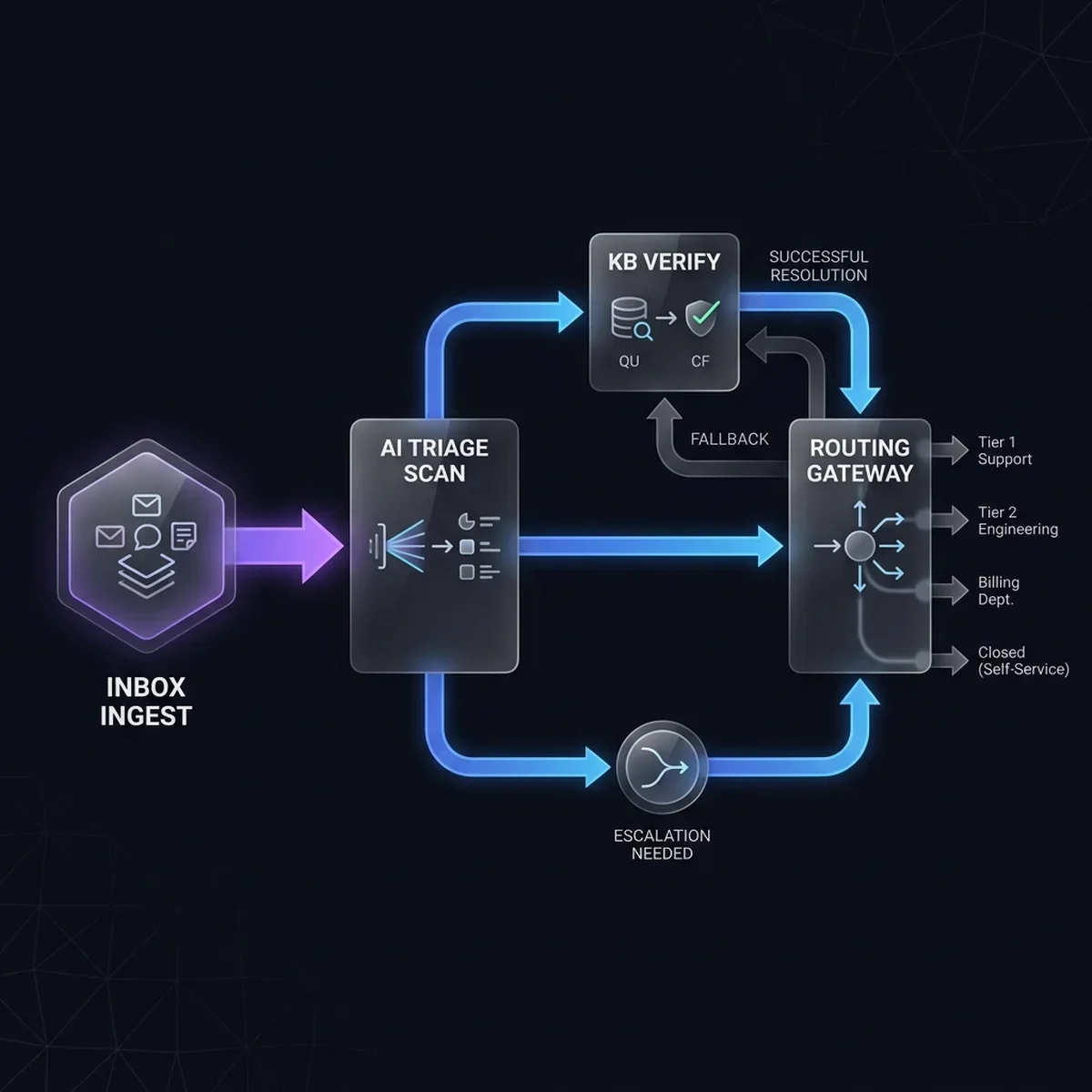
The incident resolution pipeline runs as a continuous event loop, processing data from ticket ingestion to resolution confirmation:
[ServiceNow Ticket Ingested] ──> (Triage Classification) ──> [Knowledge Retrieval] ──> (Escalation Validation) ──> [Auto-Resolution Run]- Ticket Ingestion: The Triage Agent identifies new ServiceNow incidents via webhook subscriptions.
- AI Classification: The agent parses the issue description, assigns priority and category tags, and updates the ServiceNow record.
- KB Search: The Retrieval Agent queries the vector database for matching KB articles and extracts past troubleshooting logs.
- Validation Check: The Escalation Validator verifies the suggested fix against security allowlists and contract boundaries.
- Action Execution: The Auto-Resolution Agent runs the approved command (e.g., password reset, directory update) and writes the confirmation log to the ticket.
Operations Dashboards & Real-Time Auditing
The following interfaces represent the administrative consoles of the ITSM Auto-Triage Engine, providing service desk managers and compliance teams with clean workspaces to track system performance.
1. Ticket Triage Inbox
The main ticket workspace displays incoming incidents, agent categorization outputs, and priority assignments.
| Interface Component | System Screenshot | Core Functional Insight |
|---|---|---|
| Ticket Triage Inbox | 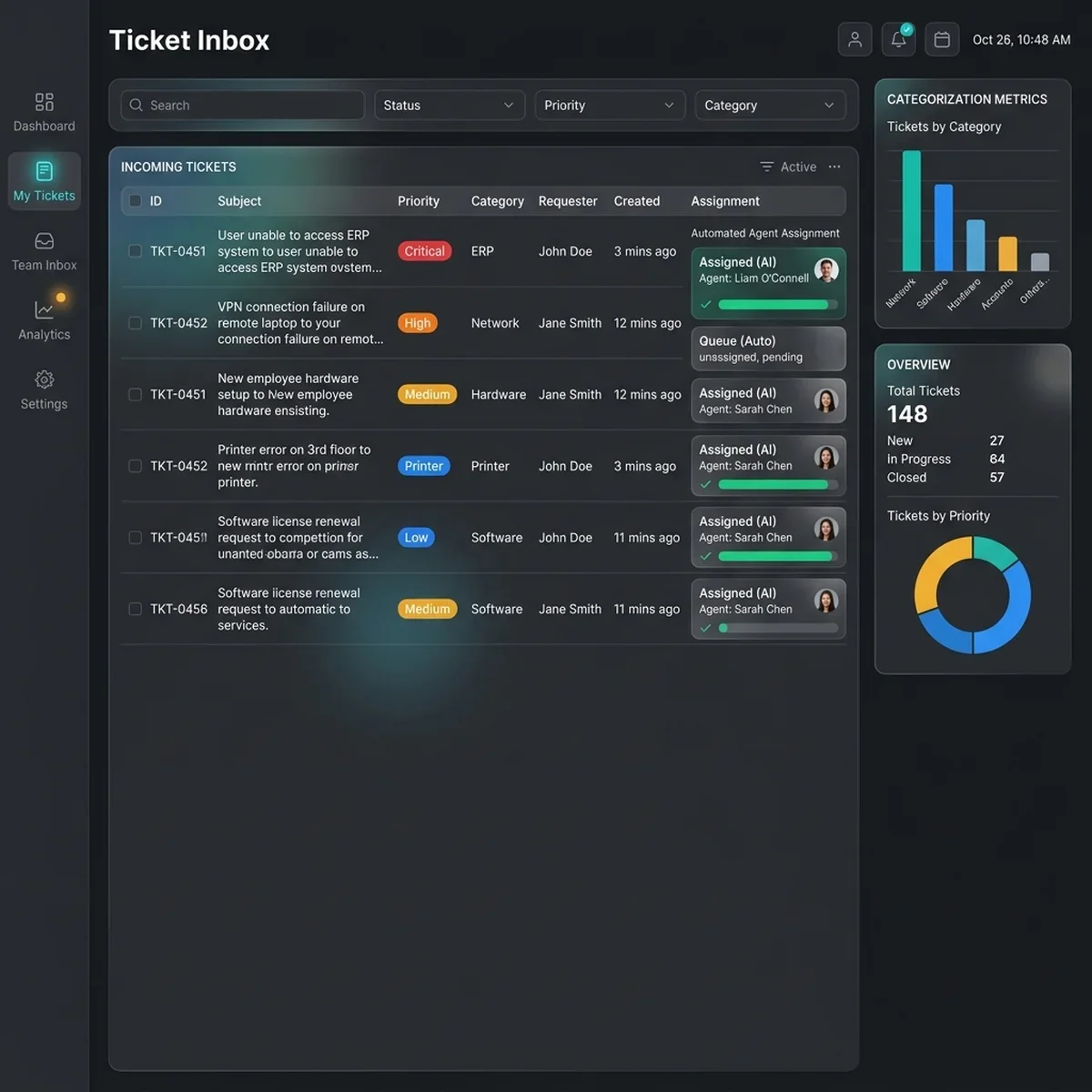 | Allows managers to monitor incoming ticket categories, verify agent assignments, and manage triage queues. |
2. Routing Rules & Quality Auditing
The Routing rules workspace manages agent confidence thresholds, while the Quality panel streams system audit logs.
| Interface Component | System Screenshot | Core Functional Insight |
|---|---|---|
| Routing Rules | 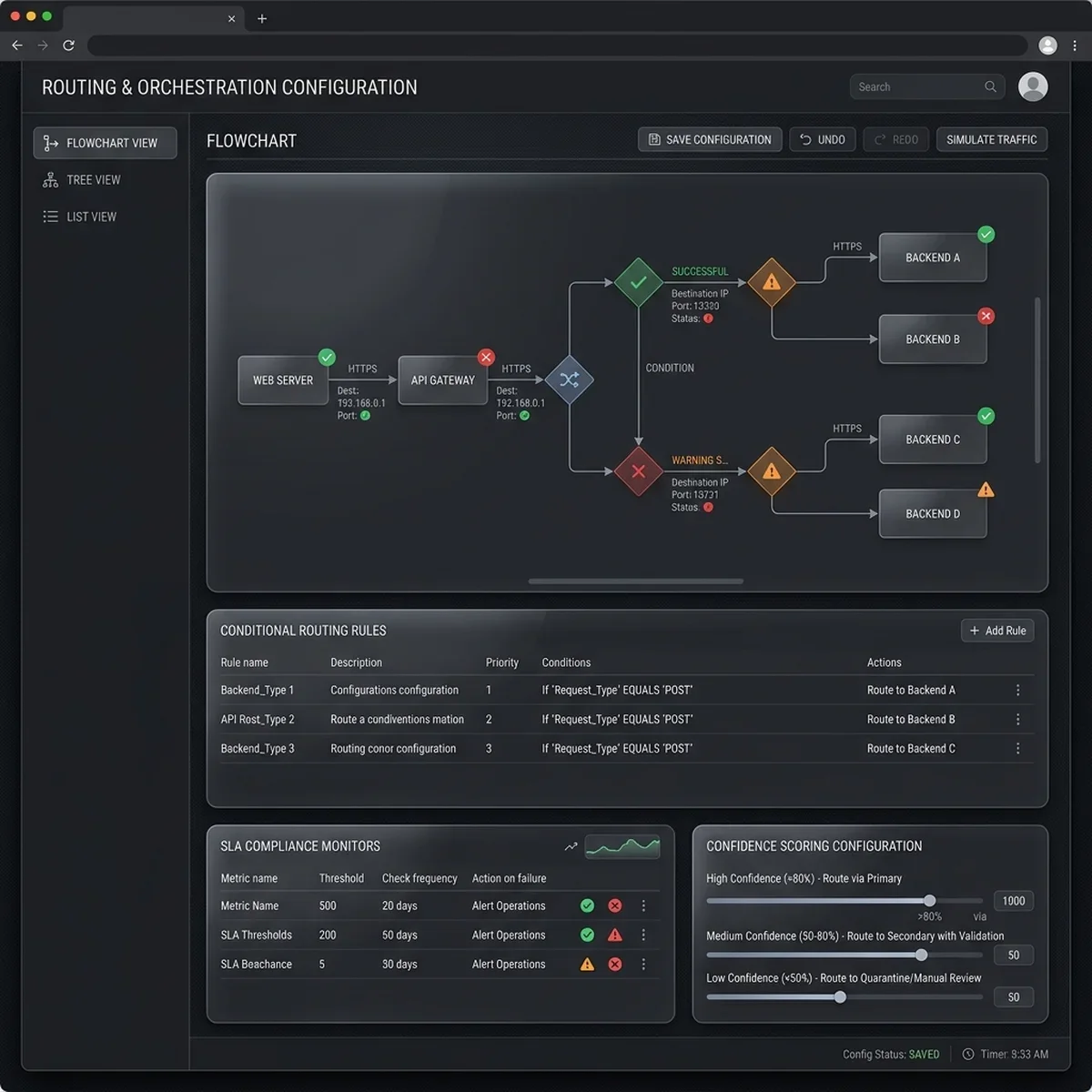 | Provides a rule configuration screen to manage agent routing thresholds, block unauthorized actions, and define escalation rules. |
| Audit Logs | 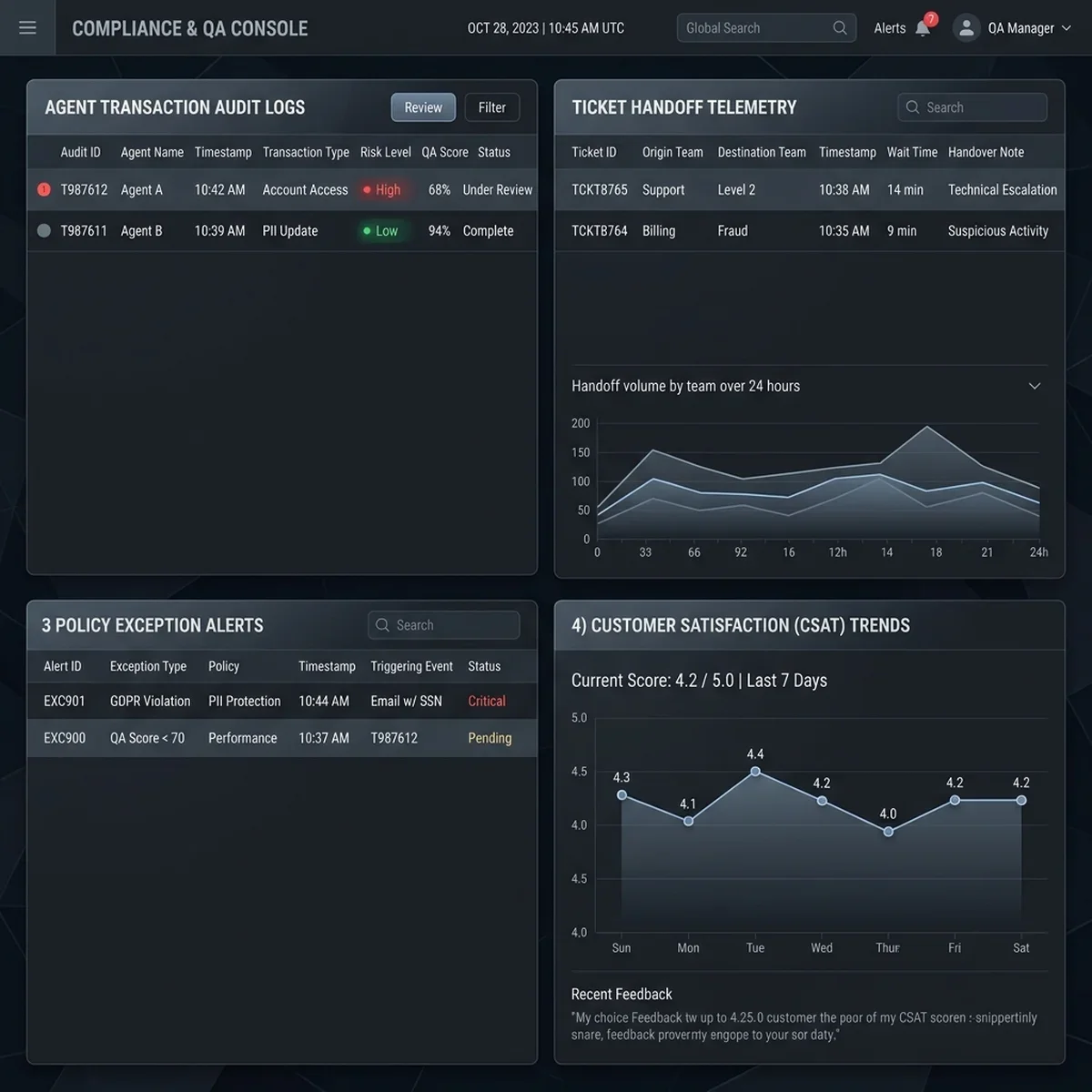 | Tracks every automated support transaction, logging queries, scripts executed, and exceptions for compliance reviews. |
Detailed Tech Stack Blueprint
To ensure system reliability, scale, and integration security, the ITSM Auto-Triage Engine is built on a modern enterprise stack:
Before vs After Transformation Analysis
The operational benefit of consolidating IT support processes into a governed agentic pipeline is outlined in this comparative analysis:
Key Learnings & Takeaways
- Centralize Knowledge Assets: Do not deploy agents on scattered knowledge files. Consolidate your internal docs and ticket histories in a clean vector database first.
- Set Validation Thresholds: Automation requires guardrails. Use validator agents to check security allowlists and contract boundaries before running troubleshooting scripts.
- Connect to Existing APIs: Don't build new ticketers. Integrate agents directly with ServiceNow or Jira Service Desk APIs using event brokers to minimize implementation friction.
Consulting Transformation & Strategic CTAs
Scaling IT operations safely requires clear system architectures, secure gateways, and robust governance models. As a business-technology consultant, I partner with organizations to modernize their service desks and design modern automation platforms:
- ITSM System Audits: We review your ticket queues, identify routing bottlenecks, and design custom automation roadmaps.
- Agent Integration Architecture: We build event-driven integrations to connect agents to ServiceNow and database resources.
- Knowledge Base Vectorization: We structure and index your internal documentations and ticket logs to fuel retrieval engines.
To explore how these IT operations strategies can secure your team's support functions, explore our services at /services. To schedule an architecture review or design a custom integration playbook, connect with us at /contact.
You can also read our related playbooks on agentic integrations for legacy ERP systems and learn about scaling operations in our analysis of decision intelligence in enterprise AI platforms.
Frequently Asked Questions
How does the Triage Agent determine ticket categories?
The Triage Agent evaluates incoming ticket descriptions against pre-trained classification models, mapping keywords and sentiment to specific routing tags.
Does the Retrieval Agent share customer data across clients?
No. The pgvector database uses strict client partitioning schemas, ensuring that the Retrieval Agent only queries knowledge files authorized for that client.
How does the system prevent infinite resolution loops?
The orchestrator maintains transaction histories and stops workflows if an agent attempts to execute the same resolution script twice on the same incident.
What occurs when a ticket's classification confidence is low?
If the Triage Agent's confidence score falls below 85%, it halts auto-routing and sends the ticket to the manual L1 review queue.
What is the average timeline for implementing an ITSM auto-triage engine?
Engines are deployed in three 4-week phases: KB Audits & Mapping (Phase 1), API & Event Stream Integration (Phase 2), and Triage Agent Testing (Phase 3).
| Ticket ID | Client | Issue | Severity | Age | SLA Status | Status | |
|---|---|---|---|---|---|---|---|
INC-4821 | Nexus Financial | VPN tunnel down — 12 users | P1 | 14m | Breached | Triaging | |
INC-4820 | Metro Logistics | Exchange server disk 92% full | P1 | 28m | At Risk | Running Playbook | |
INC-4819 | CityHealth Clinic | EHR application slow — 3 depts | P2 | 45m | On Track | Auto-Resolved | |
INC-4818 | Atlas Retail | POS system offline — 4 stores | P1 | 1h 2m | Breached | Escalated | |
INC-4817 | Sunrise School | Wi-Fi AP offline in main building | P3 | 2h 14m | On Track | Auto-Resolved |
| Solution ID | Title | Similarity | Success Rate | Avg Resolve Time | Playbook | |
|---|---|---|---|---|---|---|
SOL-8421 | FortiGate IKEv2 Phase 2 SA Reset | 0.96 | 94% | 4.2 min | vpn_tunnel_reset.yml | |
SOL-8119 | Cisco ASA VPN Tunnel Restart | 0.88 | 91% | 6.1 min | cisco_vpn_restart.yml | |
SOL-7820 | Azure VPN Gateway Reset (Portal) | 0.84 | 78% | 18 min | Manual steps | |
SOL-7410 | DNS Resolution Fix for VPN Split Tunnel | 0.81 | 82% | 8.4 min | dns_fix.yml |
| Client | SLA Tier | P1 SLA | Current MTTR | Breach Risk % | Open P1s | Status |
|---|---|---|---|---|---|---|
| Nexus Financial | Platinum | 30 min | 24 min | 82% | 2 | Breached |
| Atlas Retail | Gold | 1 hour | 72 min | 98% | 1 | Breached |
| Metro Logistics | Gold | 1 hour | 38 min | 42% | 1 | At Risk |
| CityHealth Clinic | Silver | 4 hours | 45 min | 4% | 1 | On Track |
| Sunrise School | Silver | 8 hours | 2.1h | 2% | 0 | On Track |
| Time | Agent | Action | Incident | Tool Used | Result |
|---|---|---|---|---|---|
| 09:14:24 | Triage-01 | Categorize | INC-4821 | pgvector similarity | network.vpn 0.96 |
| 09:14:22 | Network-01 | Run Playbook | INC-4821 | Ansible Tower | Running |
| 09:12:18 | Infrastructure-01 | Resolve | INC-4820 | Disk cleanup script | Resolved |
| 09:10:45 | Application-01 | Restart service | INC-4819 | PowerShell runbook | Resolved |
| 09:08:31 | Triage-01 | Escalate | INC-4818 | Escalation API | HITL queue |
| 09:05:00 | Hardware-01 | Diagnose | INC-4818 | pgvector search | Low confidence 0.68 |