By Vatsal Shah | May 26, 2026 | 16 min read
Table of Contents
- Introduction: The Spreadsheet-Driven C-Suite
- What is Decision Intelligence?
- Why Decision Intelligence Matters in 2026
- Core Concepts: How Decision Intelligence Systems Work
- Step-by-Step: Implementing Decision Intelligence in the Enterprise
- Real-World Use Cases (with Polyglot Code Snippets)
- Comparative Intelligence: Traditional BI vs. Decision Intelligence vs. Autonomous Engines
- Procedural Logic: Lifecycle of a Decision Recommendation
- Critical Pitfalls & Modern Anti-Patterns
- Futuristic Horizon: 2027-2030 Transition Roadmap
- Key Takeaways
- Frequently Asked Questions (FAQ)
- About the Author
- Conclusion & Next Steps: The 90-Day Decision Architecture Review
Introduction: The Spreadsheet-Driven C-Suite
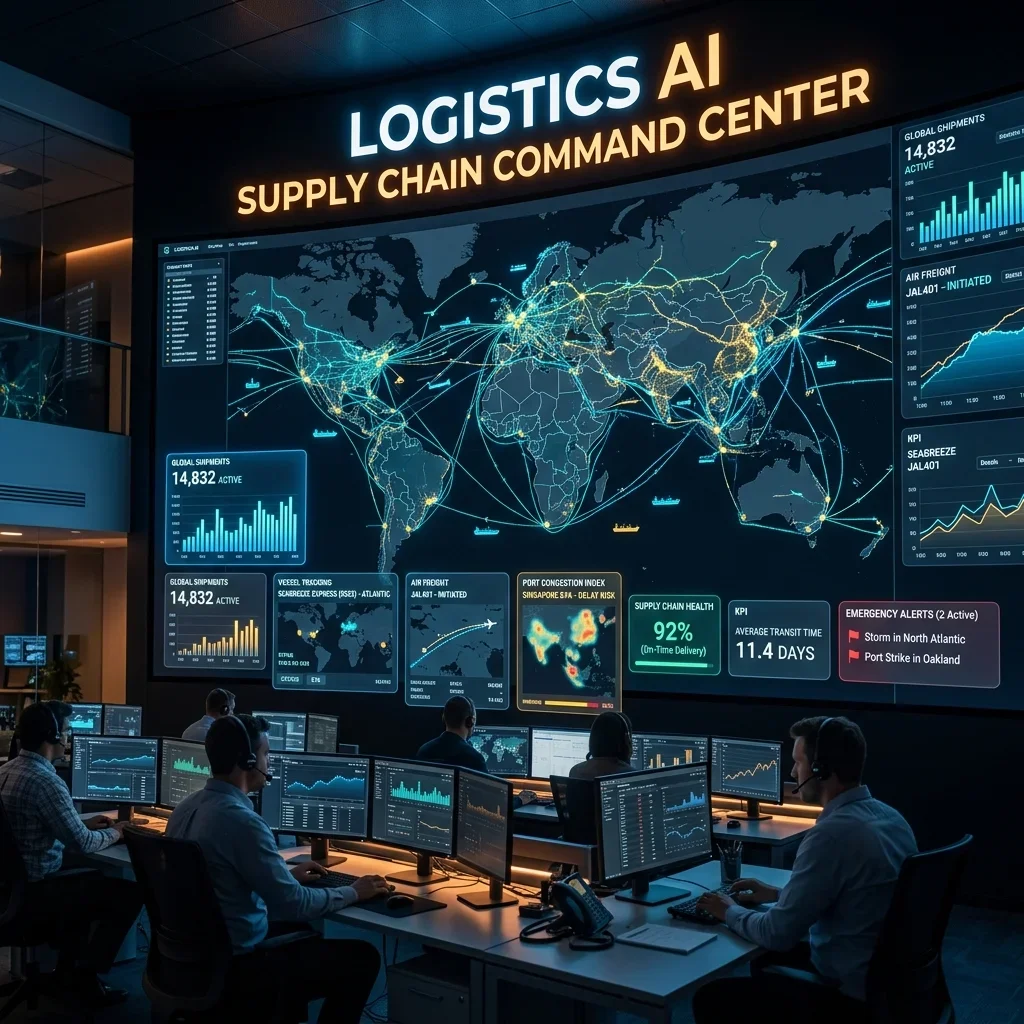
Despite billions of dollars invested in database infrastructure, cloud data lakes, and real-time business intelligence dashboards, the way modern enterprise leaders make high-stakes decisions is fundamentally broken. When a multi-national organization needs to decide whether to enter a new market, adjust pricing strategies across millions of product stock-keeping units (SKUs), or re-route supply chains during a global logistics crisis, they rarely rely on automated, real-time intelligence.
Instead, they rely on spreadsheets.
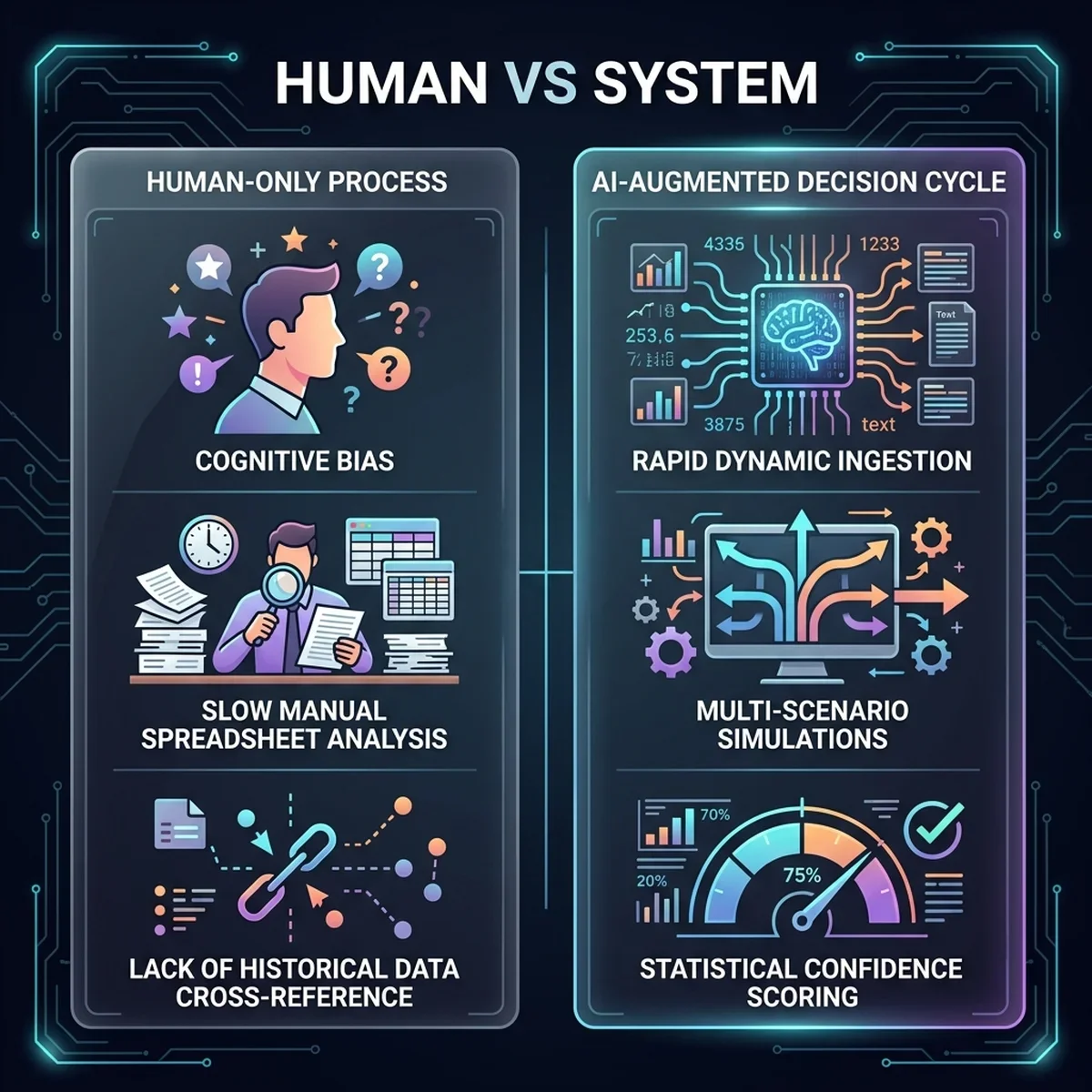
Data is extracted manually from legacy enterprise resource planning (ERP) systems, compiled into fragile desktop spreadsheets, and analyzed through the filter of human cognitive bias. The result is a sluggish, error-prone cycle. Decisions that should take minutes take weeks, and the resulting strategies are frequently out of date before they are even signed off. Spreadsheets are static, disconnected, and silent on their own limitations; they contain no indicators of statistical confidence, no ability to simulate dynamic scenario deviations, and no automated audit trail.
In 2026, leading enterprises are abandoning gut instinct and spreadsheet-bound strategy. They are deploying Decision Intelligence (DI)—an engineering discipline that transforms raw enterprise data into active, augmented, and auditable strategic choices. By combining predictive machine learning models, multi-scenario simulations, and human-in-the-loop verification, Decision Intelligence bridges the gap between raw data visualization and operational action. This guide breaks down the architectural topology, process lifecycles, and implementation roadmap required to deploy Decision Intelligence across your organization.
Spreadsheets are systems of record, not systems of decision. They show what happened, but they cannot model what will happen under ten different stress-test scenarios. Decision Intelligence shifts the corporate focus from passive retrospectives to active scenario modeling and statistical confidence scoring.
What is Decision Intelligence?
At its core, Decision Intelligence is a structured discipline that models, optimizes, and automates business choices. It treats decisions as repeatable engineering processes rather than isolated artistic moments.
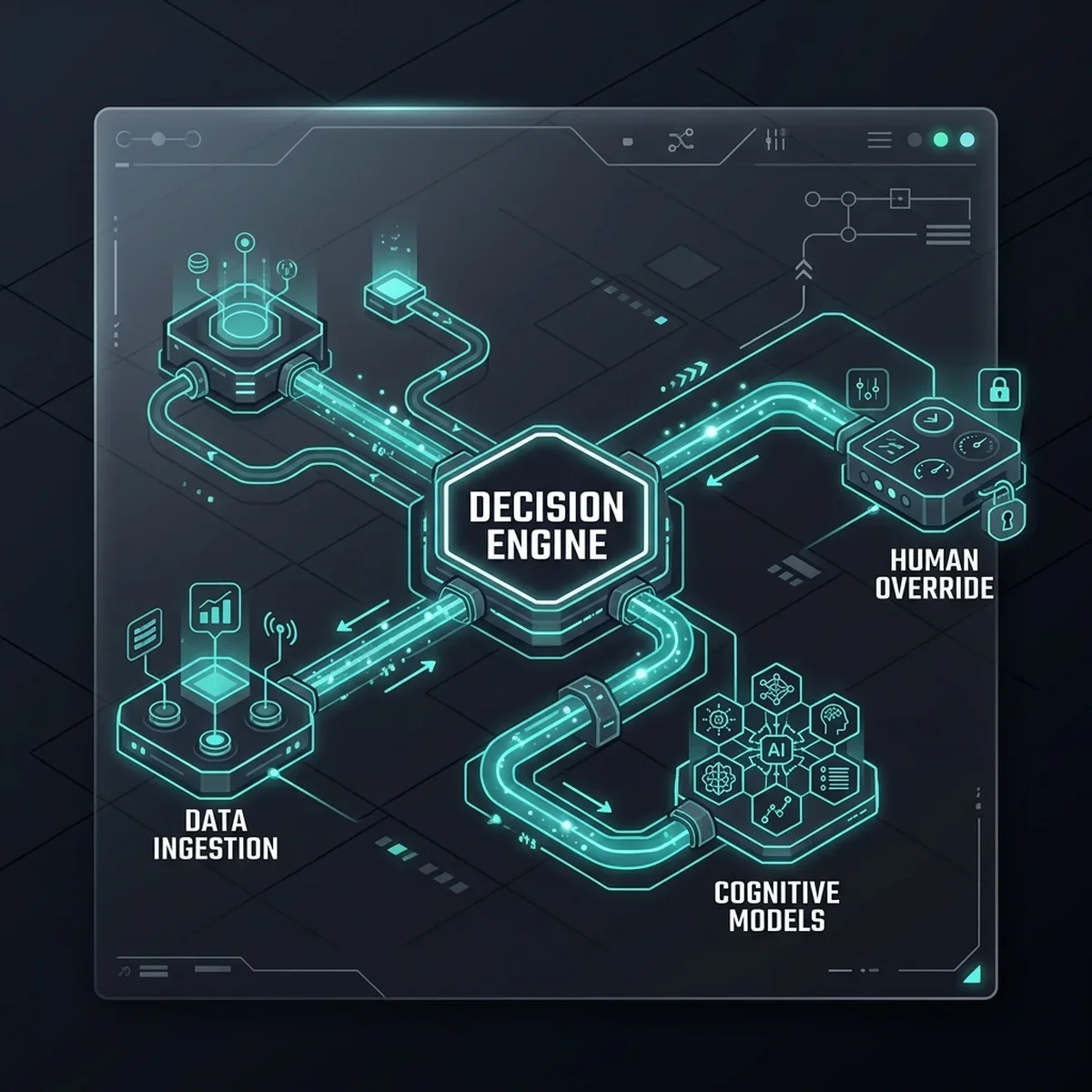
In the 2026 enterprise landscape, Decision Intelligence is built on three core pillars:
- Decision Modeling (Gartner DI Framework): Mapping out the inputs, actions, intermediate calculations, values, and outcomes of a decision. This creates a visual dependency graph showing exactly how data feeds into a business choice.
- AI-Augmented Strategy: Utilizing predictive decision engines to simulate hundreds of "what-if" scenarios, calculate statistical probabilities, and generate recommendations.
- Audit Trail and Feedback Loops: Automatically recording the data inputs, AI recommendation parameters, confidence scores, and final human actions for every major business decision. This creates a machine-readable ledger that allows models to self-improve over time.
Why Decision Intelligence Matters in 2026
The transition from passive Business Intelligence (BI) to active Decision Intelligence (DI) is driven by three measurable operational benefits:
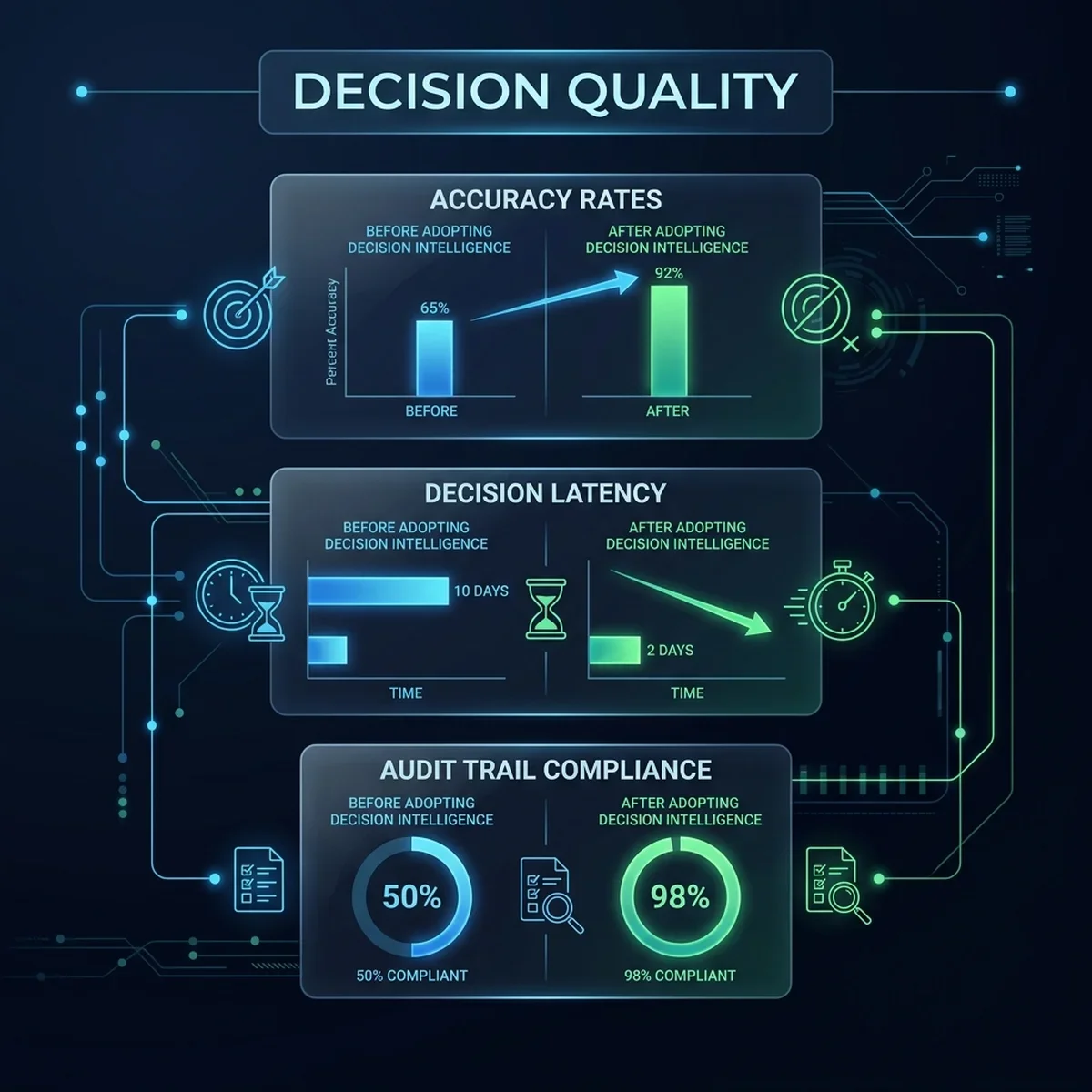
- Reduction in Decision Latency: Moving from manual data gathering and spreadsheet assembly to AI-augmented strategy dashboards reduces the time required to make complex operational decisions by up to 80%.
- Mitigation of Cognitive Bias: Humans naturally search for patterns that confirm their pre-existing beliefs. DI systems force decision-makers to evaluate decisions against structured scenario models, confidence thresholds, and objective historical data.
- Auditable Governance: In highly regulated sectors (such as finance, healthcare, and energy), every major decision must have a clear paper trail. DI systems create an automated compliance ledger, showing the exact data states and model recommendations that drove a business choice.
Decision Intelligence is vendor-neutral. It is an architectural wrapper that integrates with your existing ERPs, databases, and visualization tools, connecting them to custom reasoning engines and agent swarms.
Core Concepts: How Decision Intelligence Systems Work
To design and deploy a Decision Intelligence system, you must understand the interaction between its key architectural components:
1. The Data Ingestion Fabric
This layer collects, cleans, and structures real-time data from legacy databases, ERP systems, external market feeds, and user inputs. It translates unstructured text (emails, regulatory filings) into structured vectors that cognitive models can analyze.
2. Multi-Scenario Simulators
Instead of predicting a single future state, DI platforms run continuous simulations (such as Monte Carlo models or agent-based simulations) to forecast how a decision will perform under various stress points.
- Example: How does a 15% tariff increase combined with a shipping container shortage impact our gross margin across different supply routes?
3. Confidence and Probability Scoring
Every recommendation generated by the DI platform is paired with a statistical confidence score. This score indicates the reliability of the underlying data and the probability of achieving the desired business outcome.
Step-by-Step: Implementing Decision Intelligence in the Enterprise
Deploying a Decision Intelligence architecture across an enterprise requires a systematic, phased implementation roadmap.
Phase 1: Map the Decision Graph (Days 1–30)
Identify a high-value, repeatable operational decision (such as inventory replenishment, marketing budget allocation, or credit approval). Draw the complete dependency graph: what data points are required, who has final decision rights, and what are the measurable KPIs of a successful choice?
Phase 2: Wrap Systems with API-First Data Feeds (Days 31–60)
Establish automated data connections to replace manual CSV extracts. Use standardized schemas or Model Context Protocol (MCP) gateways to connect systems of record to a centralized analytics store.
Phase 3: Deploy Predictive Scenario Models (Days 61–90)
Build simulation models that ingest these data feeds and generate automated recommendations. Pair every recommendation with a confidence score and a scenario comparison graph.
Phase 4: Construct the Human-in-the-Loop Override Interface (Days 91–120)
Create user interfaces that display the AI's recommendations, the supporting scenario charts, and the confidence scores. Allow human operators to approve recommendations with a single click or manually adjust parameters to trigger new simulations.
Phase 5: Log Decisions to the Governance Ledger (Continuous)
Write the inputs, outputs, and overrides of every decision to an immutable ledger (such as a relational audit table or a secure event stream). Use this data to continuously fine-tune predictive models and retrain agents.
Real-World Use Cases (with Polyglot Code Snippets)
Let's explore two common enterprise use cases to see how Decision Intelligence operates in practice.
Use Case 1: Multi-Scenario Simulation for Inventory Optimization
In this scenario, a supply chain manager must decide how much safety stock to order for a critical component. If they order too much, capital is tied up in inventory; if they order too little, production halts. The Decision Intelligence engine runs a Python-based Monte Carlo simulation using multi-variable inputs to model the profit outcomes of different order sizes under fluctuating market demands.
Here is a Python implementation of the scenario modeling engine:
class="tok-cm"># python
import random
import json
from typing import List, Dict, Any

class InventorySimulator:
    class="tok-kw">def __init__(self, unit_cost: float, selling_price: float, holding_cost: float):
        self.unit_cost = unit_cost
        self.selling_price = selling_price
        self.holding_cost = holding_cost

    class="tok-kw">def run_simulation(self, order_quantity: int, simulated_runs: int = 1000) -> Dict[str, Any]:
        profits: List[float] = []

        class="tok-cm"># Simulate market demand variations using a normal distribution pattern
        for _ in range(simulated_runs):
            class="tok-cm"># Demand varies around a mean of 500 units with a standard deviation of 100
            demand = int(random.gauss(500, 100))
            demand = max(0, demand) class="tok-cm"># Demand cannot be negative

            sold = min(order_quantity, demand)
            unsold = max(0, order_quantity - demand)

            revenue = sold * self.selling_price
            cost = order_quantity * self.unit_cost
            holding = unsold * self.holding_cost
            profit = revenue - cost - holding
            profits.append(profit)

        avg_profit = sum(profits) / len(profits)
        min_profit = min(profits)
        max_profit = max(profits)

        class="tok-cm"># Calculate probability of achieving positive profit
        profitable_runs = sum(1 for p in profits if p > 0)
        profit_prob = (profitable_runs / simulated_runs) * 100

        return {
            class="tok-str">"order_qty": order_quantity,
            class="tok-str">"expected_avg_profit": round(avg_profit, 2),
            class="tok-str">"worst_case_profit": round(min_profit, 2),
            class="tok-str">"best_case_profit": round(max_profit, 2),
            class="tok-str">"profitability_probability": fclass="tok-str">"{round(profit_prob, 1)}%"
        }

class="tok-cm"># Simulating three different inventory decision choices
if __name__ == class="tok-str">"__main__":
    class="tok-cm"># Cost = $10, Price = $25, Holding = $2 per unit
    simulator = InventorySimulator(unit_cost=10.0, selling_price=25.0, holding_cost=2.0)

    scenarios = [400, 500, 600]
    results = {}

    for qty in scenarios:
        results[fclass="tok-str">"Order_{qty}"] = simulator.run_simulation(order_quantity=qty)

    print(json.dumps(results, indent=2))
Use Case 2: Ingestion & Threshold-Based Recommendation Router
This service acts as an automated decision gateway. When operational metrics arrive (e.g., system latency spikes or resource bottlenecks), this Go service validates the inputs, evaluates them against pre-defined confidence and urgency thresholds, and decides whether to auto-resolve or escalate the decision to human operators.
Here is a Go implementation of the decision router:
// go
package main

import (
	"encoding/json"
	"fmt"
	"time"
)

type OperationalAlert struct {
	ResourceID     string    `json:"resource_id"`
	MetricName     string    `json:"metric_name"`
	MetricValue    float64   `json:"metric_value"`
	AlertThreshold float64   `json:"alert_threshold"`
	Timestamp      time.Time `json:"timestamp"`
}

type DecisionRoute struct {
	ActionTaken   string    `json:"action_taken"`
	Status        string    `json:"status"`
	ConfidencePct float64   `json:"confidence_pct"`
	ProcessedAt   time.Time `json:"processed_at"`
}

class DecisionEngine {
	// Evaluates alerts and routes the decision
	func RouteDecision(alert OperationalAlert) DecisionRoute {
		discrepancy := alert.MetricValue - alert.AlertThreshold

		// If alert is minor, resolve automatically with high confidence
		if discrepancy <= (alert.AlertThreshold * 0.15) {
			return DecisionRoute{
				ActionTaken:   fmt.Sprintf("Auto-scale resource %s: Increased limit by 15%%", alert.ResourceID),
				Status:        "AUTO_RESOLVED",
				ConfidencePct: 94.5,
				ProcessedAt:   time.Now(),
			}
		}

		// If alert is critical, calculate recommendation but route to human review
		return DecisionRoute{
			ActionTaken:   fmt.Sprintf("Escalate: Request human approval to scale resource %s by 50%%", alert.ResourceID),
			Status:        "HUMAN_REVIEW_REQUIRED",
			ConfidencePct: 78.2,
			ProcessedAt:   time.Now(),
		}
	}
}

func main() {
	engine := DecisionEngine{}

	// Case 1: Minor spike
	alert1 := OperationalAlert{
		ResourceID:     "Server-Cluster-A",
		MetricName:     "CPU_Util",
		MetricValue:    85.0,
		AlertThreshold: 80.0,
		Timestamp:      time.Now(),
	}

	res1 := engine.RouteDecision(alert1)
	out1, _ := json.MarshalIndent(res1, "", "  ")
	fmt.Printf("Decision 1:\n%s\n", string(out1))

	// Case 2: Major critical spike
	alert2 := OperationalAlert{
		ResourceID:     "Database-Replica-01",
		MetricName:     "CPU_Util",
		MetricValue:    98.0,
		AlertThreshold: 80.0,
		Timestamp:      time.Now(),
	}

	res2 := engine.RouteDecision(alert2)
	out2, _ := json.MarshalIndent(res2, "", "  ")
	fmt.Printf("\nDecision 2:\n%s\n", string(out2))
}
Traditional BI vs. Decision Intelligence vs. Autonomous Engines
The following matrix illustrates the evolution of enterprise decision-making tools:
| Operational Dimension | Business Intelligence (BI) | Decision Intelligence (DI) | Autonomous Decision Engine |
|---|---|---|---|
| Pimary Question | "What happened to our business metrics?" | "What choices do we have and what are their expected profits?" | "How can the system optimize this transaction in real time?" |
| Data View | Static charts, historical graphs. | Multi-variable scenarios and simulation curves. | Dynamic parameters and adaptive feedback loops. |
| Decision Ownership | 100% human (prone to manual interpretation and bias). | Human-in-the-Loop (augmented decision-making). | Fully automated (within pre-approved guardrails). |
| Audit Trail | None (decision logic remains inside board emails). | Complete (logs inputs, models, and final approvals). | Complete (automated logs of API parameters). |
| Complexity Ceiling | Low (limited by manual spreadsheet capacity). | High (handles hundreds of dynamic variables). | High (optimizes sub-second metrics at scale). |
Procedural Logic: Lifecycle of a Decision Recommendation
The lifecycle of a decision recommendation in an enterprise DI platform is structured as a cyclic feedback loop, ensuring safety and continuous learning.
[Real-Time System & Market Feeds]
               │
               ▼
 [Data Quality & Vector Alignment]
               │
               ▼
[Multi-Scenario Simulator Engine] (Calculate Probabilities)
               │
               ▼
 [Confidence Scorer & Gatekeeper]
               │
      ┌────────┴────────┐
      ▼                 ▼
[High Confidence]  [Low Confidence]
      │                 │
      │                 ▼
      │           [Escalate to Human Analyst UI]
      │                 │
      │                 └─────────┐
      ▼                           ▼
[Approved Action Trigger] ──► [Log Decisions to Ledger]
                                  │
                                  ▼
                     [Verify Action Business Outcome]
                                  │
                                  ▼
                    [Fine-Tune Predictor Models]
This cycle guarantees that if the prediction model has low confidence in a recommendation, it escalates the choice to the human analyst, logs the analyst's manual adjustments, and utilizes that feedback to retrain the simulation models for the next run.
Critical Pitfalls & Modern Anti-Patterns
Organizations executing a Decision Intelligence strategy must actively guard against these three standard pitfalls:
- The Black-Box Trap: Deploying complex AI models that generate recommendations without explaining why. Enterprise leaders will not trust recommendations they do not understand. Always ensure recommendations show the underlying factor weighting.
- The Spreadsheet Legacy Habit: Allowing teams to bypass the DI platform and continue using manual, offline spreadsheets to analyze critical operational parameters. If the decision isn't modeled and logged inside the system, the enterprise loses the audit trail.
- Ignoring the Actions Loop: Building a platform that recommends decisions but lacks the API integrations to execute them. Decision Intelligence must connect directly to tool-calling workflows to achieve true operational velocity.
Never deploy Decision Intelligence platforms without clear transaction authorization limits. If the platform has tool-calling access to financial ledgers, it must contain hardcoded limits that prevent the system from executing high-value wire transfers or asset allocations without multi-person human sign-off.
Futuristic Horizon: 2027-2030 Transition Roadmap
The evolution of Decision Intelligence will continue to accelerate as enterprises build denser API fabrics:
- Autonomous Strategic War Rooms (2027–2028): Companies will use simulation networks to model entire quarters. Before the executive board meets, AI coordinators will model thousands of strategy variations, presenting the board with complete scenario stress-tests.
- Self-Adjusting Strategy Models (2029–2030): DI platforms will detect shift metrics in global markets autonomously. When a supplier’s factory goes offline, the system will recalculate alternative supply lines, evaluate freight costs, check customs compliance, and execute new contracts in seconds, achieving continuous strategic optimization.
Key Takeaways
- Spreadsheets Breed Error: High-stakes decisions made using fragmented spreadsheets suffer from high latency and cognitive bias.
- DI is an Engineering Discipline: Decision Intelligence treats business choices as structured, repeatable, and auditable processes.
- Confidence Scoring is Mandatory: Every recommendation must specify its statistical confidence to build trust with enterprise leaders.
- Audit Trails Drive Learning: Logging decision data and overrides creates a machine-readable ledger that allows models to self-improve.
- Mitigate Bias with Scenarios: Force leaders to evaluate options against multi-scenario simulations rather than gut instinct.
Frequently Asked Questions (FAQ)
How does Decision Intelligence differ from standard Business Intelligence?
Business Intelligence is retrospective; it builds dashboards to show what has already happened. Decision Intelligence is prospective and action-oriented; it runs simulations to model future scenarios, evaluates options, and integrates with APIs to execute the chosen actions.
Can we use Decision Intelligence with legacy databases that lack modern APIs?
Yes. Decision Intelligence sits as an orchestration layer. For legacy systems, we wrap databases with lightweight API services or employ secure data extraction pipelines to feed parameters into the simulation engine.
How do we ensure that AI-augmented decisions are auditable for compliance?
The platform logs the exact snapshot of data inputs, the model version, the generated confidence scores, and the final human action to an immutable audit table. This creates a complete, compliant paper trail for every business transaction.
What types of enterprise decisions are best suited for Decision Intelligence?
Repeatable, multi-variable decisions such as dynamic pricing adjustments, supply chain replenishment, credit risk evaluation, and IT resource provisioning. These decisions benefit most from continuous simulation modeling.
Does implementing Decision Intelligence require hiring a large team of data scientists?
No. By utilizing pre-trained cognitive models, standardized API frameworks, and Model Context Protocol (MCP) servers, existing enterprise architects and engineers can build and govern decision models without custom modeling from scratch.
About the Author
Vatsal Shah is the principal architect of Business Tech Navigator. He holds over 15 years of experience designing and scaling data architectures, predictive models, and governance frameworks for mid-market and enterprise organizations. Vatsal helps IT and business leaders replace legacy operational bottlenecks with resilient, auditable decision engines.
Conclusion & Next Steps: The 90-Day Decision Architecture Review
The spreadsheet-driven enterprise operating model is obsolete. Continuing to run $50M business cycles on disconnected sheets and human gut feeling is a recipe for operational drag and strategic failure.
To modernise your decision infrastructure, I recommend initiating a 90-Day Decision Architecture Review:
- Phase 1 (Days 1–30): Identify your highest-latency operational decision point and map its dependency graph.
- Phase 2 (Days 31–60): Build automated data pipelines to feed the decision nodes, replacing manual CSV extracts.
- Phase 3 (Days 61–90): Deploy a scenario simulation pilot in a human-in-the-loop environment to validate recommendation accuracy and confidence scoring.
To map your decision architecture, design custom simulation models, or run an audit of your data integrity pipelines, reach out to the advisory team at Business Tech Navigator today. Let's engineering your strategic advantage.
Contact our team today to schedule a structured Decision Architecture Review and align your operational choices with auditable, AI-augmented systems.