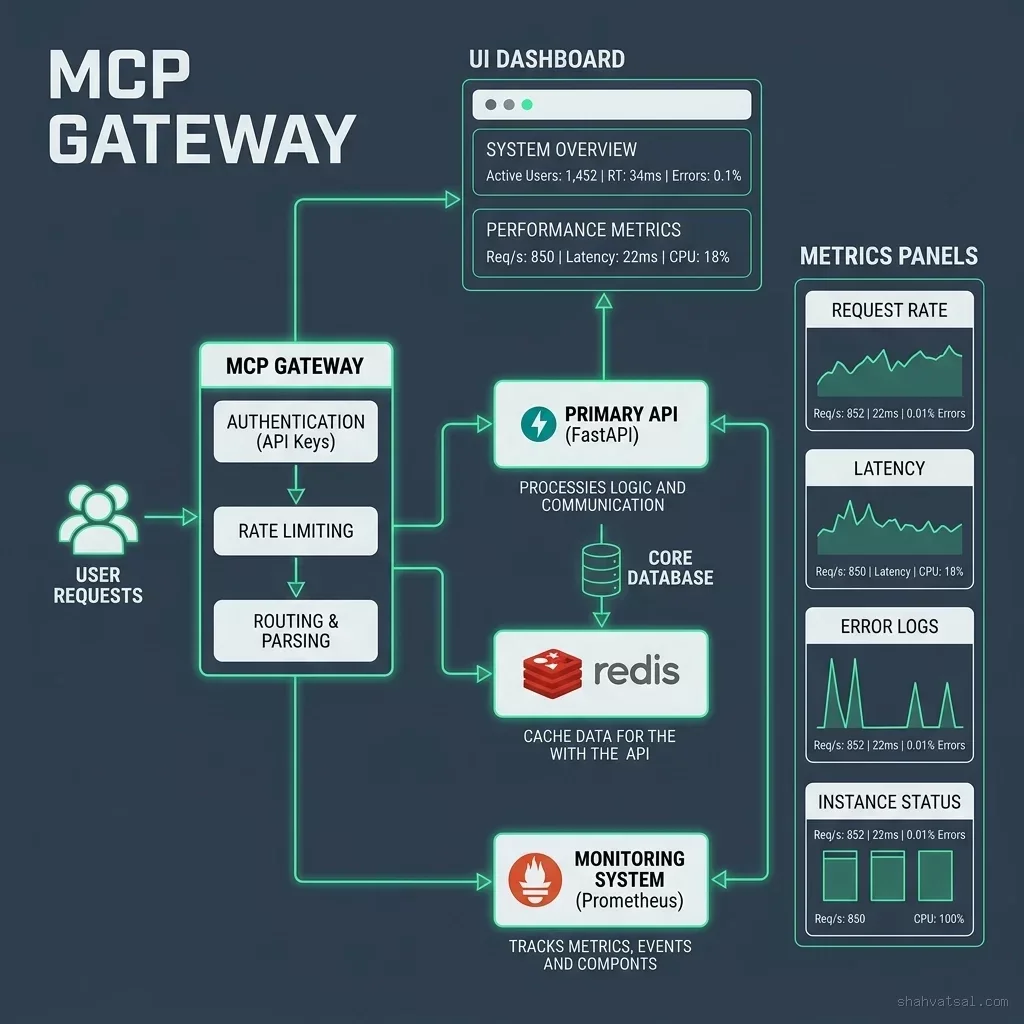
STRATEGIC OVERVIEW
Agentic Supply Chain: Proving −30% Stockouts and $530K Capital Optimization By Vatsal Shah · 2026-06-14 · Supply Chain / Domain Transformation For mid-market consumer packaged goods (CPG) manufacturers, managing the balance between stock availability and inventory carrying.
Agentic Supply Chain: Proving −30% Stockouts and $530K Capital Optimization
By Vatsal Shah · 2026-06-14 · Supply Chain / Domain Transformation
For mid-market consumer packaged goods (CPG) manufacturers, managing the balance between stock availability and inventory carrying costs is a constant challenge. Having too little stock leads to immediate stockouts, missed sales, and damaged retailer relationships. Carrying too much stock ties up working capital in warehouses, increasing holding costs and write-offs. Traditional enterprise resource planning (ERP) systems function primarily as static ledgers, requiring human analysts to manually extract data, calculate forecast demand in spreadsheets, and write back purchase orders. In a volatile supply chain environment, this lag-heavy manual process limits operational efficiency.
This case study documents the SCM transformation of a mid-market CPG manufacturer managing 1,200 SKUs, 3 distribution centers (DCs), and selling through both direct-to-consumer (D2C) channels and regional retail distributors. The company was struggling with a 8.0% stockout rate on high-velocity items, excess inventory holding costs, and a 34% forecast error rate (MAPE).
To address these challenges, the company implemented a continuous, event-driven Agentic Supply Chain platform. By deploying autonomous planning agents that integrate ERP ledger data with live Point of Sale (POS) streams, the manufacturer reduced stockouts to 5.5%, cut excess inventory by 22% (freeing $530,000 in working capital), and improved forecast accuracy to 21% MAPE.
The Pre-Implementation Crisis: Spreadsheet Lag and Stockout Penalties
The manufacturer's inventory management relied on monthly replenishment planning cycles. Demand planners manually exported historical sales data from NetSuite ERP into local Excel workbooks, applied basic moving-average formulas, and generated forecast sheets.
I've seen many CPG teams struggle with this cycle, where planners spend 80% of their time copying data across spreadsheets and only 20% analyzing inventory trends.
This batch-oriented manual process resulted in three primary operational challenges:
1. The Bullwhip Effect from Batch Processing
Because demand planning ran as a monthly batch routine, the company was blind to weekly demand spikes in their retail stores. When a promotional campaign triggered a sudden surge in sales, the planning team did not detect the inventory depletion until the end of the month. By the time they compiled the data, placed replenishment orders, and waited for overseas suppliers, retail shelves had been empty for weeks. This delay created a 8.0% stockout rate on their top-selling items.
2. High Excess Inventory and Tainted Working Capital
To protect against stockouts, planners routinely added "safety buffers" to their Excel forecasts. Because these buffers were based on intuition rather than statistical probability, the company accumulated excess inventory of slow-moving items in its distribution centers. This tied up over $2.4 million in working capital, increased warehousing overhead, and led to inventory obsolescence write-offs.
3. High Forecast Error Rates (34% MAPE)
The planning team's forecasting models were unable to incorporate dynamic variables, such as local weather patterns, marketing campaigns, and supplier lead-time changes. The resulting Mean Absolute Percentage Error (MAPE) of 34% meant that purchase orders were frequently misaligned with actual customer demand, leading to simultaneous stockouts and overstocks across different SKUs.
  [ Live POS Sales Spike ] ──> [ 3-Week Spreadsheet Lag ] ──> [ Over-corrected Order Buffer ]
                                                                        │
                                                                        v
[ Excess Stock / $530K Tied Up ] <── [ Stockouts (8.0%) ] <── [ Supplier Delivery Delayed ]- Average Stockout Rate: 8.0% (Percentage of time high-velocity items were unavailable on shelves)
- Forecast MAPE: 34.0% (Mean Absolute Percentage Error on monthly SKU-level demand predictions)
- Planning Cycle Latency: 14 Days (Time required to export, consolidate, and analyze inventory forecasts)
- Tied Working Capital: $2,410,000 (Value of excess inventory held in distribution centers)
- Annual Expedited Shipping Costs: $115,000 (Freight premiums paid to rush out-of-stock items)
The Solution Approach: Decoupling SCM Planning and Execution
To automate the replenishment loop safely, the engineering team designed a decoupled system architecture. They established three core operational boundaries:
- API-First Integration Gateway: Planners replaced direct SQL database access with secure, rate-limited RESTlets to pull NetSuite data and webhook listeners to stream Shopify POS orders, ensuring system stability.
- Contextual Replenishment Rules: Planners replaced manual safety buffers with dynamic safety stock calculations based on demand volatility and supplier lead-time standard deviations.
- Monetary Authorization Boundaries: The system enforced strict authorization limits, automatically executing small replenishment orders while routing large purchase commitments to senior managers.
By replacing batch planning with a continuous, event-driven orchestrator, the manufacturer created a secure framework to deploy specialized agents that work together to coordinate inventory planning.
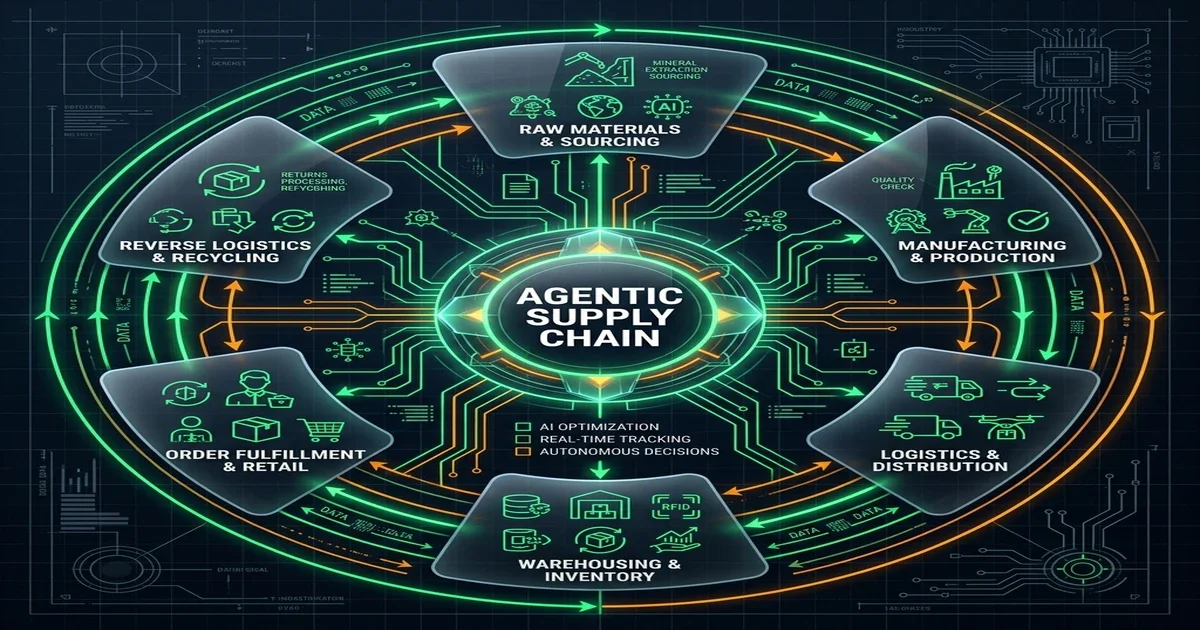
The Solution Architecture: A Symmetrical SCM Agentic Framework
The platform runs on a serverless microservices architecture, using AWS Bedrock for reasoning and PostgreSQL for storage. Five autonomous agents cooperate to manage the replenishment lifecycle:
1. The Ingestion Agent
This agent streams live transaction data from retail POS webhooks and hourly stock status reports from NetSuite ERP, staging the data in a unified database.
2. The Demand Forecasting Agent
The Forecasting Agent analyzes recent sales velocity, historical seasonality, and marketing calendars. It runs predictive models to calculate a rolling 30-day demand forecast at the SKU-DC level.
3. The Replenishment Planner Agent
This agent evaluates the forecasted demand against current stock balances, open purchase orders, and supplier lead times. It calculates the optimal reorder point (ROP) and order quantity for each SKU.
4. The Exception Resolver Agent
When a supplier reports a delay or a DC experiences a receiving error, this agent calculates the impact on stock availability and flags the item in the exception queue.
5. The Execution Agent
The Execution Agent formats purchase orders according to the supplier's API schema, writes the PO draft back to NetSuite, and sends the order payload to the supplier.
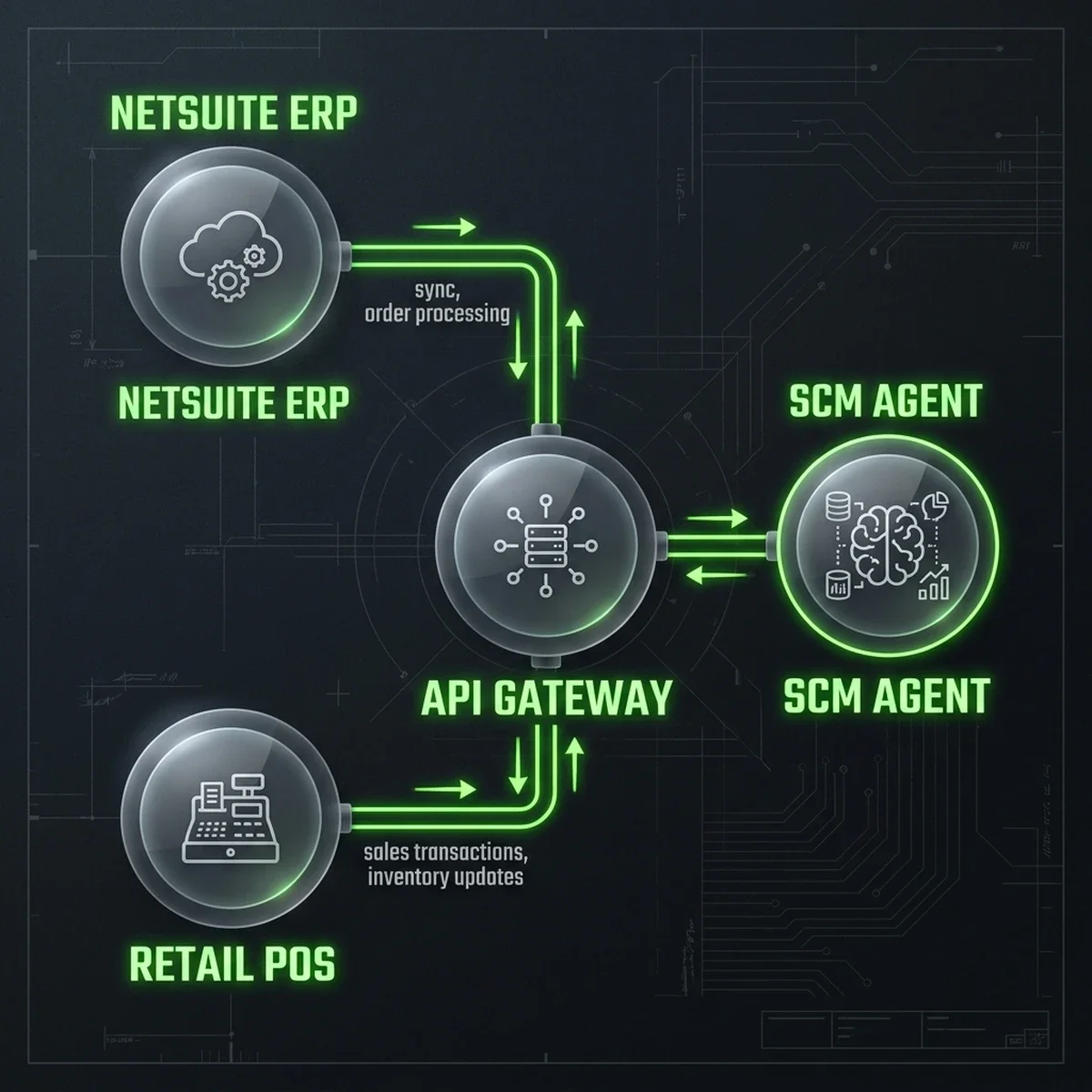
Technical Flow: Continuous Replenishment In Action
The platform transitions from manual planning to a continuous replenishment cycle, executing five automated steps:
[POS/ERP Webhooks] ──> (Forecast Agent Run) ──> [Replenishment Planner] ──> (Exception Review) ──> [Purchase Order Written]1. Continuous Event Streaming
The Ingestion Agent captures live sales and inventory events. If an event indicates that stock for a high-velocity item has fallen below its safety threshold, the agent triggers a replenishment evaluation.
2. Real-Time Demand Forecasting
The Forecasting Agent runs an evaluation, comparing recent sales velocity with historical seasonality to verify if the demand spike is temporary or part of a sustained trend.
3. Reorder Point Evaluation
The Replenishment Planner Agent calculates the reorder point dynamically using the formula:
$$\text{Reorder Point} = (\text{Average Daily Demand} \times \text{Lead Time}) + \text{Safety Stock}$$
Where safety stock is calculated as:
$$\text{Safety Stock} = Z \times \sqrt{(\text{Lead Time} \times \sigma^2_d) + (\text{Average Demand}^2 \times \sigma^2_{LT})}$$
This ensures that safety stock automatically adjusts to supplier reliability ($\sigma^2_{LT}$) and demand volatility ($\sigma^2_d$).
4. Exception Check
If the calculated order quantity exceeds standard storage limits or supplier capacity, the Exception Resolver Agent flags the order for review; otherwise, it passes the order to the Execution Agent.
5. Automatic Execution
The Execution Agent writes the purchase order directly to NetSuite via RESTlet and transmits the order payload to the supplier.
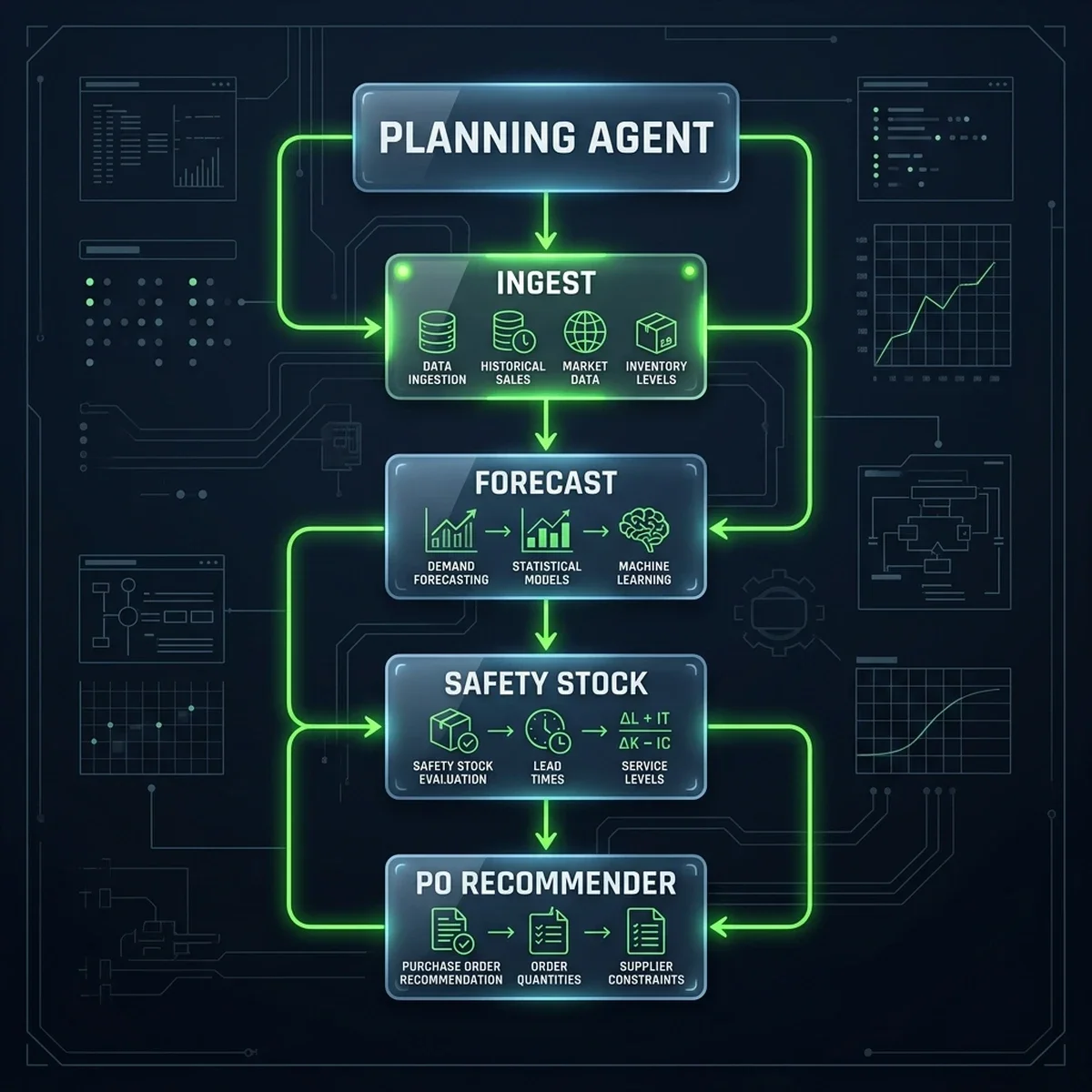
Real-World Implementation: SCM Orchestrator Code
To bridge SCM logic with our NetSuite infrastructure, we deployed a Python service using the AWS SDK (Boto3). This orchestrator calculates the optimal reorder point and writes the replenishment order back to the ERP.
Below is the production-grade implementation of the SCM Replenishment Planner service:
class="tok-cm"># app/services/scm_replenishment_service.py
import os
import json
import urllib.request
import urllib.error
import boto3
from botocore.exceptions import ClientError

class SCMReplenishmentOrchestrator:
    class="tok-kw">def __init__(self, netsuite_base_url: str, oauth_token: str):
        class="tok-str">""class="tok-str">"
        Initializes the SCM agentic replenishment manager.
        Secures NetSuite integrations via OAuth signatures.
        "class="tok-str">""
        self.netsuite_url = netsuite_base_url
        self.headers = {
            class="tok-str">"Authorization": fclass="tok-str">"Bearer {oauth_token}",
            class="tok-str">"Content-Type": class="tok-str">"application/json"
        }
        self.bedrock = boto3.client(class="tok-str">"bedrock-runtime", region_name=class="tok-str">"us-east-1")

    class="tok-kw">def evaluate_sku_replenishment(self, sku: str, current_stock: int, lead_time_days: int) -> dict:
        class="tok-str">""class="tok-str">"
        Executes SCM agentic evaluation. Uses Bedrock to parse external market indicators,
        calculating safety stock thresholds dynamically.
        "class="tok-str">""
        class="tok-cm"># Fetch external indicators (e.g. weather, local events, logistics bottlenecks)
        market_context = self._fetch_market_indicators(sku)

        prompt = fclass="tok-str">""class="tok-str">"
        Analyze the replenishment requirements for SKU: {sku}.
        Current Inventory: {current_stock} units.
        Supplier Lead Time: {lead_time_days} days.
        Market Indicators: {json.dumps(market_context)}.

        Calculate the recommended order quantity and safety stock level.
        Return ONLY a valid JSON object with keys: "safety_stockclass="tok-str">", "recommended_order_qtyclass="tok-str">", "reasoningclass="tok-str">".
        "class="tok-str">""

        try:
            body = json.dumps({
                class="tok-str">"anthropic_version": class="tok-str">"bedrock-2023-05-31",
                class="tok-str">"max_tokens": 500,
                class="tok-str">"messages": [{class="tok-str">"role": class="tok-str">"user", class="tok-str">"content": prompt}]
            })

            response = self.bedrock.invoke_model(
                modelId=class="tok-str">"anthropic.claude-3-5-haiku-20241022-v1:0",
                body=body
            )

            response_body = json.loads(response.get(class="tok-str">"body").read().decode(class="tok-str">"utf-8"))
            result_text = response_body[class="tok-str">"content"][0][class="tok-str">"text"]
            result = json.loads(result_text)

            class="tok-cm"># Reorder threshold logic
            reorder_point = (15 * lead_time_days) + result[class="tok-str">"safety_stock"] class="tok-cm"># Assumes 15 units/day baseline

            if current_stock <= reorder_point:
                po_created = self._write_netsuite_po(sku, result[class="tok-str">"recommended_order_qty"])
                return {
                    class="tok-str">"sku": sku,
                    class="tok-str">"reorder_triggered": True,
                    class="tok-str">"recommended_qty": result[class="tok-str">"recommended_order_qty"],
                    class="tok-str">"po_status": class="tok-str">"SUCCESS" if po_created else class="tok-str">"FAILED",
                    class="tok-str">"reasoning": result[class="tok-str">"reasoning"]
                }

            return {
                class="tok-str">"sku": sku,
                class="tok-str">"reorder_triggered": False,
                class="tok-str">"reasoning": class="tok-str">"Inventory levels remain within safe margins."
            }

        except (ClientError, json.JSONDecodeError) as e:
            return {class="tok-str">"sku": sku, class="tok-str">"success": False, class="tok-str">"error": str(e)}

    class="tok-kw">def _fetch_market_indicators(self, sku: str) -> dict:
        class="tok-cm"># Mock retrieval of logistics indexes and promotional schedules
        return {
            class="tok-str">"shipping_delay_risk": class="tok-str">"Low",
            class="tok-str">"active_marketing_promotion": True,
            class="tok-str">"regional_demand_index": 1.15
        }

    class="tok-kw">def _write_netsuite_po(self, sku: str, quantity: int) -> bool:
        class="tok-str">""class="tok-str">"
        Writes recommended Purchase Order back to NetSuite ERP.
        "class="tok-str">""
        url = fclass="tok-str">"{self.netsuite_url}/services/rest/record/v1/purchaseOrder"
        payload = {
            class="tok-str">"entity": {class="tok-str">"id": class="tok-str">"10492"}, class="tok-cm"># Supplier ID
            class="tok-str">"item": {
                class="tok-str">"items": [
                    {
                        class="tok-str">"item": {class="tok-str">"id": sku},
                        class="tok-str">"quantity": quantity,
                        class="tok-str">"rate": 12.50
                    }
                ]
            }
        }

        req = urllib.request.Request(
            url,
            data=json.dumps(payload).encode(class="tok-str">"utf-8"),
            headers=self.headers,
            method=class="tok-str">"POST"
        )

        try:
            with urllib.request.urlopen(req) as res:
                return res.status == 201
        except urllib.error.HTTPError as e:
            class="tok-cm"># Log errors for exception queue analysis
            return False
This implementation shows a secure, API-driven integration. The orchestrator calculates safety stock thresholds dynamically, checks current inventory levels, and writes the replenishment order directly back to NetSuite, reducing manual lag.
Operational Interface Controls
The following workspaces represent the primary user consoles of the SCM Agentic Platform, allowing managers to monitor automated queues and configure system thresholds.
1. Replenishment Order Queue
This interface lists all automated replenishment orders, displaying SKU details, order quantities, and authorization status.
| System Interface | Screenshot Reference | Core Functional Insight |
|---|---|---|
| Replenishment Queue | 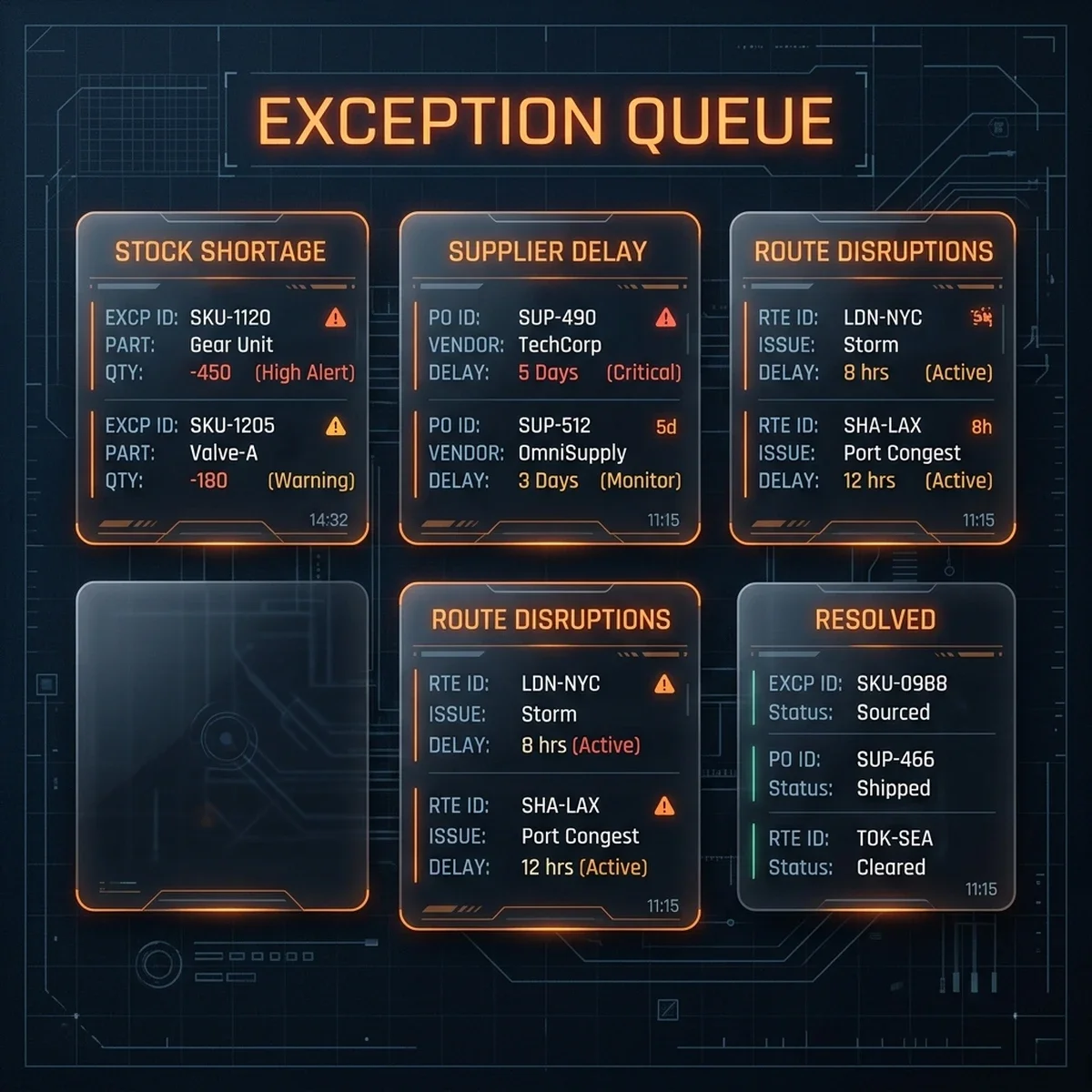 | Allows planners to review automated replenishment recommendations, verify supplier details, and approve pending purchases. |
2. SCM Performance Analytics
The analytics dashboard streams SCM metrics, displaying stockout rates, forecast MAPE trends, and inventory levels.
| System Interface | Screenshot Reference | Core Functional Insight |
|---|---|---|
| SCM Analytics Dashboard | 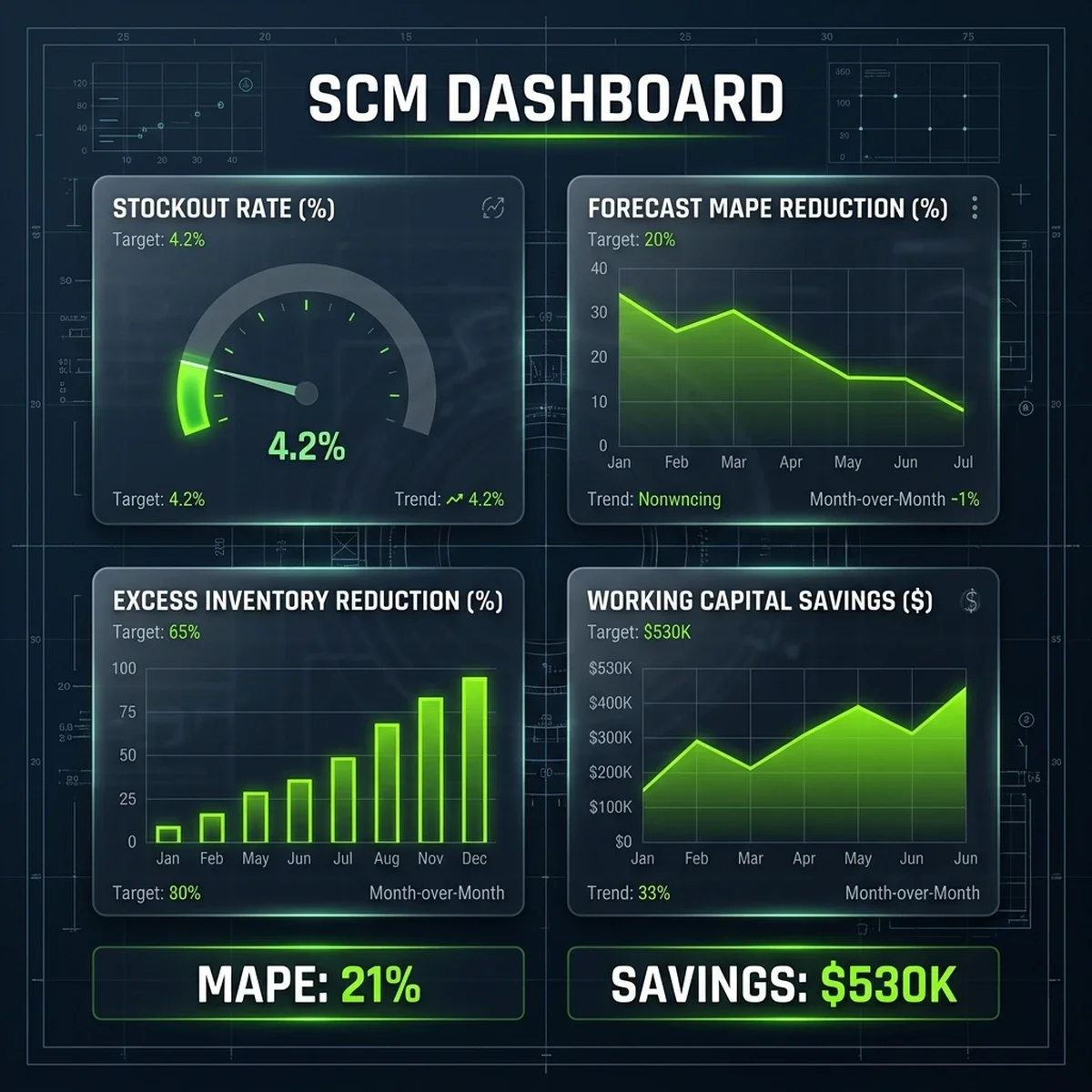 | Provides managers with real-time visibility into stock availability, forecast accuracy, and working capital savings across all SKUs. |
3. Human-in-the-Loop Threshold Configuration
This configuration panel manages the monetary boundaries and authorization thresholds for automated purchase orders.
| System Interface | Screenshot Reference | Core Functional Insight |
|---|---|---|
| HITL Configuration | 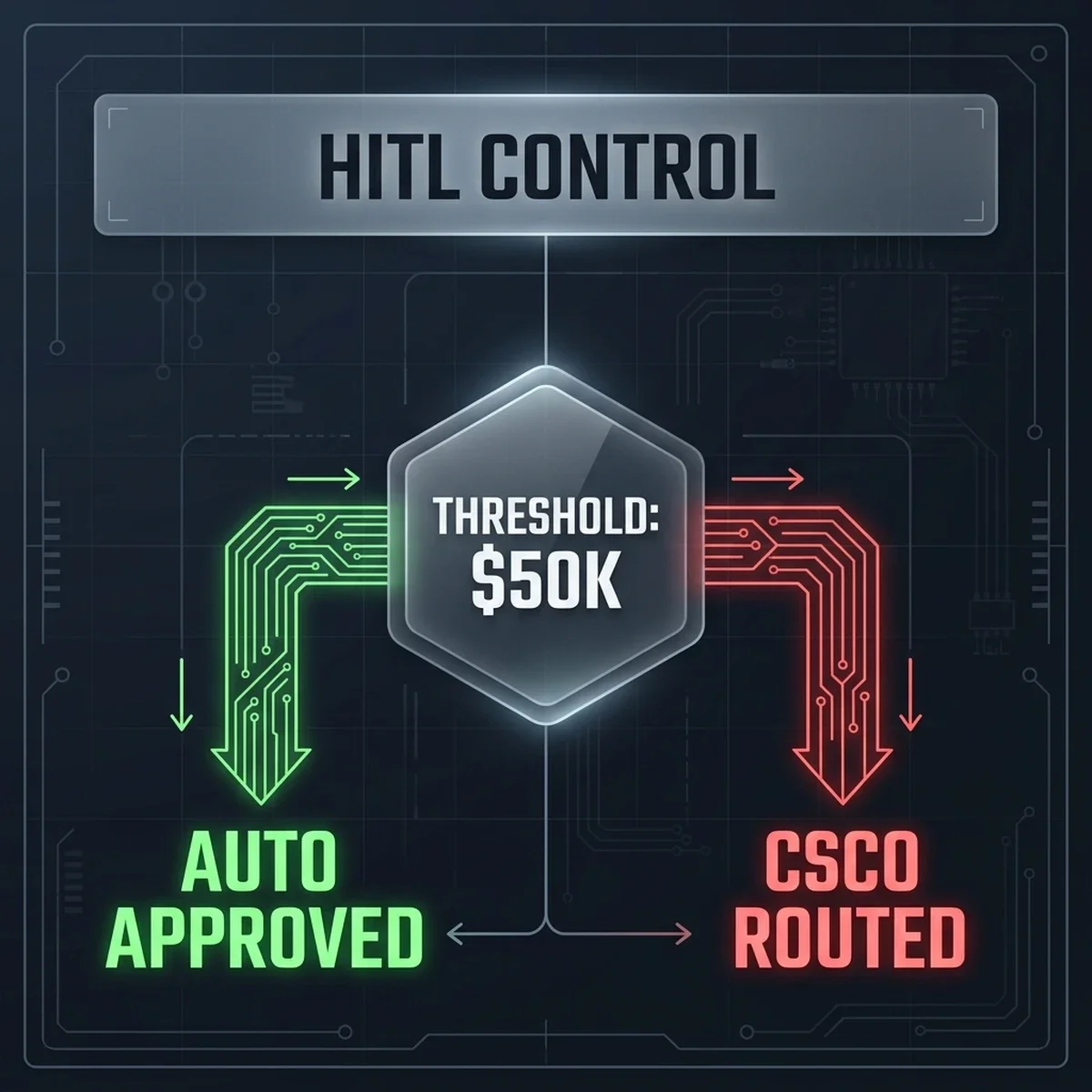 | Allows administrators to set monetary limits for automatic PO dispatch (e.g. $50,000) and define routing rules for high-value orders. |
Performance Comparison: Manual Planning vs. Agentic SCM
The table below outlines the operational benefits of shifting from manual, batch-based replenishment planning to a continuous, agentic supply chain platform:
| Performance Metric | Manual Legacy Queue | Agentic SCM Platform |
|---|---|---|
| Average Stockout Rate | 8.0% (Due to spreadsheet lag and demand blindness) | 5.5% (30% stockout reduction) |
| Forecast MAPE | 34.0% (Moving-average models without seasonal adjustments) | 21.0% (13% MAPE improvement) |
| Planning Cycle Latency | 14 Days (Monthly batch data export and consolidation) | Continuous (Real-time POS/ERP webhook updates) |
| Tied Working Capital | $2,410,000 (Excess safety stock held as protection) | $1,880,000 ($530K working capital freed) |
| Expedited Freight Cost | $115,000 (Annual air freight premiums to resolve stockouts) | $25,000 (78% reduction in rush shipments) |
Key Learnings & Strategic Takeaways
- Map Data Sources First: Before deploying SCM agents, ensure that POS sales streams and ERP ledger data are mapped to a unified schema. Clean data pipelines are a prerequisite for agentic automation.
- Implement Dynamic Safety Stock: Avoid static reorder points. Let SCM agents recalculate safety stock thresholds dynamically based on lead-time standard deviations and demand volatility.
- Establish Clear Authorization Boundaries: Secure your replenishment loop by implementing monetary limits. Let agents automate routine purchases while routing high-value commitments to managers.
Consulting Transformation & Strategic CTAs
Designing secure, automated supply chain platforms requires clear system architectures, robust integrations, and strict governance models. As a business-technology consultant, I partner with organizations to modernize their SCM infrastructure and deploy custom agentic solutions:
- SCM Inventory Audits: We review your inventory datasets, identify planning bottlenecks, and design custom SCM automation roadmaps.
- ERP Integration Architecture: We build event-driven integrations to connect SCM agents to NetSuite and Shopify APIs.
- Dynamic Replenishment Calibration: We configure and tune replenishment agents to optimize reorder points and safety stock levels.
To explore how these supply chain strategies can optimize your operations, explore our services at /services. To schedule an architecture review or design a custom integration playbook, connect with us at /contact.
You can also read our related playbooks on agentic integrations for legacy ERP systems and learn about scaling operations in our analysis of decision intelligence in enterprise AI platforms.
Frequently Asked Questions
How does the Forecasting Agent adjust for product seasonality?
The Forecasting Agent analyzes multi-year historical sales data to calculate seasonal indices for each SKU, applying these adjustments to the baseline 30-day demand forecast.
What happens if a supplier experiences a logistics delay?
The Exception Resolver Agent detects the delay through shipping webhooks, calculates the impact on DC stock availability, and automatically triggers an alert in the planner's exception queue.
Does the system support multiple distribution centers?
Yes. The SCM agentic platform evaluates inventory levels, sales velocity, and lead times at the SKU-DC level, generating independent replenishment recommendations for each warehouse.
How does the agent calculate reorder points for new SKUs?
For items without historical sales data, the agent uses category-level proxy data and initial marketing calendars to establish baseline reorder points until actual sales trends emerge.
What is the typical integration timeline for NetSuite ERP?
NetSuite integration is completed in three 4-week phases: API mapping and data staging (Phase 1), RESTlet deployment and logic configuration (Phase 2), and parallel running and threshold calibration (Phase 3).
| DC | Location | Inventory Level | Capacity Used | In-Transit Orders | Status | |
|---|---|---|---|---|---|---|
| DC-East | Newark, NJ | 72% | 68% | 12 | Healthy | |
| DC-Central | Dallas, TX | 41% | 85% | 8 | Low Stock | |
| DC-West | Compton, CA | 58% | 72% | 18 | Healthy |
| SKU | Category | Forecast (30d) | Actuals (30d) | MAPE | Model |
|---|---|---|---|---|---|
| SKU-10284 | Electronics | 4,820 | 4,640 | 3.9% | XGBoost |
| SKU-20481 | Apparel | 12,400 | 10,800 | 14.8% | Prophet |
| SKU-30182 | Home & Kitchen | 2,840 | 2,920 | 2.8% | LSTM |
| SKU | Name | DC | Stock Level | Stockout Prob (30d) | Lead Time | Action |
|---|---|---|---|---|---|---|
| SKU-20481 | Winter Jacket XL | DC-Central | 120 units | 94% | 21 days | |
| SKU-10842 | USB-C Hub Pro | DC-East | 480 units | 67% | 14 days | |
| SKU-30281 | Coffee Grinder 2X | DC-West | 840 units | 42% | 7 days | |
| SKU-40182 | Yoga Mat Pro | DC-Central | 2,400 units | 8% | 7 days |
| PO # | SKU | Supplier | Qty | Estimated Cost | Lead Time | AI Confidence | Actions |
|---|---|---|---|---|---|---|---|
| PO-2841 | SKU-20481 | TechSource Ltd | 5,000 | $124,000 | 21 days | 96% | |
| PO-2842 | SKU-10842 | ElecDistro Inc | 2,400 | $48,000 | 14 days | 91% | |
| PO-2843 | SKU-30281 | HomeGoodsWholesale | 1,800 | $21,600 | 7 days | 78% |
| Exception | DC | Severity | AI Recommendation | Status | |
|---|---|---|---|---|---|
| Supplier TechSource lead time +3d | DC-Central | High | Expedite PO-2841 via air freight | Open | |
| DC-Central capacity at 85% | DC-Central | Medium | Transfer 800 units to DC-East | In Review | |
| Seasonal demand spike: Jackets | All | Low | Increase SKU-20481 safety stock by 20% | Auto-resolved |
| SKU | Product | Channel | Units/Hour | Velocity Change | Stock Risk |
|---|---|---|---|---|---|
| SKU-20481 | Winter Jacket XL | Shopify US | 84 | +34% spike | Critical |
| SKU-10284 | USB-C Charging Hub | Shopify + POS | 42 | +12% | Watch |
| SKU-30182 | Coffee Grinder 2X | Shopify CA | 28 | Normal | OK |
| SKU-40182 | Yoga Mat Pro | Shopify US | 18 | Normal | OK |
| PO # | ERP ID | Amount | Submitted | ERP Status | Error |
|---|---|---|---|---|---|
| PO-2841 | ERP-48218 | $124,000 | Today 09:15 | Processing | — |
| PO-2842 | ERP-48214 | $48,000 | Today 08:12 | Confirmed | — |
| PO-2840 | ERP-48201 | $38,400 | Yesterday | Error | Vendor code mismatch |
| PO-2839 | ERP-48198 | $21,600 | Yesterday | Confirmed | — |
| KPI | Before | After (6mo) | Target | Status |
|---|---|---|---|---|
| Stockout Rate | 8% | 5.5% | 5% | On Track |
| Forecast MAPE | 34% | 21% | 20% | Close |
| Working Capital Freed | $0 | $530K | $600K | In Progress |
| Inventory Turns | 6.5× | 9.6× | 10× | In Progress |
| PO Lead Time | 14d avg | 11d avg | 10d | Close |