Atlassian has announced significant updates to Atlassian Rovo, expanding its integration with Jira Product Discovery (JPD) and extending the capabilities of its cloud-hosted Model Context Protocol (MCP) server. These updates turn Jira from a passive transactional system of record into an active, agentic database, allowing external AI clients (like Claude, ChatGPT, Cursor, and VS Code) to read, analyze, and write data back directly to Atlassian tools.
The Shift: From Passive Tracker to Agentic Control Plane
For years, project management platforms like Jira Software, Confluence, and Jira Product Discovery have functioned as passive databases. Teams spent hours manually entering updates, copying goals, and formatting reports. When AI assistants were introduced, they acted primarily as document summarizers or text generators, requiring humans to do the actual data entry and system traversal.
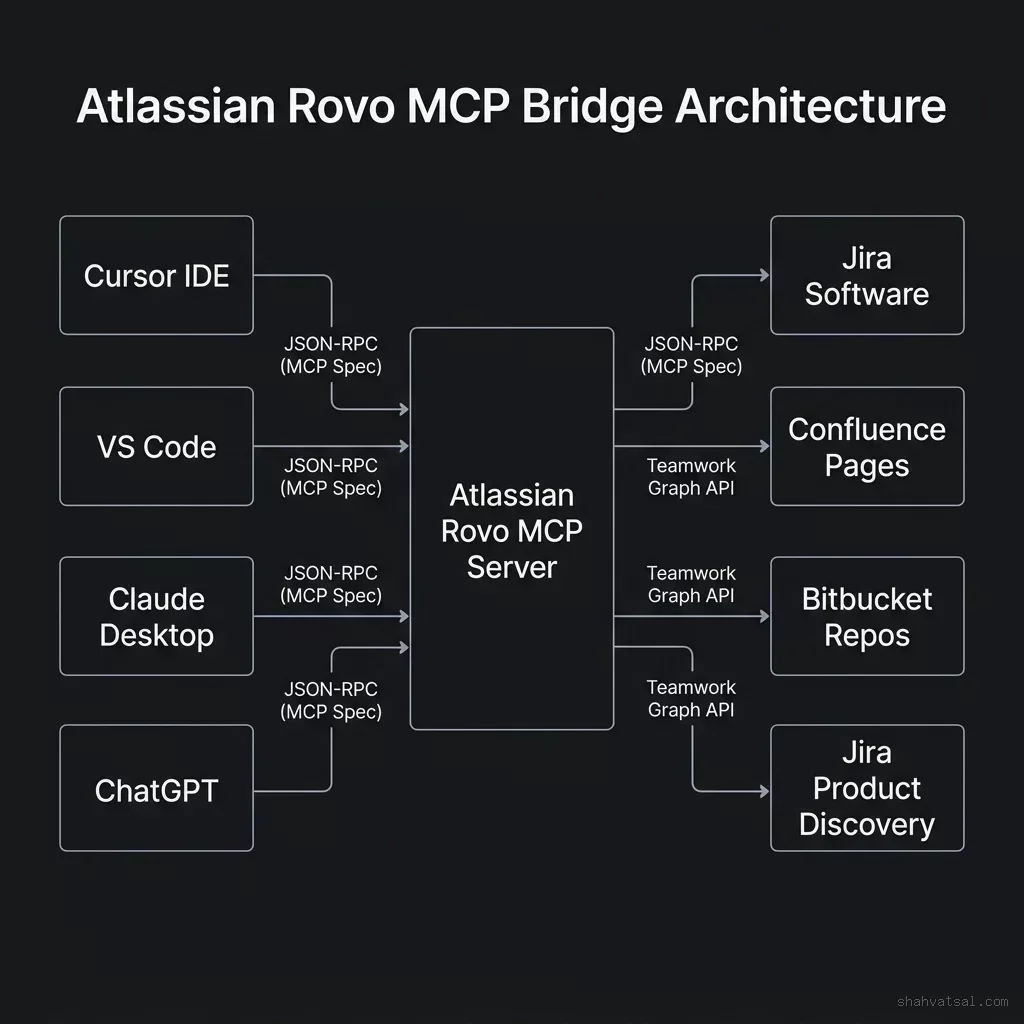
Atlassian Rovo's updated Model Context Protocol (MCP) architecture changes this dynamic. By exposing Atlassian's data schemas as standard tool calls using the open MCP protocol, external agents can interact with the system directly.
Instead of a developer asking an AI to "summarize my tickets so I can go copy them to Jira," the AI agent can now use Rovo tools to query Jira Software directly, identify blocking issues, create new tasks, update statuses, write comments, and assign owners. This write-back capability turns Jira into an agentic system of record where AI agents can execute administrative actions directly on behalf of developers.
Integrating Rovo with Jira Product Discovery (JPD)
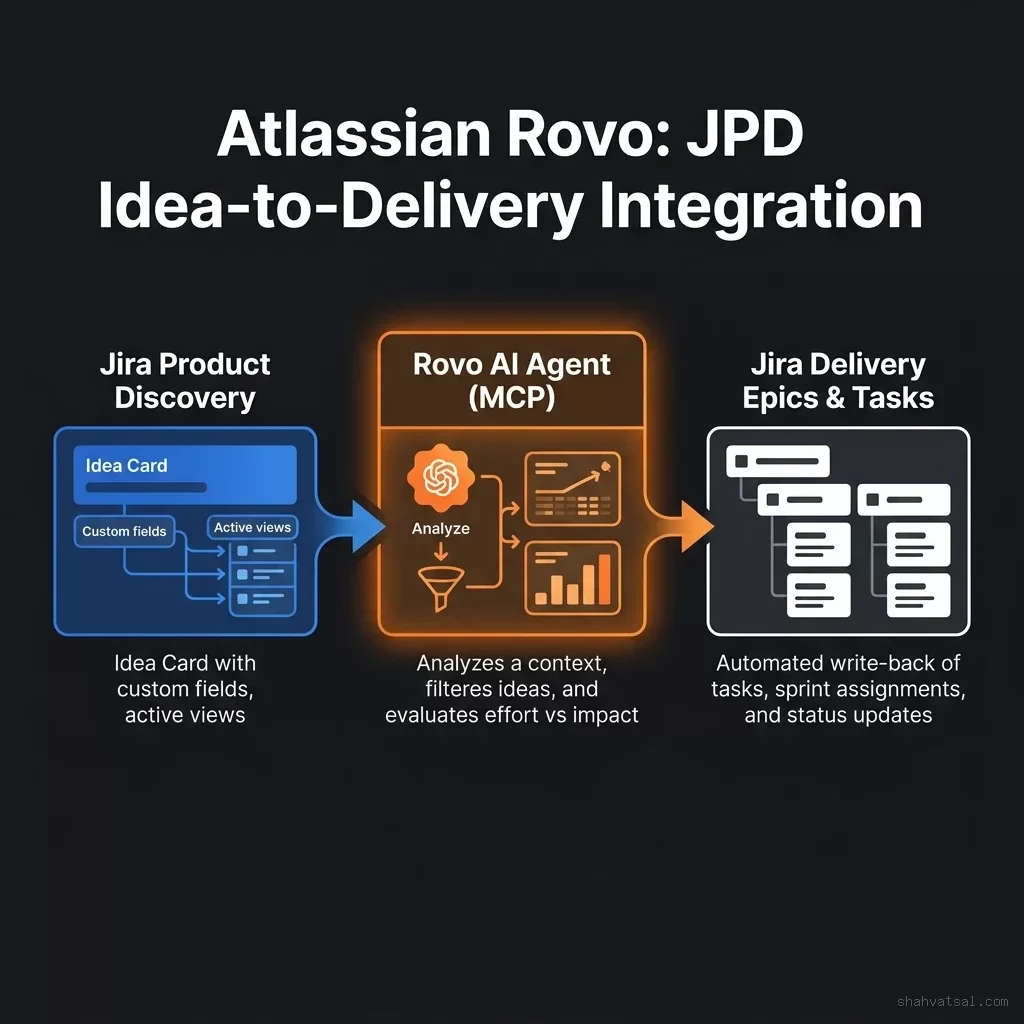
The June-July 2026 release brings deep integration between Rovo and Jira Product Discovery (JPD), Atlassian's dedicated tool for product managers to capture, prioritize, and track ideas before they go into active development.
Rovo has been updated to natively interpret the structural metadata of JPD views:
View Awareness: Rovo reads the JPD view description, board headings, and card metadata. When asked to evaluate ideas, it understands the context of the view.
Filter Compliance: The AI respects all active view filters. If a product manager has filtered a view to only show "high-priority security ideas," Rovo restricts its evaluation to those records.
Field Mapping: JPD uses custom fields like "effort score," "customer value," or "business impact." Rovo reads these scores natively. Product managers can run executive queries such as: "Summarize our top five ideas on this board that have high customer value but low estimated engineering effort."
This JPD integration closes the gap between product strategy (planning, capturing ideas) and delivery execution. Rovo acts as a bridge, reading ideas in JPD, evaluating them against historical delivery metrics, and transitioning them into active Jira tasks when approved.
Teamwork Graph Natively Exposed in Rovo MCP
A key technical detail of the updated platform is the unification of Teamwork Graph tools within the Rovo MCP server.
The Teamwork Graph is Atlassian's underlying semantic map. It connects the relationships between people, projects, teams, goals, documentation (Confluence), repos (Bitbucket), and issues (Jira). Rather than treating a Jira ticket as a standalone record, the Teamwork Graph maps its context: who is working on it, which Confluence spec defines it, which Bitbucket PR resolves it, and which business goal it supports.
By exposing the Teamwork Graph natively as a set of tools within the Rovo MCP server, AI agents can perform "multi-hop" queries. Instead of running multiple separate searches (RAG) and trying to stitch the data together locally, the agent can call a single Teamwork Graph tool to retrieve the complete network context of a project.
This architecture resolves the "context gap" that often limits external AI models. When an agent in Cursor or VS Code needs context to write a script, it uses the MCP server to traverse the Teamwork Graph, retrieving the exact Confluence page detailing the requirements and the recent Jira updates without requiring the developer to copy-paste the data.
Rovo MCP Server vs. Standard Integration
For engineering teams setting up AI agents, understanding how the Rovo MCP server differs from standard Atlassian API integrations is critical:
| Feature | Standard REST API Integration | Atlassian Rovo MCP Server |
|---|---|---|
| Protocol | Custom HTTP requests / REST | Model Context Protocol (MCP 1.0) |
| Client Support | Custom integration code required | Natively supported by Cursor, Claude Desktop, VS Code |
| Context Graph | Flat data query (requires manual stitching) | Multi-hop Teamwork Graph traversal |
| Write-Back | REST PUT/POST endpoints | Autonomous tool calls (create, update, comment) |
| Governance | API key credentials | Federated OAuth with fine-grained user permissions |
The use of MCP 1.0 (an open standard championed by Anthropic and other AI labs, as analyzed in the Model Context Protocol 1.0 explainer) is a strategic move. By adopting a standard protocol, Atlassian ensures that as new AI clients emerge, they can connect to Atlassian data immediately without requiring custom connectors.
Implementation Guide for Product Teams
For product operations and engineering leaders looking to implement the Atlassian Rovo MCP server, the following steps are recommended:
Configure the MCP Server: Expose the Rovo MCP server endpoint in your local development clients (such as the project.json or global configuration file of your Cursor or Claude Desktop environments).
{
  class="tok-str">"mcpServers": {
    class="tok-str">"atlassian-rovo": {
      class="tok-str">"command": class="tok-str">"npx",
      class="tok-str">"args": [class="tok-str">"-y", class="tok-str">"@atlassian/rovo-mcp-server"],
      class="tok-str">"env": {
        class="tok-str">"ATLASSIAN_API_TOKEN": class="tok-str">"your-token-here",
        class="tok-str">"ATLASSIAN_EMAIL": class="tok-str">"your-email-here"
      }
    }
  }
}
Establish Write-Back Boundaries: By default, restrict write-back permissions. AI agents should be allowed to read JPD views and query Teamwork Graph contexts autonomously. However, actions that modify delivery schedules—such as sprint planning, issue assignment, or epic creation—should require explicit developer validation.
Clean Up JPD Schemas: For Jovo to work effectively, ensure JPD fields are clearly labeled. Avoid vague or overlapping custom fields. Use distinct parameters (e.g., "Customer Impact Score" instead of "Score 1") to ensure the LLM maps view context correctly.
For organizations shifting to agentic team execution, this write-back layer is the primary infrastructure component that enables the transition to autonomous delivery management, a concept explored in the post-managerial era leadership guide.
Sources: Atlassian Blog · Atlassian News · Jira Product Discovery Feature Focus July 2026
Frequently Asked Questions
What is the Atlassian Rovo MCP Server?
The Atlassian Rovo MCP Server is a cloud-hosted Model Context Protocol (MCP) server that connects external AI clients (like Claude, ChatGPT, Cursor, and VS Code) to Atlassian databases including Jira Software, Confluence, and Bitbucket.
How does Rovo integrate with Jira Product Discovery (JPD)?
Rovo natively reads JPD views, respecting active filters, metadata, and custom prioritization fields. This allows product managers to run complex reasoning queries against JPD boards from natural language interfaces.
What is Rovo's write-back capability?
Rovo's write-back feature allows external AI agents to perform structural modifications inside Jira Software—such as creating tasks, updating assignees, and adding comments—rather than simply summarizing data.
What is the Teamwork Graph inside the Rovo MCP?
The Teamwork Graph is Atlassian's semantic map connecting issues, code repositories, Confluence specs, teams, and goals. Exposing it via MCP allows AI agents to execute multi-hop queries across an organization's work graph.
Is there a separate Teamwork Graph MCP server?
No. Atlassian has unified all Teamwork Graph tools directly within the Rovo MCP server, providing a single integration point for external developer environments and AI models.