The AI coding agent ecosystem has hit its "npm moment" with the rapid adoption of the agentskills.io open standard and Vercel’s skills.sh registry. Designed to standardise how specialized workflows, guidelines, and automation scripts are packaged for autonomous AI agents, the standard relies on the SKILL.md file format. By July 2026, the registry has surpassed 90,000 published skills, allowing developers to extend agent capabilities with a single command. However, a viral compatibility stress-test has highlighted a widening portability gap, with Cursor failing to fully load assets that run seamlessly in Claude Code, Codex, and Gemini CLI.
The Context Crisis: Solving AI Agent Bloat
Early implementations of agentic developer tools relied on long, unstructured system prompts. To ensure an AI agent followed security rules, code style guidelines, and deployment practices, developers had to append these instructions to the global configuration files of their IDEs.
This approach created two major bottlenecks:
- Context Window Saturation: As developers added more instructions, the agent's prompt grew bloated. Agents spent valuable tokens reading irrelevant styling guides while executing unrelated tasks like database migrations.
- Lack of Portability: Prompts written for one IDE (like Cursor) could not easily be shared with command-line agents (like Claude Code) or background CI/CD execution engines, forcing teams to maintain duplicate configuration sets.
The Agent Skills standard resolves these bottlenecks by treating developer instructions as modular packages. Instead of loading every rule into memory at once, agents load specialized "skills" on-demand when the user's task requires them.
Anatomy of the SKILL.md Standard
Under the agentskills.io specification, a skill is structured as a directory containing a primary metadata file and optional execution assets:
SKILL.md: The entry point containing structured instructions.scripts/: Local scripts (bash, Python, Node) that the agent can invoke to execute or validate the task.references/: Supporting documentation, API specifications, or code examples that the agent can read if it needs additional context.
The SKILL.md file uses YAML frontmatter to define its metadata:
---
name: class="tok-str">"deploy-vercel"
description: class="tok-str">"Safely build and deploy web applications to Vercel production hosting, verifying build integrity."
version: class="tok-str">"1.2.0"
---
class="tok-cm"># Instructions
1. Run the local build command to verify compiling succeeds.
2. Trigger the production deployment using the Vercel CLI.
3. Verify the live domain status code is 200.
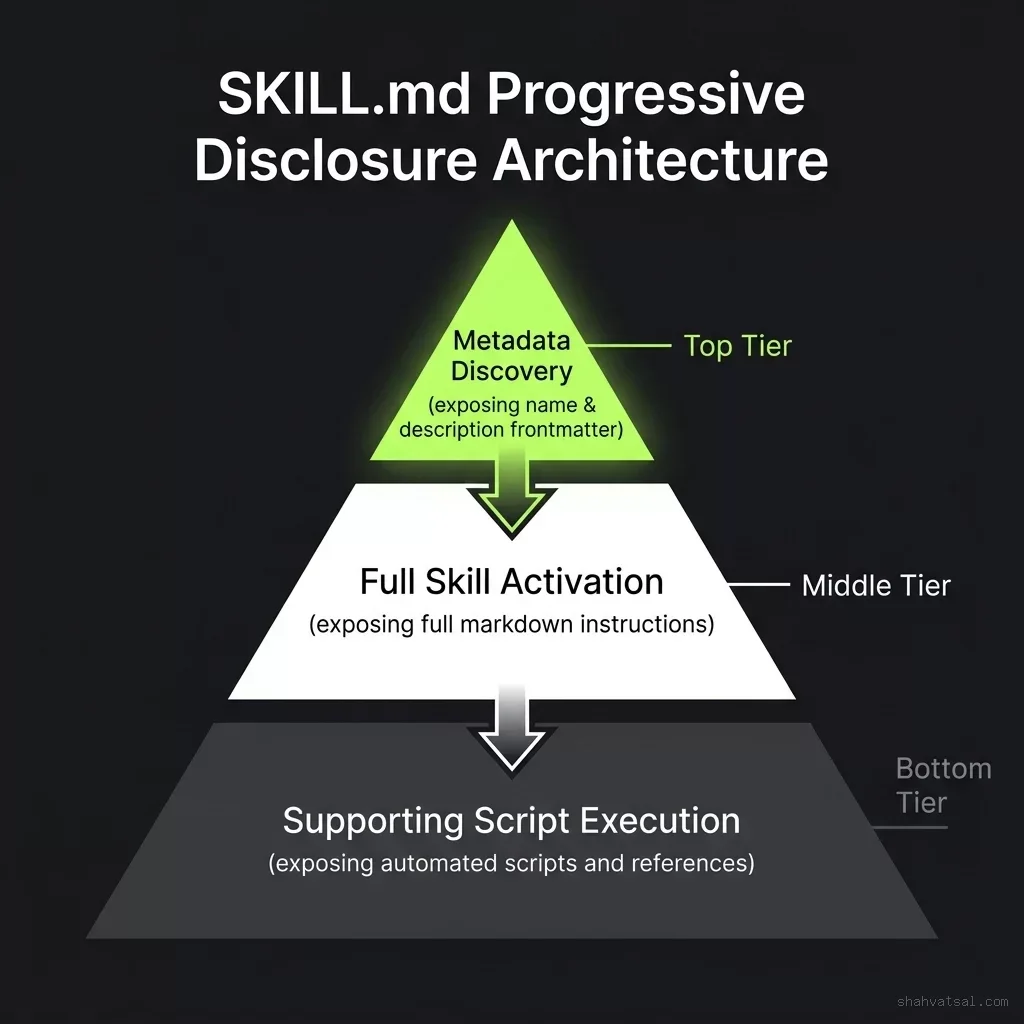
Using progressive disclosure, the host IDE only exposes the skill's name and description frontmatter during the initial task planning phase. The agent scans these descriptions, determines which skills are relevant to the user's prompt, and only loads the full markdown instructions for the matching skills. This prevents context window bloat and keeps execution tokens focused on the task.
Vercel's skills.sh: The npm for AI Agents
To support this packaging standard, Vercel launched skills.sh, a centralized registry and hub for discovering and installing skills. Developers can browse public skills, publish their own development guides, and manage team-specific workflows.
The installation loop mimics the simplicity of package managers:
class="tok-cm"># Add a Vercel deployment skill to the local project
npx skills add vercel/deploy-vercel
Running the npx skills command downloads the skill directory from the registry and places it in the project's customization root under .agents/skills/. The next time an agent is launched in that workspace, it automatically discovers the new .agents/skills/deploy-vercel/SKILL.md file and adds the deployment guidelines to its available capabilities.
The adoption of this registry has been rapid, expanding from a few hundred seed skills in early 2026 to over 90,000 listings by July. It has become the default mechanism for platform providers to distribute SDK integrations, API guidelines, and deployment playbooks directly to developer agents.
The Portability Stress-Test: Cursor's Compatibility Gap
While the Agent Skills standard was designed to be platform-agnostic, a comprehensive compatibility test published by Towards AI on July 7, 2026, revealed a significant portability gap among major AI coding tools.
The test evaluated how four leading agent environments—Claude Code CLI, Gemini CLI, Codex Desktop, and Cursor IDE—handled a multi-step verification skill that required parsing YAML frontmatter, loading supporting shell scripts from the scripts/ directory, and resolving dynamic $ARGUMENTS.
The results showed a clear divide in how IDEs and command-line agents parse the customization root:
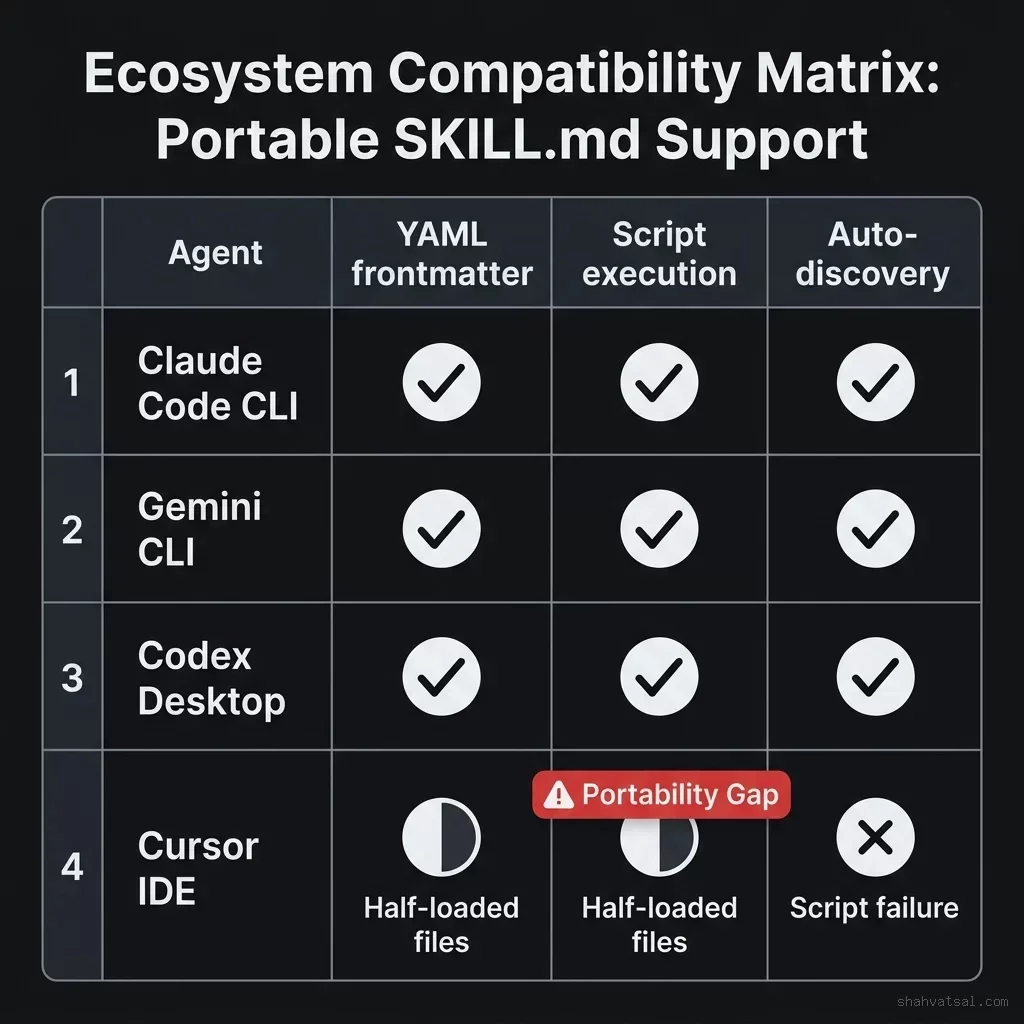
| Agent Environment | Frontmatter Parsing | Supporting Scripts (scripts/) | Dynamic $ARGUMENTS | Overall Compatibility |
|---|---|---|---|---|
| Claude Code CLI | Natively supported | Natively executed | Fully resolved | 100% (Full Support) |
| Gemini CLI | Natively supported | Natively executed | Fully resolved | 100% (Full Support) |
| Codex Desktop | Natively supported | Natively executed | Fully resolved | 100% (Full Support) |
| Cursor IDE | Half-loaded (Failed metadata) | Blocked execution | Unresolved variables | 35% (Portability Gap) |
Why Cursor Collapsed
The Towards AI analysis detailed why Cursor failed the stress-test.
Unlike CLI-based agents that execute directly in a terminal sandbox and read the local workspace file tree dynamically, Cursor uses a hybrid cloud-client architecture. When a developer triggers the agent in Cursor, the IDE sends project context to Cursor's cloud servers for planning.
This architecture creates a synchronization gap. During the Towards AI test, Cursor's cloud planner identified that a skill was relevant based on the frontmatter, but failed to synchronize the supporting helper files in the scripts/ directory to the local execution container. When the agent attempted to run the verification scripts, it encountered missing path errors and aborted the task.
Additionally, Cursor's parser failed to resolve dynamic $ARGUMENTS passed via the SKILL.md templates, leading to syntax errors when generating bash command strings.
This portability gap means that while developers can write a single skill and expect it to run perfectly across CLI-based agent environments, they must write custom workarounds or fall back to global .cursorrules files when deploying the same workflow inside Cursor.
Strategic Impact on Enterprise Workflows
For enterprise engineering teams, standardizing on the .agents/skills/ directory structure is a high-leverage move:
Decoupled Workflows: By writing instructions in the SKILL.md format, teams avoid vendor lock-in. If a team decides to migrate from one AI tool to another, their custom coding practices, security checks, and deployment guidelines remain intact and immediately discoverable by the new agent.
Automated Code Review Gates: Integrating skills with local verification scripts allows teams to build deterministic quality gates. For example, a "migrate-database" skill can include a script that runs a linter against SQL schema migrations, preventing the agent from committing code that violates database performance rules.
This standardization is a critical component of the transition away from ad-hoc prompting toward structured, engineering-first AI coordination, a change discussed in the Vibe Coding is Dead analysis and implemented natively in modern agent setups like the Vercel Eve open-source framework.
Recommendations for Technical Leaders
To leverage the Agent Skills ecosystem while navigating the portability gap, organizations should adopt the following guidelines:
Establish a Project Customization Root: Standardize on the .agents/skills/ directory structure for all internal repositories. Package coding styles, API design rules, and validation checks as independent skills containing a SKILL.md file and a scripts/ folder.
Design for CLI First, IDE Second: When writing custom verification scripts, optimize them to run in CLI-based agent runtimes (like Claude Code or Gemini). These environments provide the highest level of compatibility and permissions for script-based validation.
Use Fallbacks for Cursor: Until Cursor resolves its synchronization issues, maintain a simplified, flat version of critical guidelines inside .cursorrules or .cursor/rules/ for developer convenience, while keeping the full, script-based validation logic in the .agents/ folder for CLI and CI/CD agents.
Sources: Agent Skills Open Spec · skills.sh Registry · Towards AI Review
Frequently Asked Questions
What is the Agent Skills standard?
Agent Skills (agentskills.io) is an open-source specification for packaging guidelines, instructions, and verification scripts into modular directories using the SKILL.md file format.
What is skills.sh?
skills.sh is a Vercel-backed centralized directory and registry for discovering, sharing, and installing portable agent skills using the CLI command npx skills add.
How does progressive disclosure prevent context bloat?
Under the standard, the host environment only reads the YAML frontmatter (name and description) of all available skills during the planning phase. The full instruction set is only loaded when the agent determines the skill is relevant to the task, saving context tokens.
What is the Cursor compatibility gap?
A Towards AI stress-test showed that while CLI agents (like Claude Code and Gemini) fully support the standard, Cursor IDE fails to load local helper scripts and resolve dynamic variables because of its hybrid cloud-client architecture.
How should developers organize their custom agent guidelines?
Teams should organize custom rules within the .agents/skills/ folder under the project root, keeping guidelines modular and separating instruction markdown from local execution scripts.