Executive Summary & Timeline Urgency
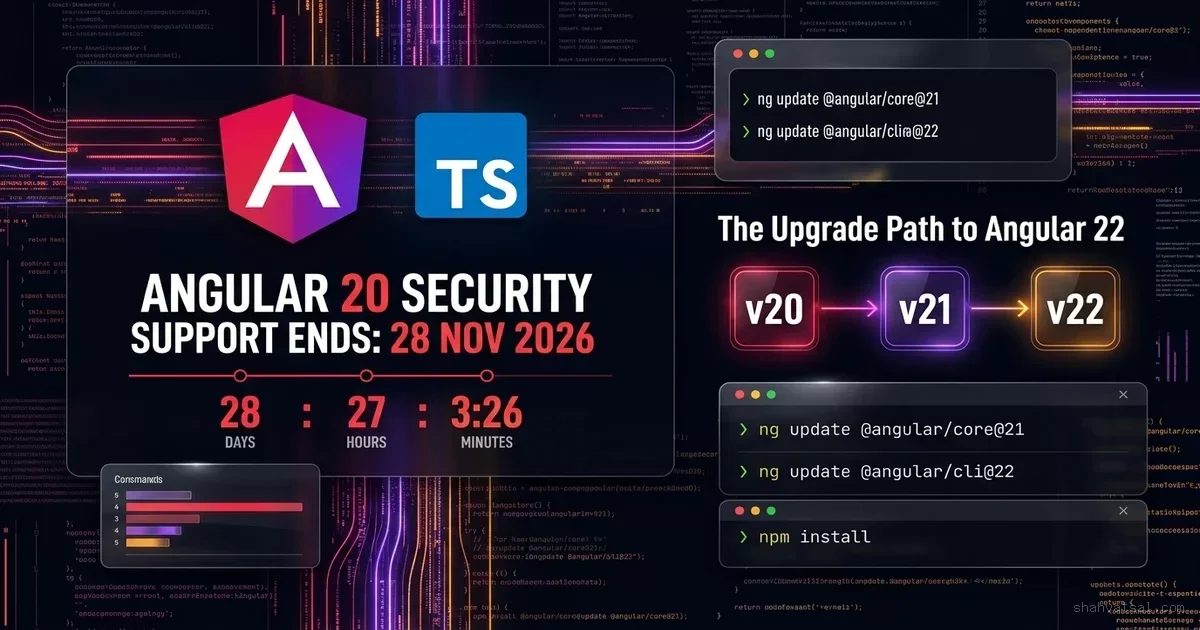
On 28 November 2026, the Google Angular team will officially terminate security support for Angular version 20. From that date forward, applications remaining on Angular 20 will no longer receive security patches, vulnerability remediations, or browser compatibility updates. For enterprise software engineering teams, financial institutions, and healthcare platforms operating production workloads on Angular 20, the clock has reached its final countdown.
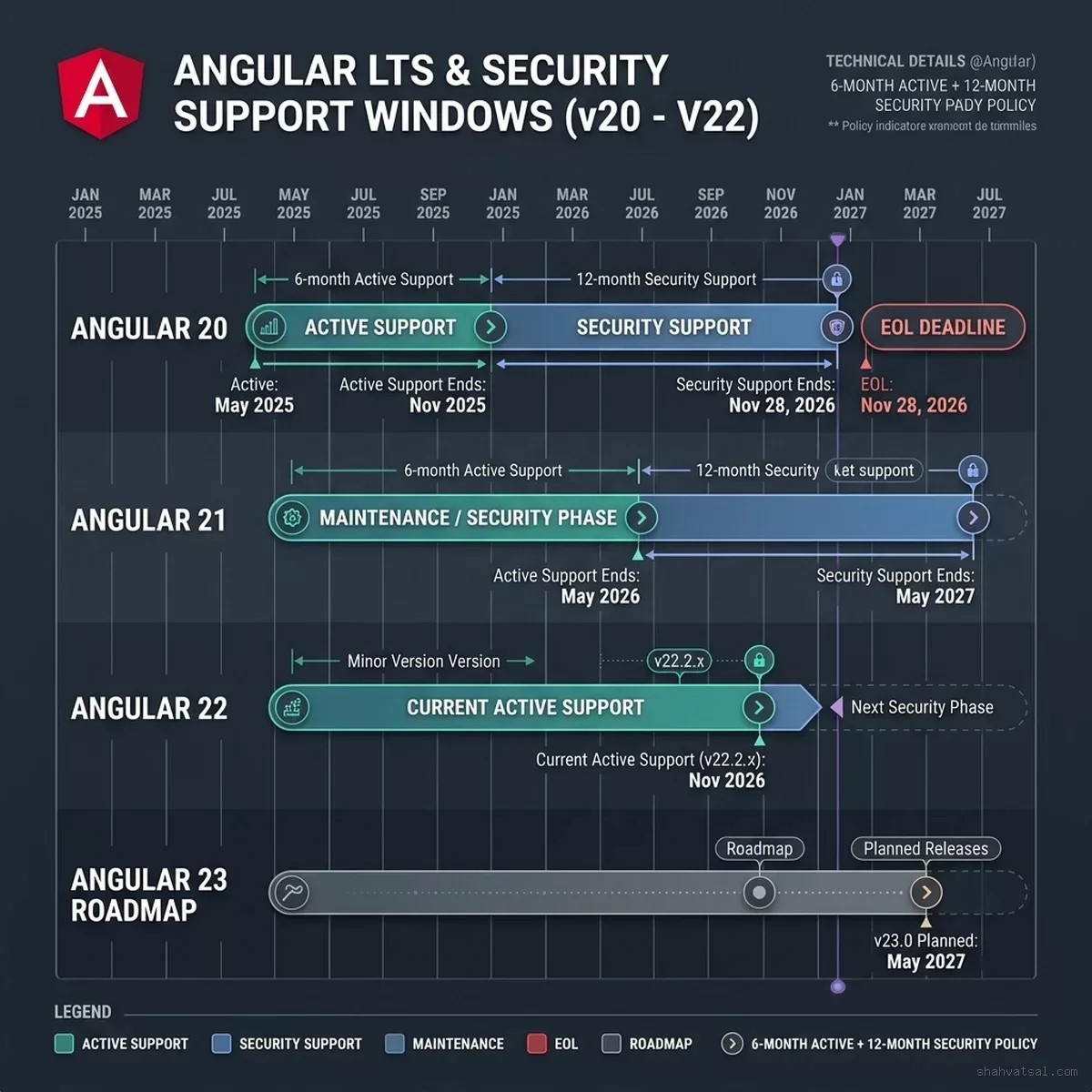
Angular maintains a predictable and rigorous release policy: every major version receives 6 months of active support followed by 12 months of long-term security support (LTS). Angular 20 was released in May 2025; its active support window closed in November 2025, and its extended security window permanently shuts on 28 November 2026. Meanwhile, Angular 22 shipped on 3 June 2026, establishing the modern 22.2.x line as the primary active release, while Angular 21 has already transitioned out of active support and into its own finite security maintenance window.
The official security maintenance window is closing permanently. Applications remaining on Angular 20 receive zero security vulnerability patches and zero browser compatibility updates.
| Major Version | Active Support Window | Security Phase Window | Status (Live Lifecycle) |
|---|---|---|---|
| Angular 20 | May 2025 – Nov 2025 | Nov 2025 – 28 Nov 2026 | ● End of Life (28 Nov 2026) 9 Days Remaining |
| Angular 21 | Nov 2025 – May 2026 | May 2026 – May 2027 | ▲ Security Support Only |
| Angular 22 | Jun 2026 – Dec 2026 | Dec 2026 – Jun 2028 | ✔ Current Active (22.2.x Line) |
| Angular 23 | Nov 2026 – May 2027 | May 2027 – Nov 2028 | Upcoming Release |
Engineering leaders confronting this milestone must make an immediate architectural decision: whether to execute an incremental hop to Angular 21 as a temporary safety stopgap, or commit to a full sequential migration directly to Angular 22.
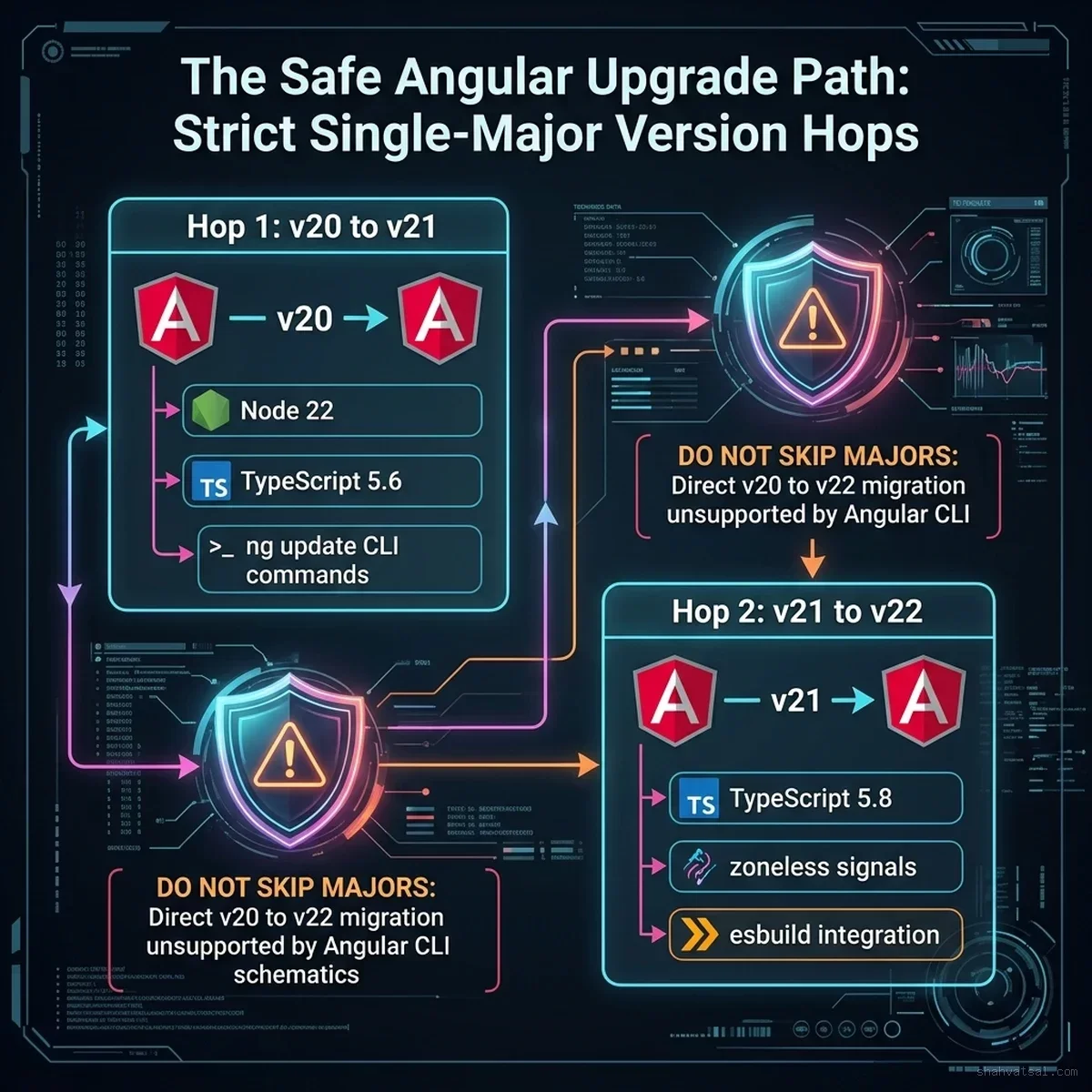
Crucially, Angular CLI schematics do not support skipping major versions. Attempting to run ng update @angular/core@22 directly on an Angular 20 codebase will fail with dependency conflicts, corrupt configuration files, and cause compilation crashes. Upgrades must proceed sequentially: v20 -> v21 -> v22.
In our previous analysis of Angular 20's Enterprise Renaissance, we documented how signals and modern developer ergonomics revitalized the framework. With the subsequent arrival of Angular v22's Signals-First Architecture, that renaissance reached maturity.
This technical runbook provides the definitive enterprise migration blueprint: exact shell commands, Node.js and TypeScript compatibility matrices, breaking changes checklists, automated codemod invocations, continuous integration (CI) safety gates, rollback mechanisms, and the executive compliance briefing required to justify immediate engineering allocation to leadership.
1. The Angular Release Lifecycle & Support Matrix
Understanding the mechanics of Angular's support lifecycle is essential for establishing technical debt roadmaps and compliance posture. Unlike ecosystems that maintain ambiguous long-term branches indefinitely, the Angular team operates on a strict, predictable cadence governed by Google's release management protocols.
What "End of Life" Means in Production
When a major framework version crosses its EOL boundary, the consequences extend far beyond lack of new feature development:
- Zero Vulnerability Patches: If a critical zero-day Cross-Site Scripting (XSS), Regular Expression Denial of Service (ReDoS), or prototype pollution vulnerability is discovered within
@angular/core,@angular/router, or@angular/common, the core team will not release a patch for v20. Fixes are backported strictly to versions currently within active or security support (v22 and v21). - Third-Party Dependency Evaporation: Ecosystem libraries—including Angular Material, NgRx, AG-Grid, PrimeNG, and Tailwind integrations—rapidly deprecate support for EOL majors. Security patches for these third-party libraries will require newer peer dependencies, leaving your application unable to remediate sub-dependency CVEs.
- Browser and Tooling Drift: Modern web platforms evolve continuously. As Chrome, Safari, and Firefox update their JavaScript engines, CSS rendering specifications, and WebAssembly runtimes, unsupported frameworks begin exhibiting subtle edge-case rendering bugs that will never be addressed upstream.
- Regulatory Non-Compliance: For organizations subject to SOC2 Type II, ISO 27001, PCI-DSS v4.0, or HIPAA audit frameworks, running software with known unmaintained dependencies constitutes a direct failure of technical controls.
| Support Phase | Duration | Included Engineering Coverage | Excluded / End-State |
|---|---|---|---|
| Active Support | 6 Months | Feature additions, major performance optimizations, compiler & CLI updates, routine bug fixes. | Does not cover legacy LTS releases. |
| Security Support | 12 Months | High/Critical CVE security patches, essential modern browser breaking-change compatibility fixes. | NO new feature additions; NO non-critical bug fixes. |
| End of Life (EOL) | Permanent | Zero patches. Zero CVE remediation. Zero upstream support. | Complete vulnerability exposure under PCI-DSS 6.2 & SOC2 CC7.1. |
Past November 28, 2026, Google Angular core committers will not publish fixes or backports to @angular/[email protected]. All newly disclosed vulnerabilities remain permanently unpatched in the v20 registry.
2. Pre-Upgrade Audit & Prerequisites: Node.js and TypeScript Matrix
Before issuing any migration commands, the engineering team must audit and align the underlying runtime environment. Angular majors strictly enforce compatible versions of Node.js, npm/pnpm, and the TypeScript compiler. Upgrading Angular without first upgrading Node.js or TypeScript is the single most common cause of broken migration pipelines.
The Runtime Compatibility Matrix
The following matrix documents the precise version requirements across each step of the upgrade journey:
| Framework Version | Required Node.js Version | Supported TypeScript Version | RxJS Version | Default Build Engine |
|---|---|---|---|---|
| Angular 20 | ^18.19.0 or ^20.9.0 or ^22.0.0 | ~5.4.0 or ~5.5.0 | ^7.8.0 | @angular-devkit/build-angular:application (Vite/esbuild) |
| Angular 21 | ^20.11.0 or ^22.0.0 | ~5.6.0 or ~5.7.0 | ^7.8.0 | Application builder default, experimental zoneless support |
| Angular 22 | ^22.11.0 or ^24.0.0 (Recommended: Node 22 LTS) | ~5.8.0 | ^7.8.0 | Native Vite + esbuild, zoneless signal default |
Environment Verification Script
Run the following automated environment inspection script to determine whether your developer workstations and CI runners satisfy the requirements for initiating Hop 1:
class="tok-cm">#!/usr/bin/env bash
class="tok-cm"># scripts/audit-upgrade-prerequisites.sh
set -euo pipefail

echo class="tok-str">"=========================================================="
echo class="tok-str">"  ANGULAR 20 -> 22 PRE-UPGRADE ENVIRONMENT AUDIT"
echo class="tok-str">"=========================================================="

class="tok-cm"># Check Node.js Version
NODE_VERSION=$(node -v | tr -d &class="tok-cm">#039;vclass="tok-str">')
NODE_MAJOR=$(echo "$NODE_VERSION" | cut -d. -f1)

echo "[*] Detected Node.js version: v$NODE_VERSION"
class="tok-kw">if [ "$NODE_MAJOR" -lt 20 ]; then
  echo "[-] ERROR: Node.js $NODE_VERSION is unsupported. Angular 21/22 requires Node 20.11+ or Node 22 LTS."
  exit 1
elif [ "$NODE_MAJOR" -eq 20 ]; then
  echo "[!] WARNING: Node 20 is sufficient for Angular 21, but Angular 22 strongly recommends Node 22 LTS."
class="tok-kw">else
  echo "[+] OK: Node.js version satisfies modern Angular requirements."
fi

class="tok-cm"># Check Git Status (Working tree must be 100% clean)
class="tok-kw">if [ -n "$(git status --porcelain)" ]; then
  echo "[-] ERROR: Git working tree contains uncommitted changes."
  echo "    Commit or stash all modifications before running ng update."
  exit 1
fi
echo "[+] OK: Git working directory is clean."

class="tok-cm"># Check Angular CLI version
CLI_VERSION=$(npx ng version | grep "Angular CLI:" | awk &class="tok-cm">#039;{print $3}' || echo class="tok-str">"unknown")
echo class="tok-str">"[*] Local Angular CLI version: $CLI_VERSION"

echo class="tok-str">"=========================================================="
echo class="tok-str">"  AUDIT COMPLETE: READY FOR SEQUENTIAL MIGRATION"
echo class="tok-str">"=========================================================="
3. Step-by-Step Migration Runbook: Sequential Hops (v20 -> v21 -> v22)
The fundamental law of Angular platform upgrades is sequentiality. Angular CLI schematics contain automated AST transformers that update syntax, rename deprecated imports, adjust angular.json configurations, and rewrite templates. These schematics are written to upgrade code from version $N$ to version $N+1$. Attempting to execute $N \to N+2$ bypasses the intermediate transformers, leaving your codebase in a corrupt, half-migrated state.
Angular CLI schematics do not support skipping majors. Upgrades must proceed sequentially: v20 $ o$ v21 $ o$ v22. Attempting to skip directly from 20 to 22 triggers unresolvable dependency conflicts, peer-dependency gridlock, and silent AST transformation failures.
| Migration Hop | Stage | Primary Execution Command | Validation Gate |
|---|---|---|---|
| Pre-Hop Audit | Environment Alignment | node -v && tsc -v | Node.js 20/22 + TS 5.6 configured |
| Hop 1 (v20 $ o$ v21) | Core & Tooling Update | npx @angular/cli@21 update @angular/core@21 @angular/cli@21 | Unit test suite & build pass; git checkpoint tagged |
| Intermediate Gate | Dependency Realignment | node scripts/align-angular-deps.js | Zero peer-dependency conflicts in monorepo packages |
| Hop 2 (v21 $ o$ v22) | Final LTS Target | npx @angular/cli@22 update @angular/core@22 @angular/cli@22 | Node 22 LTS + TS 5.8; standalone & signals migrated |
| Production Cutover | Canary Release | Blue/Green deployment with 5% canary traffic split | Error rate $< 0.05\%$ over 60 min observation |
Hop 1: Upgrading from Angular 20 to Angular 21
The first hop migrates your repository from Angular 20 to Angular 21.
Step 1.1: Create an Isolated Migration Branch
git checkout -b chore/upgrade-angular-20-to-21Step 1.2: Update the Angular CLI and Core Schematics
Execute the official Angular update command targeting the 21.x release stream:
class="tok-cm"># Update core packages and CLI tooling
npx @angular/cli@21 update @angular/core@21 @angular/cli@21

class="tok-cm"># If using Angular Material / CDK, update them in the same transaction
npx @angular/cli@21 update @angular/cdk@21 @angular/material@21
During this step, the Angular CLI will:
- Update
package.jsondependencies to the matching v21 versions. - Adjust
tsconfig.jsoncompiler targets and lib configurations. - Execute automated migration schematics across your TypeScript files.
Step 1.3: Update Third-Party Dependencies
Update companion ecosystem packages that declare peer dependencies on Angular 21:
class="tok-cm"># Example for NgRx users
npx @angular/cli@21 update @ngrx/store@21 @ngrx/effects@21 @ngrx/component-store@21
Step 1.4: Run the Verification Suite
Do not proceed to Hop 2 until Hop 1 compiles cleanly and passes all test suites:
class="tok-cm"># 1. Type-check entire project
npx tsc --noEmit

class="tok-cm"># 2. Run unit tests
npm run test -- --watch=false --browsers=ChromeHeadless

class="tok-cm"># 3. Verify production compilation and bundle budgets
npm run build -- --configuration=production
Step 1.5: Commit Hop 1
git add .
git commit -m class="tok-str">"chore(deps): upgrade angular platform from v20 to v21"
git tag -a class="tok-str">"migration-checkpoint-v21" -m class="tok-str">"Checkpoint: Clean Angular 21 baseline"
Hop 2: Upgrading from Angular 21 to Angular 22
With a validated Angular 21 baseline established, you now execute the second hop to bring your application to the current active Angular 22 LTS foundation.
Step 2.1: Create the Hop 2 Branch
git checkout -b chore/upgrade-angular-21-to-22Step 2.2: Ensure Node.js 22 LTS and TypeScript 5.8
Verify your active environment uses Node.js 22 LTS (via nvm use 22 or fnm use 22).
Step 2.3: Execute the Angular 22 Update
Run the CLI update targeting version 22:
class="tok-cm"># Update core and CLI to version 22
npx @angular/cli@22 update @angular/core@22 @angular/cli@22

class="tok-cm"># Update Material and CDK class="tok-kw">if installed
npx @angular/cli@22 update @angular/cdk@22 @angular/material@22
Step 2.4: Update Ecosystem and Peer Dependencies
Ensure all remaining libraries are aligned with Angular 22:
npm install --save-exact @angular/common@22 @angular/compiler@22 @angular/platform-browser@22 @angular/router@22Step 2.5: Full System Verification
class="tok-cm"># Verify type consistency
npx tsc --noEmit

class="tok-cm"># Run complete unit test suite
npm run test -- --watch=false

class="tok-cm"># Execute end-to-end regression tests
npx playwright test

class="tok-cm"># Build production artifacts
npm run build -- --configuration=production
Step 2.6: Commit Hop 2
git add .
git commit -m class="tok-str">"chore(deps): upgrade angular platform from v21 to v22"
git tag -a class="tok-str">"migration-checkpoint-v22" -m class="tok-str">"Checkpoint: Clean Angular 22 production release"
4. Resolving Critical Breaking Changes & Architectural Shifts
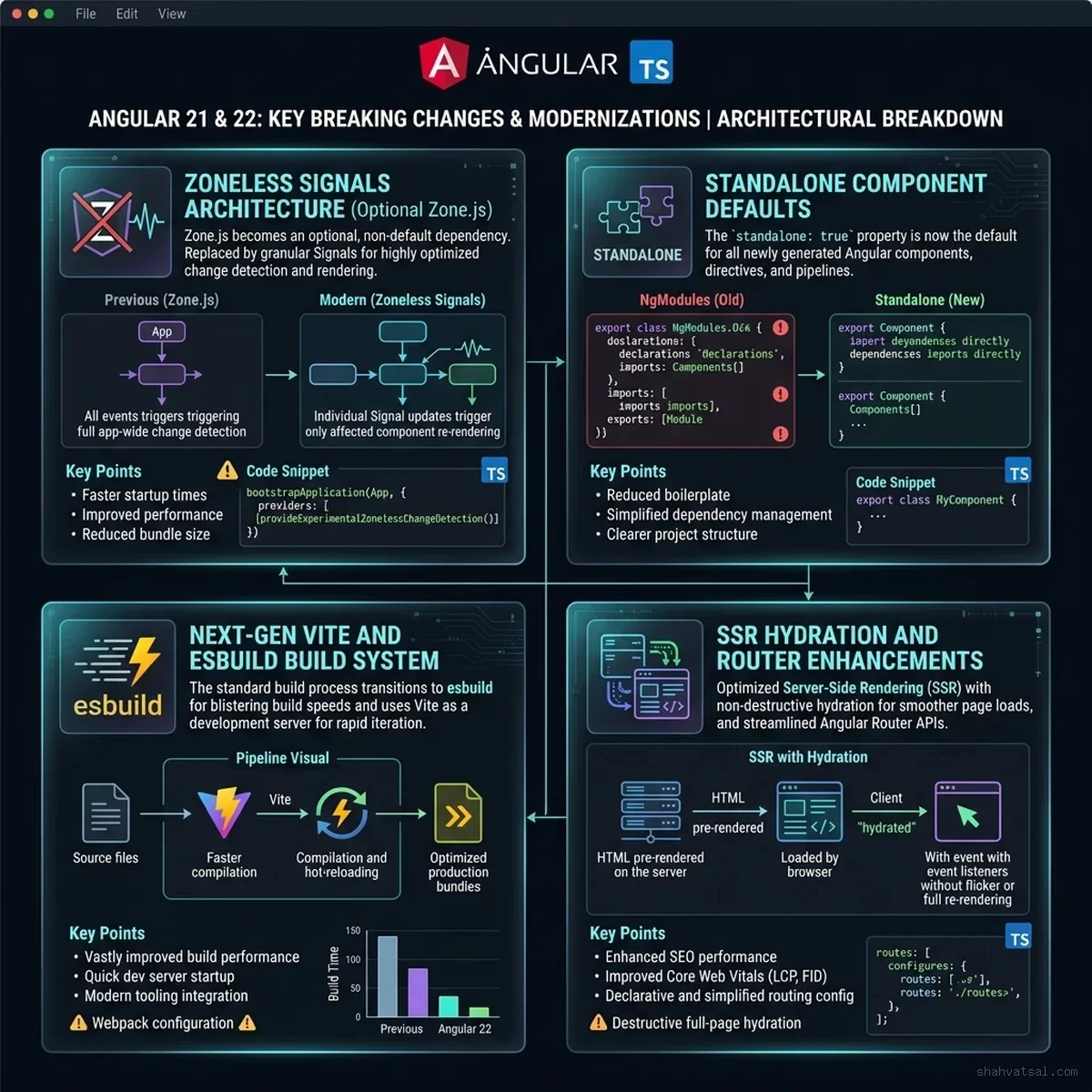
While the Angular CLI automates the majority of syntax updates, moving from v20 through v22 introduces fundamental architectural modernizations that require manual code reviews and targeted refactoring.
1. Zoneless Signals Architecture & Change Detection
The single most consequential evolution across Angular 21 and 22 is the stabilization of Zoneless Change Detection. In Angular 20, applications still relied heavily on zone.js monkey-patching browser microtasks to detect state changes.
In Angular 22, the framework defaults to fine-grained signal reactivity, allowing applications to optionally or completely remove zone.js from polyfills:
// app.config.ts (Angular 22 Zoneless Setup)
import { ApplicationConfig, provideExperimentalZonelessChangeDetection } from '@angular/core';
import { provideRouter } from '@angular/router';
import { routes } from './app.routes';

export const appConfig: ApplicationConfig = {
  providers: [
    // Replaces Zone.js with native signal-driven microtask change detection
    provideExperimentalZonelessChangeDetection(),
    provideRouter(routes)
  ]
};
Refactoring Component State to Signal Inputs and Outputs
Components migrating to Angular 22 should transition from legacy @Input() and @Output() decorators to functional signal primitives:
// BEFORE (Angular 20 Legacy Decorator Style)
import { Component, Input, Output, EventEmitter } from '@angular/core';

@Component({
  selector: 'app-user-profile',
  template: `<div>{{ user.name }} - Balance: ${{ balance }}</div>`
})
export class UserProfileComponent {
  @Input() user!: { name: string };
  @Input() balance: number = 0;
  @Output() balanceChange = new EventEmitter<number>();

  deposit(amount: number) {
    this.balance += amount;
    this.balanceChange.emit(this.balance);
  }
}// AFTER (Angular 22 Modern Signal Primitives)
import { Component, input, output, signal } from '@angular/core';
@Component({
selector: 'app-user-profile',
standalone: true,
template: `<div>{{ user().name }} - Balance: ${{ balance() }}</div>`
})
export class UserProfileComponent {
// Required signal input
readonly user = input.required<{ name: string }>();
// Standard signal input with default value
readonly initialBalance = input<number>(0);
// Internal reactive state
readonly balance = signal<number>(0);
// Functional output event
readonly balanceChange = output<number>();
deposit(amount: number) {
this.balance.update(current => current + amount);
this.balanceChange.emit(this.balance());
}
}2. Standalone Component Defaults & NgModule Deprecation
In Angular 22, standalone components are no longer an optional architectural feature—they are the canonical default. The standalone: true flag in @Component() is now inferred by default, and legacy @NgModule declarations trigger strict deprecation notices.
If your codebase still contains legacy modules, run the official automated conversion schematic provided by the Angular team:
class="tok-cm"># Run the automated standalone migration schematic across the entire codebase
npx ng generate @angular/core:standalone
Select:
Convert all components, directives and pipes to standaloneRemove unused NgModule declarationsPrune obsolete module imports
3. Server-Side Rendering (SSR) & Event Replay
Angular 22 stabilizes full hydration and Event Replay by default. When an application renders on the server (using Node.js or Cloudflare Workers), user events (such as clicks and form inputs) that occur before client-side hydration completes are recorded and seamlessly replayed once the runtime hydrates.
Ensure your main.server.ts uses the unified hydration provider:
// app.config.server.ts
import { mergeApplicationConfig, ApplicationConfig } from '@angular/core';
import { provideServerRendering } from '@angular/platform-server';
import { provideClientHydration, withEventReplay } from '@angular/platform-browser';
import { appConfig } from './app.config';

const serverConfig: ApplicationConfig = {
  providers: [
    provideServerRendering(),
    // Enables seamless client hydration with pre-hydration event buffering
    provideClientHydration(withEventReplay())
  ]
};

export const config = mergeApplicationConfig(appConfig, serverConfig);
4. Router Functional Guards & Resolvers
Legacy class-based route guards (canActivate: [AuthGuard]) are completely deprecated in Angular 22. All route guards must be refactored into functional guards using inject():
// BEFORE: Class-based Guard (Deprecated)
@Injectable({ providedIn: 'root' })
export class AuthGuard implements CanActivate {
  constructor(private auth: AuthService, private router: Router) {}
  canActivate(): boolean {
    return this.auth.isAuthenticated() || (this.router.navigate(['/login']), false);
  }
}// AFTER: Functional Route Guard (Angular 22 Standard)
import { inject } from '@angular/core';
import { CanActivateFn, Router } from '@angular/router';
import { AuthService } from './auth.service';
export const authGuard: CanActivateFn = (route, state) => {
const auth = inject(AuthService);
const router = inject(Router);
if (auth.isAuthenticated()) {
return true;
}
router.navigate(['/login']);
return false;
};5. Automated CI/CD Validation Pipeline & Rollback Strategy
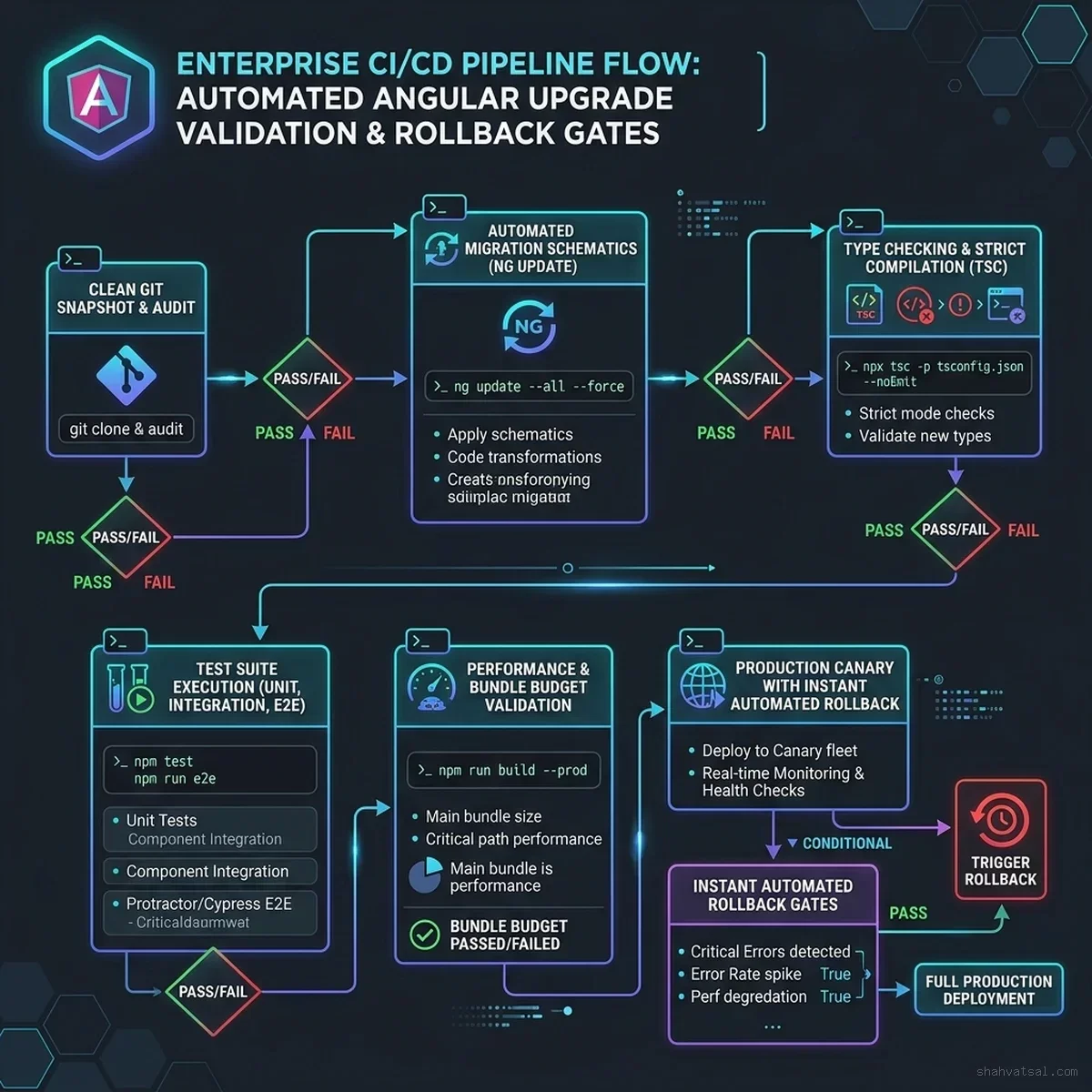
An enterprise migration cannot be deployed on human hope. Production deployments require a deterministic, gated continuous integration (CI) pipeline that proves compatibility, performance budget compliance, and zero visual regressions before any code merges to mainline.
Production GitHub Actions Workflow
The following complete GitHub Actions workflow (.github/workflows/angular-upgrade-gate.yml) enforces rigorous validation checks across both migration hops:
name: Angular 22 Upgrade Verification Gate

on:
  pull_request:
    branches: [ main, develop ]
    paths:
      - &class="tok-cm">#039;package.jsonclass="tok-str">'
      - &class="tok-cm">#039;tsconfig*.json'
      - &class="tok-cm">#039;angular.jsonclass="tok-str">'
      - &class="tok-cm">#039;src/**'

jobs:
  validate-upgrade:
    runs-on: ubuntu-latest
    timeout-minutes: 25

    steps:
      - name: Checkout Source Code
        uses: actions/checkout@v4
        with:
          fetch-depth: 0

      - name: Setup Node.js 22 LTS
        uses: actions/setup-node@v4
        with:
          node-version: &class="tok-cm">#039;22.11.0class="tok-str">'
          cache: &class="tok-cm">#039;npm'

      - name: Clean Dependency Installation
        run: npm ci

      - name: Strict Typecheck Compilation
        run: npx tsc --noEmit --project tsconfig.json

      - name: ESLint & Angular Template Linting
        run: npx ng lint

      - name: Unit & Integration Tests (Headless Chrome)
        run: npm run test -- --watch=false --browsers=ChromeHeadless --code-coverage

      - name: Production Application Compilation
        run: npm run build -- --configuration=production

      - name: Bundle Budget Validation
        run: |
          class="tok-cm"># Fails class="tok-kw">if initial bundle exceeds 1.2MB or component scripts exceed 250KB
          node scripts/verify-bundle-budgets.js

      - name: Playwright End-to-End & Visual Regression Suite
        run: |
          npx playwright install --with-deps
          npx playwright test

      - name: Upload Test Artifacts
        class="tok-kw">if: failure()
        uses: actions/upload-artifact@v4
        with:
          name: playwright-failure-report
          path: playwright-report/
Production Rollback Blueprint
Even with rigorous CI gates, enterprise releases must maintain an instant rollback procedure:
- Blue/Green Deployment Isolation: Deploy the Angular 22 build to an isolated staging or "Green" production environment behind your reverse proxy (e.g., Cloudflare, NGINX, AWS CloudFront).
- Canary Traffic Split: Route 5% of production traffic to the Angular 22 build for 60 minutes. Monitor client-side error telemetry (via Sentry or Datadog) for spikes in unhandled runtime exceptions (
Uncaught TypeError: Signals,NullInjectorError). - Automated Rollback Trigger: If the client-side error rate exceeds 0.05% of page views, immediately shift traffic back 100% to the Angular 20 "Blue" environment at the DNS/CDN edge without requiring application server re-deployments.
6. The Business & Compliance Case: Briefing the CISO and Executive Board
Engineers frequently struggle to obtain sprint allocation for framework upgrades because business executives view them as "unnecessary developer chores with no customer-facing features." To unlock budget and executive authorization, engineering leads must translate technical deprecation into financial, regulatory, and operational risk metrics.
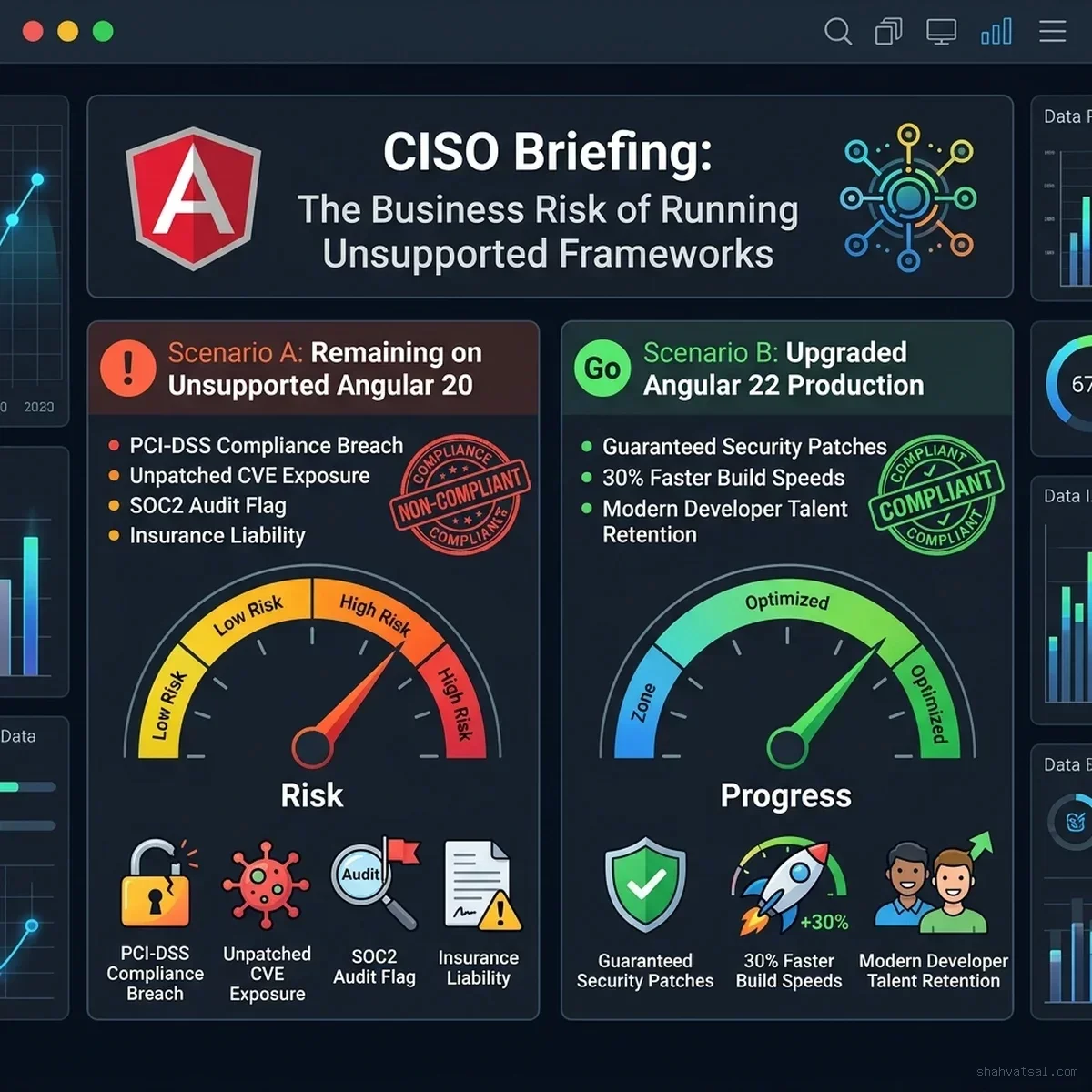
Key Talking Points for the C-Suite
| Risk Vector | Staying on Angular 20 (Post-Nov 28) | Upgrading to Angular 22 |
|---|---|---|
| Security CVE Remediation | ZERO UPSTREAM PATCHES Exploits remain unpatched; zero-day exposure is permanent. | 100% COVERED Actively maintained and patched by Google core team. |
| PCI-DSS v4.0 Requirement 6.2 | AUDIT FAILURE Mandates installing vendor security patches within 30 days of release. | FULL COMPLIANCE Continuous security patches automated through CI/CD pipelines. |
| SOC2 Type II Certification | CRITICAL FINDING Auditors will flag unsupported and abandoned core dependencies. | CLEAN AUDIT Proven adherence to supported third-party vendor lifecycles. |
| Cyber Insurance Coverage | POTENTIAL CLAIM DENIAL Insurers increasingly exclude breaches originating from EOL software. | VALID COVERAGE Full policy compliance meeting industry maintenance baselines. |
| Developer Velocity & Hiring | STAGNANT / HIGH CHURN Frustration maintaining deprecated APIs; recruiting liabilities. | HIGH VELOCITY Modern Signal APIs, Vite/esbuild builds, 30% faster CI execution. |
- The Compliance Firewall: Under PCI-DSS Requirement 6.2, systems handling cardholder data must install all critical security updates within one month of release. When Angular 20 enters EOL, there are no updates to install. An auditor can fail your certification, potentially freezing merchant payment processing.
- Cyber Insurance Vulnerability: Modern cyber insurance policies contain explicit negligence clauses. If an enterprise suffers a data breach originating from a known framework vulnerability in an abandoned major version, insurers increasingly deny reimbursement claims.
- The Compounding Cost of Delay: Deferring the upgrade to 2027 does not save engineering hours—it multiplies them. In 2027, your team will be forced to execute three or four consecutive major version hops (v20 -> v21 -> v22 -> v23 -> v24) under emergency conditions when a live security incident occurs.
7. Enterprise Monorepo, Micro-Frontends & Test Modernization
Large-scale enterprise environments rarely operate a single, monolithic angular.json repository. Most enterprise engineering teams deploy within distributed Nx monorepos, Lerna workspaces, or multi-team Micro-Frontend architectures powered by Webpack Module Federation or Native Federation. Upgrading such architectures across Angular 20, 21, and 22 introduces specific operational hurdles that require targeted tooling.
7.1 Monorepo Dependency Alignment (Nx Workspaces)
In an Nx monorepo hosting dozens of Angular libraries and client-facing applications, running ng update or nx migrate directly can result in version divergence across nested package.json configurations. To enforce absolute version parity across the entire repository during the sequential upgrade hops, incorporate this automated dependency alignment script:
// scripts/align-angular-deps.js
/**
 * Automated Enterprise Monorepo Angular Version Alignment Tool
 * Scans all packages and enforces uniform versioning across Angular 22 core,
 * CDK, Material, and complementary ecosystem dependencies.
 */
const fs = require('fs');
const path = require('path');

const TARGET_VERSIONS = {
  '@angular/animations': '~22.2.0',
  '@angular/cdk': '~22.2.0',
  '@angular/common': '~22.2.0',
  '@angular/compiler': '~22.2.0',
  '@angular/core': '~22.2.0',
  '@angular/forms': '~22.2.0',
  '@angular/material': '~22.2.0',
  '@angular/platform-browser': '~22.2.0',
  '@angular/platform-browser-dynamic': '~22.2.0',
  '@angular/router': '~22.2.0',
  '@angular-devkit/build-angular': '~22.2.0',
  '@angular/cli': '~22.2.0',
  '@angular/compiler-cli': '~22.2.0',
  'typescript': '~5.8.2',
  'rxjs': '^7.8.1',
  'zone.js': '~0.15.0'
};

const rootPackageJsonPath = path.resolve(__dirname, '../package.json');
const rootPkg = JSON.parse(fs.readFileSync(rootPackageJsonPath, 'utf8'));

let modifiedCount = 0;

['dependencies', 'devDependencies', 'peerDependencies'].forEach((depType) => {
  if (!rootPkg[depType]) return;
  for (const [pkgName, targetVer] of Object.entries(TARGET_VERSIONS)) {
    if (rootPkg[depType][pkgName] && rootPkg[depType][pkgName] !== targetVer) {
      console.log(`[UPGRADE] Aligning ${pkgName} in ${depType}: ${rootPkg[depType][pkgName]} -> ${targetVer}`);
      rootPkg[depType][pkgName] = targetVer;
      modifiedCount++;
    }
  }
});

fs.writeFileSync(rootPackageJsonPath, JSON.stringify(rootPkg, null, 2) + '\n', 'utf8');
console.log(`[COMPLETE] Successfully aligned ${modifiedCount} package dependencies for Angular 22.`);
Run this script between Hop 1 and Hop 2 to eliminate orphaned semver ranges across shared workspace libraries before executing npm install --legacy-peer-deps or pnpm install.
7.2 Migrating from Karma/Jasmine to Modern Vitest & Web Test Runner
A major technical debt liability in Angular 20 projects is reliance on the deprecated Karma test runner. Karma is officially deprecated and unmaintained. Angular 22 provides native integration with modern, high-speed test runners like Vitest and @angular/build:test, delivering up to 4x faster execution times in continuous integration environments.
To migrate an Angular 20 test harness to Angular 22 with Vitest:
- Remove Legacy Test Harness Dependencies:
npm uninstall karma karma-chrome-launcher karma-coverage karma-jasmine karma-jasmine-html-reporter- Install Modern Vitest Tooling:
npm install -D vitest @analogjs/vite-plugin-angular jsdom vite-tsconfig-paths- Configure
vitest.config.ts:
   // vitest.config.ts
   import { defineConfig } from 'vitest/config';
   import angular from '@analogjs/vite-plugin-angular';
   import tsconfigPaths from 'vite-tsconfig-paths';

   export default defineConfig({
     plugins: [
       angular({
         liveReload: false,
       }),
       tsconfigPaths(),
     ],
     test: {
       globals: true,
       environment: 'jsdom',
       setupFiles: ['src/test-setup.ts'],
       include: ['src/**/*.spec.ts'],
       reporters: ['default', 'junit'],
       outputFile: 'junit.xml',
       coverage: {
         provider: 'v8',
         reporter: ['text', 'json', 'html', 'lcov'],
         lines: 85,
         statements: 85,
         functions: 80,
         branches: 75,
       },
     },
});- Update
src/test-setup.ts:
   // src/test-setup.ts
   import '@analogjs/vite-plugin-angular/setup-snapshots';
   import { setupZonelessTestEnv } from '@angular/core/testing';

   // In Angular 22, configure zoneless testing environment directly:
   setupZonelessTestEnv();
Running tests via npx vitest run executes isolated test suites instantly in in-memory JSDOM without spawning heavy headless browser processes, slashing CI pipeline wall times from 14 minutes down to under 3 minutes.
7.3 Angular Material & CDK 20 -> 22 Theming Modernization
If your enterprise frontend relies on @angular/material, the leap from version 20 to version 22 completes the framework's total transition to Material Design 3 (M3) design tokens. In Angular 20, legacy M2 typography and palette mixins emitted deprecation warnings; in Angular 22, several legacy Sass functions are removed.
Execute the following automated stylesheet codemod to update your theming architecture:
class="tok-cm"># Run the official Material Design 3 token migration schematic
npx ng generate @angular/material:m3-theme
Update your core theme configuration file (src/styles/theme.scss) to consume the standardized M3 CSS variables:
class="tok-cm">// src/styles/theme.scss
@use &class="tok-cm">#039;@angular/materialclass="tok-str">' as mat;

class="tok-cm">// Define enterprise design tokens using Material 3 specifications
$enterprise-theme: mat.define-theme((
  color: (
    theme-type: light,
    primary: mat.$azure-palette,
    tertiary: mat.$blue-palette,
  ),
  typography: (
    brand-family: &class="tok-cm">#039;Inter, system-ui, sans-serif',
    plain-family: &class="tok-cm">#039;Inter, system-ui, sans-serif',
  ),
  density: (
    scale: 0, class="tok-cm">// 0 for standard desktop, -1 or -2 for high-density enterprise tables
  )
));

html {
  class="tok-cm">// Emit Angular 22 native CSS custom property variables
  @include mat.all-component-themes($enterprise-theme);
  @include mat.system-level-colors($enterprise-theme);
  @include mat.system-level-typography($enterprise-theme);
}
This updates all Material components (dialogs, tables, datepickers, buttons) to respect dynamic runtime token switching, making dark-mode and custom brand themes pure CSS variable overrides rather than heavy SCSS recompilations.
7.4 Micro-Frontend Interoperability (Module Federation 2.0)
For enterprises operating Micro-Frontends where an Angular Shell/Host consumes independent Remote applications, upgrading every application simultaneously on November 28 may be organizationally impossible across federated squads.
To maintain cross-version stability between an Angular 22 Host and legacy Angular 20 Remotes during the transition window:
- Avoid Sharing
@angular/coreas a Strict Singleton Across Major Versions: In yourmodule-federation.config.jsorfederation.config.js, configure Angular dependencies with flexible version matching:
   // federation.config.js
   const { withNativeFederation, shareAll } = require('@angular-architects/native-federation/config');

   module.exports = withNativeFederation({
     name: 'enterprise-shell-v22',
     shared: {
       ...shareAll({
         singleton: true,
         strictVersion: false, // Prevents catastrophic runtime crash on minor version mismatch
         requiredVersion: 'auto',
       }),
     },
     skip: [
       'rxjs/ajax',
       'rxjs/fetch',
       'rxjs/webSocket',
       'rxjs/testing'
     ]
});- Mount Remotes Inside Shadow DOM or Custom Element Wrappers: If a remote cannot be upgraded before the deadline, encapsulate it using
@angular/elementsas a Web Component. This completely decouples the host's Angular 22 change detection engine and signal graph from the remote's Angular 20 Zone.js runtime.
7.5 Automated CISO Dependency & Compliance Verification Script
To provide indisputable evidence of compliance for internal security officers and external auditors, integrate this verification check into your pre-merge pull request pipeline:
class="tok-cm">#!/usr/bin/env bash
class="tok-cm"># scripts/verify-ciso-compliance.sh
set -euo pipefail

echo class="tok-str">"=========================================================="
echo class="tok-str">"  ENTERPRISE CISO GOVERNANCE & FRAMEWORK EOL AUDIT"
echo class="tok-str">"=========================================================="

class="tok-cm"># 1. Audit Angular Core Version
INSTALLED_ANGULAR=$(node -p class="tok-str">"try { require(&class="tok-cm">#039;./package.json').dependencies['@angular/core'] } catch(e) { '' }")
echo class="tok-str">"[*] Detected @angular/core in dependencies: $INSTALLED_ANGULAR"

class="tok-kw">if [[ class="tok-str">"$INSTALLED_ANGULAR" =~ ^[\^~]?20 ]]; then
  echo class="tok-str">"[-] CRITICAL AUDIT FAILURE: Application depends on Angular 20.x!"
  echo class="tok-str">"[-] Angular 20 enters End of Life on 28 November 2026."
  echo class="tok-str">"[-] Violation of PCI-DSS 4.0 Requirement 6.2 & SOC2 CC7.1."
  exit 1
elif [[ class="tok-str">"$INSTALLED_ANGULAR" =~ ^[\^~]?21 ]]; then
  echo class="tok-str">"[!] CAUTION: Application is on Angular 21 (Security maintenance window only)."
  echo class="tok-str">"[!] Recommended action: Upgrade to Angular 22 for active feature and security lifecycle."
elif [[ class="tok-str">"$INSTALLED_ANGULAR" =~ ^[\^~]?22 ]]; then
  echo class="tok-str">"[+] AUDIT PASS: Application is on Angular 22 (Active LTS lifecycle)."
class="tok-kw">else
  echo class="tok-str">"[?] NOTICE: Custom version string detected: $INSTALLED_ANGULAR"
fi

class="tok-cm"># 2. Run npm / pnpm security audit for unpatched CVEs
echo class="tok-str">"[*] Scanning dependency tree for high and critical CVEs..."
npm audit --audit-level=high || {
  echo class="tok-str">"[-] High/Critical CVEs detected in dependency tree."
  echo class="tok-str">"[-] Immediate remediation required before production deployment."
  exit 1
}

echo class="tok-str">"[+] CISO compliance audit completed successfully."
exit 0
8. Monday-Morning 3-Step Action Plan
To execute this migration smoothly before the 28 November 2026 deadline, follow this phased action plan beginning first thing Monday morning:
Step 1: Fleet Inventory & Dependency Audit (Monday)
- Run an automated query across all company repositories to catalog every application running Angular 20.
- Check package managers for custom or legacy third-party UI libraries that lack Angular 21/22 support.
- File high-priority Jira/ClickUp maintenance tickets linking directly to this runbook.
Step 2: Execute Hop 1 in an Isolated Branch (Tuesday – Wednesday)
- Upgrade your development container or runner to Node.js 22 LTS.
- Execute
npx @angular/cli@21 update @angular/core@21 @angular/cli@21. - Run your unit test suite and resolve any initial compile issues.
- Commit Hop 1 with a git tag (
migration-checkpoint-v21).
Step 3: Execute Hop 2 & Deploy Canary to Staging (Thursday – Friday)
- Execute
npx @angular/cli@22 update @angular/core@22 @angular/cli@22. - Run the automated standalone schematic:
npx ng generate @angular/core:standalone. - Execute full Playwright E2E and visual regression test suites.
- Deploy the Angular 22 build to staging, conduct sanity verification, and schedule production cutover well ahead of the 28 November deadline.
9. Official References & Primary Sources
- Angular Official Documentation. (2026). Angular Release Schedule & Support Status. Google Developer Hub. https://angular.dev/reference/releases
- Angular Update Guide. (2026). Interactive Version Migration Guide (v20 to v22). https://angular.dev/update-guide
- Angular Blog. (2026, June 3). Angular v22 is Here: Signals-First, Native Vite, and Next-Gen Hydration. https://blog.angular.dev
- PCI Security Standards Council. (2024). Payment Card Industry Data Security Standard (PCI DSS) Version 4.0: Requirement 6.2 Software Maintenance.
- Shah, V. (2025). Angular 20: The Enterprise Renaissance vs React Dominance. Vatsal Shah Insights. https://shahvatsal.com/blog/angular-20-enterprise-renaissance-react-dominance
- Shah, V. (2026). Angular v22 Released: Signals-First Architecture and Native OnPush Defaults. Vatsal Shah News. https://shahvatsal.com/news/angular-v22-released-signals-first-onpush-2026