Claude Plugin Directory Developer Portal: Architecture, Packaging, Review Pipeline, and Enterprise Ecosystem Boundary
By Vatsal Shah | September 25, 2026 | 15 min read | Source: Anthropic Support & Release Notes (Build plugins for Claude)
Legal & Trademark Notice: Claude, Anthropic, and the Claude sunburst emblem are registered trademarks of Anthropic PBC. All architectural diagrams, analysis, and engineering teardowns presented herein are independent technical evaluations intended for engineering education, system architecture design, and enterprise compliance planning.
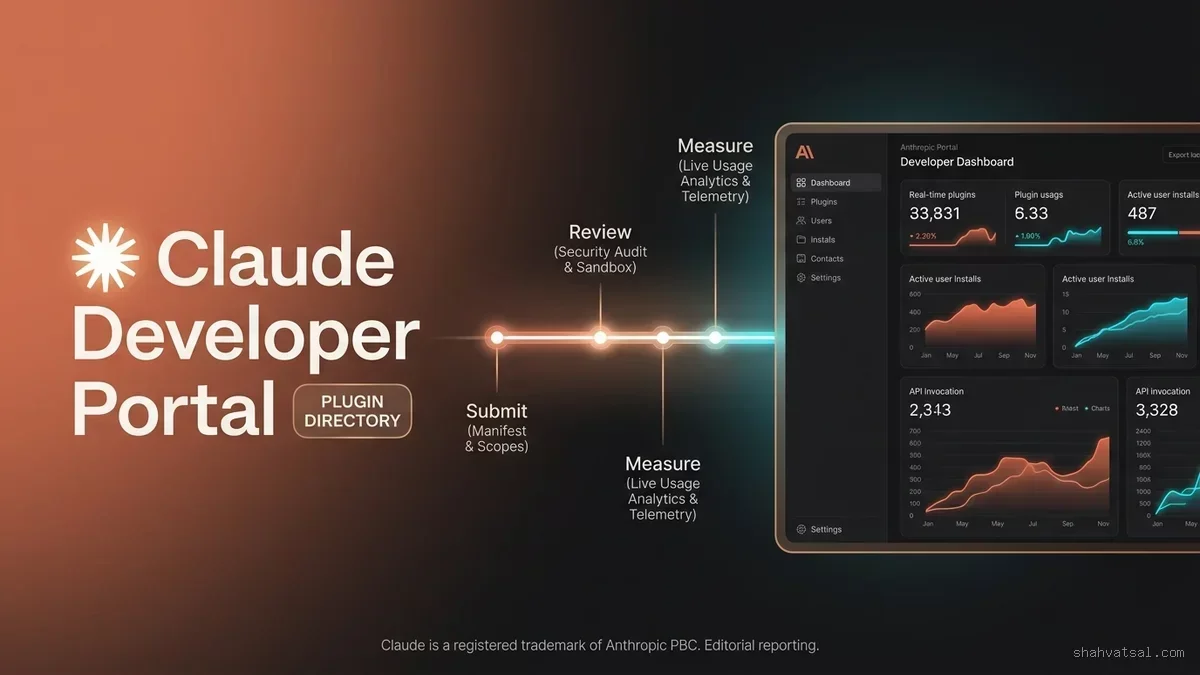
The landscape of AI extensibility reached a defining milestone on September 25, 2026, when Anthropic introduced the official Claude Plugin Directory Developer Portal alongside comprehensive documentation for building, packaging, and publishing plugins for Claude. While earlier releases in 2026 laid the foundation—such as local Model Context Protocol (MCP) server integration, Cowork automated scheduled tasks, and single-thread conversational workspace unification—the developer portal transforms Claude from an extensible conversational assistant into a full-fledged, governable enterprise application platform.
Until now, deploying third-party tools into Claude required engineers to manually configure JSON configuration files, spin up local daemons over stdio, or establish unmonitored remote Server-Sent Events (SSE) connections. For individual developers, this offered extreme flexibility; for enterprise Chief Information Security Officers (CISOs) and platform engineering teams, it presented severe visibility gaps, unverified data egress, and a total absence of lifecycle governance.
The Claude Plugin Directory Developer Portal solves this impedance mismatch. It delivers an end-to-end framework where software vendors and internal platform teams can author declarative plugin manifests, validate tool schemas, pass through automated security sandboxes, receive verified developer badges, and monitor real-time invocation telemetry across thousands of enterprise tenants.
This comprehensive technical breakdown examines the architecture of the portal, analyzes the plugin.json manifest specification, details the multi-stage review state machine, and provides an enterprise blueprint for building, testing, and deploying production-grade Claude plugins.
1. The Architectural Shift: From Ad-Hoc Tooling to Governed Distribution
To appreciate the design of the Developer Portal, one must trace the rapid evolution of agentic tooling over the past eighteen months. The initial breakthrough of the Model Context Protocol (MCP) established an open standard for exposing data sources and executable functions to large language models. However, an open protocol is not a distribution mechanism.
Organizations quickly faced the "Bazaar Problem": hundreds of unvetted GitHub repositories offering MCP wrappers, differing authentication schemes, inconsistent error handling, and zero automated auditing. Platform architects were forced to choose between locking down Claude to hermetic offline workflows or accepting uncontrolled shadow AI tool chains.
+-----------------------------------------------------------------------------------+
|               EVOLUTION OF CLAUDE EXTENSIBILITY (2025 - 2026)                    |
+-----------------------------------------------------------------------------------+
| Phase 1: Direct API & Prompt Engineering (Isolated Prompts)                       |
|   -- Single prompt, static input/output, no tool execution.                      |
|                                                                                   |
| Phase 2: Local Model Context Protocol (MCP stdio Daemons)                         |
|   -- Uncontrolled local processes, manual config editing, high dev friction.     |
|                                                                                   |
| Phase 3: Claude Cowork & Unified Conversational Threads                           |
|   -- Background task scheduling, unified context, multimodal artifacts.          |
|                                                                                   |
| Phase 4: Claude Plugin Directory & Developer Portal (September 2026)              |
|   -- Declarative manifests, verified publisher identity, automated sandboxing,   |
|       enterprise RBAC, one-click tenant deployment, and deep telemetry.           |
+-----------------------------------------------------------------------------------+
The Developer Portal bridges this gap by decoupling protocol implementation from distribution and governance:
- Protocol Implementation (MCP) remains the runtime transport layer, handling JSON-RPC message framing, tool discovery, and parameter serialization.
- Distribution & Governance (Developer Portal) acts as the control plane, handling cryptographic publisher identity, permission scope negotiation, static security analysis, and centralized tenant telemetry.
This separation ensures that developers continue to leverage the open MCP standard while enterprises gain the auditability, compliance guarantees, and reliability required for production deployment.
2. Anatomy of the Claude Plugin Manifest: plugin.json
At the heart of every Claude plugin is a declarative manifest file, strictly named plugin.json, situated at the root of the plugin repository. The Developer Portal enforces strict schema validation against the Anthropic Plugin Specification v1.2.
Below is an annotated, production-grade manifest demonstrating how an enterprise database observability plugin defines its metadata, authentication scopes, and MCP server endpoints:
{
  class="tok-str">"$schema": class="tok-str">"https:class="tok-cm">//developer.anthropic.com/schemas/v1/plugin.json",
  class="tok-str">"name": class="tok-str">"enterprise-postgres-observability",
  class="tok-str">"display_name": class="tok-str">"Enterprise PostgreSQL Observability & Query Optimizer",
  class="tok-str">"version": class="tok-str">"1.0.4",
  class="tok-str">"description": class="tok-str">"Deep inspection, slow query profiling, and index optimization for enterprise PostgreSQL clusters.",
  class="tok-str">"author": {
    class="tok-str">"name": class="tok-str">"Vatsal Technosoft Engineering",
    class="tok-str">"website": class="tok-str">"https:class="tok-cm">//vatsaltechnosoft.com",
    class="tok-str">"support_email": class="tok-str">"[email protected]"
  },
  class="tok-str">"license": class="tok-str">"Apache-2.0",
  class="tok-str">"icon": class="tok-str">"assets/icon.png",
  class="tok-str">"privacy_policy_url": class="tok-str">"https:class="tok-cm">//vatsaltechnosoft.com/privacy",
  class="tok-str">"terms_of_service_url": class="tok-str">"https:class="tok-cm">//vatsaltechnosoft.com/terms",
  class="tok-str">"capabilities": {
    class="tok-str">"tools": true,
    class="tok-str">"resources": true,
    class="tok-str">"prompts": false
  },
  class="tok-str">"runtime": {
    class="tok-str">"type": class="tok-str">"remote_sse",
    class="tok-str">"endpoint": class="tok-str">"https:class="tok-cm">//mcp.vatsaltechnosoft.com/v1/postgres/sse",
    class="tok-str">"health_check": class="tok-str">"https:class="tok-cm">//mcp.vatsaltechnosoft.com/v1/health"
  },
  class="tok-str">"auth": {
    class="tok-str">"type": class="tok-str">"oauth2",
    class="tok-str">"client_id_env": class="tok-str">"POSTGRES_OBSERVER_CLIENT_ID",
    class="tok-str">"authorization_url": class="tok-str">"https:class="tok-cm">//auth.vatsaltechnosoft.com/oauth2/authorize",
    class="tok-str">"token_url": class="tok-str">"https:class="tok-cm">//auth.vatsaltechnosoft.com/oauth2/token",
    class="tok-str">"scopes": [
      class="tok-str">"cluster:read",
      class="tok-str">"query_log:analyze",
      class="tok-str">"schema:inspect"
    ]
  },
  class="tok-str">"security": {
    class="tok-str">"egress_domains": [
      class="tok-str">"mcp.vatsaltechnosoft.com",
      class="tok-str">"auth.vatsaltechnosoft.com",
      class="tok-str">"api.telemetry.internal"
    ],
    class="tok-str">"data_residency": [class="tok-str">"US", class="tok-str">"EU"],
    class="tok-str">"requires_local_filesystem": false
  }
}
Key Schema Properties Breakdown
| Property | Type | Requirement | Purpose & Architectural Function |
|---|---|---|---|
name | String | Mandatory | Unique slug identifier within the Claude Plugin Directory namespace. Must follow kebab-case. |
runtime.type | Enum | Mandatory | Specifies execution model: remote_sse for hosted enterprise microservices or local_stdio for developer CLI packages. |
runtime.endpoint | String | Conditional | The production URL broadcasting Server-Sent Events (SSE) adhering to the MCP transport specification. |
auth.type | Enum | Mandatory | Authentication mechanism: oauth2, apiKey, oidc_bearer, or none. |
security.egress_domains | Array | Mandatory | Explicit domain allowlist. Claude's runtime proxy terminates connections to any host not explicitly declared here. |
security.data_residency | Array | Optional | Geographic regulatory compliance tagging (e.g., GDPR, HIPAA, SOC 2). |
By forcing developers to declare network egress domains and data residency tags up front, Anthropic allows enterprise tenant administrators to programmatically filter and approve plugins based on organizational data privacy guidelines.
3. The Plugin Submission and Sandboxing Pipeline
Submitting a plugin to the Claude Plugin Directory is not a simple file upload; it triggers an intensive automated validation pipeline designed to isolate malicious code, detect prompt injection attack surfaces, and verify operational resilience.
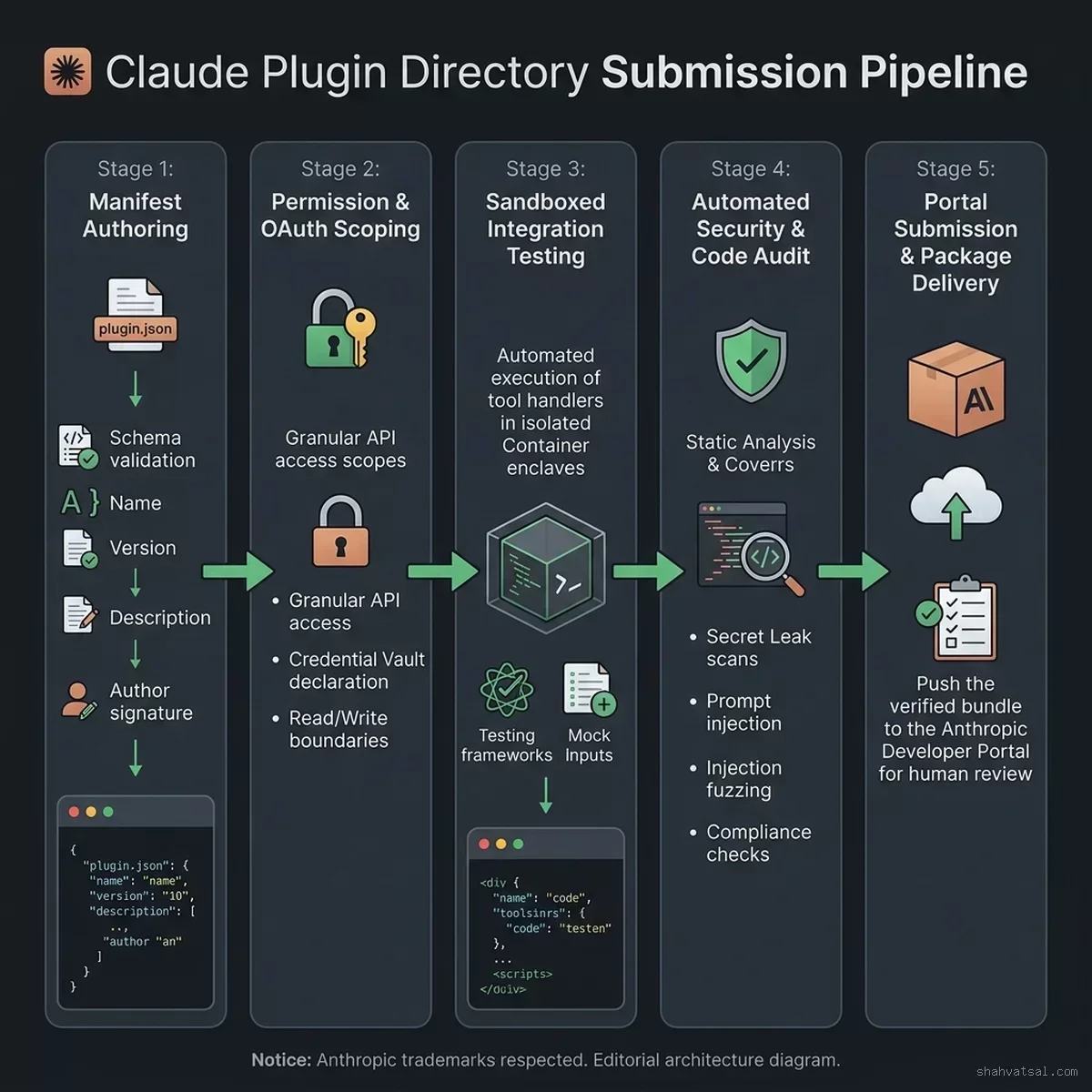
Figure 1: End-to-end Claude Plugin Submission and Automated Sandboxing Pipeline.
The submission lifecycle consists of four distinct verification phases:
Phase 1: Static Schema & Cryptographic Attestation
When a developer initiates claude-plugin submit via CLI or uploads a manifest via the web console, the portal first validates the JSON payload against the published JSON schema. It validates that all declared icon assets adhere to standard resolutions (256x256 WebP or PNG), that privacy policy links return valid HTTP 200 responses, and that the developer has signed the submission with a registered GPG or ECDSA key.
Phase 2: Automated Security Sandbox & Taint Analysis
The portal spins up an isolated, ephemeral sandbox environment:
- Network Egress Verification: The sandbox verifies that the declared
runtime.endpointresponds within acceptable latency thresholds (< 350ms initial handshake). - Tool Schema Fuzzing: The portal queries the MCP server's
tools/listendpoint and generates hundreds of adversarial inputs to detect edge-case crashes, unhandled exceptions, and potential SQL or shell injection vulnerabilities. - Indirect Prompt Injection Scanning: Tool descriptions and return payloads are analyzed using specialized LLM safety classifiers to ensure that tool descriptions cannot manipulate Claude's system prompts or hijack execution context.
Phase 3: Tenant Isolation & Egress Enforcement Testing
The sandbox monitors outbound network traffic. If the remote MCP server attempts to route traffic to any IP address or domain not explicitly declared in security.egress_domains, the sandbox immediately flags an Egress Violation fault, and the submission is automatically rejected.
Phase 4: Human Review & Publisher Tier Verification
Plugins requesting high-privilege scopes (such as filesystem write access, financial transaction processing, or broad CRM modifications) are routed to Anthropic's human security review queue. Once passed, the publisher is granted an official verification badge visible in the public directory.
4. The Plugin Lifecycle & Review State Machine
To maintain transparency between developers and directory reviewers, the portal operates on a deterministic finite state machine (FSM). Developers can inspect the exact state of their plugin at any second via the Developer Portal API or web interface.
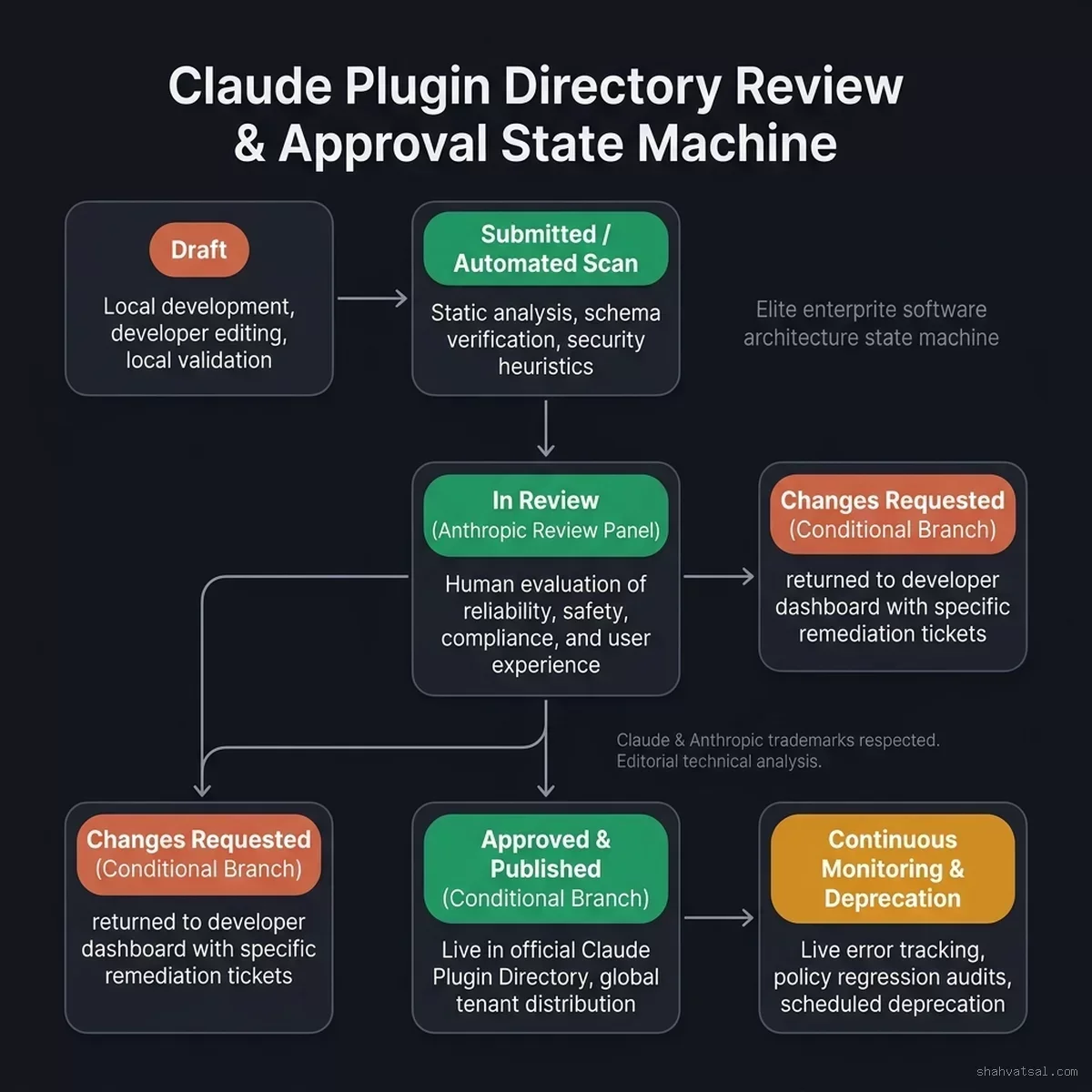
Figure 2: Claude Plugin Lifecycle and Review State Machine across Draft, Validation, Security Scan, and Directory Publication.
Transition States and Gate Criteria
The lifecycle progresses through the following standardized states:
- DRAFT: The plugin configuration is authored and edited locally or within the portal editor. No public visibility.
- VALIDATING: The automated pipeline evaluates schema integrity, verifies icon assets, and checks domain availability.
- SANDBOX_SCAN: Ephemeral sandboxes execute automated fuzzing, latency benchmarks, and network egress audits.
- HUMAN_REVIEW: Triggered if the plugin requests privileged capabilities (
requires_local_filesystem: trueor unverified external OAuth scopes). - VERIFIED_ACTIVE: The plugin is published to the public Claude Plugin Directory, accessible to Pro, Team, and Enterprise users.
- REJECTED_REMEDIATION: Automated or human review discovered security flaws, excessive latency, or misleading descriptions. The portal outputs an actionable remediation report detailing exact failing test suites.
- DEPRECATED: The developer has published a newer major version or initiated sun-setting. Existing tenant connections continue to function with a deprecation warning, but new installations are blocked.
State Machine Progression:

[ DRAFT ] ---------> [ VALIDATING ] ---------> [ SANDBOX_SCAN ]
                          |                         |
                          ▼ (Schema Fail)           ▼ (Vulnerability / Taint Fail)
               [ REJECTED_REMEDIATION ] <------------+
                          ▲
                          | (Policy / Audit Fail)
                          |----------------- [ HUMAN_REVIEW ]
                          |                         |
                          |                         ▼ (Pass Audit)
[ DEPRECATED ] <---- [ VERIFIED_ACTIVE ] <------------+
5. Telemetry, Observability, and Operational Dashboards
Building an AI plugin does not end at publication. Once an enterprise plugin is installed across hundreds of corporate Claude workspaces, developers require deep observability into tool performance, failure rates, and token utilization.
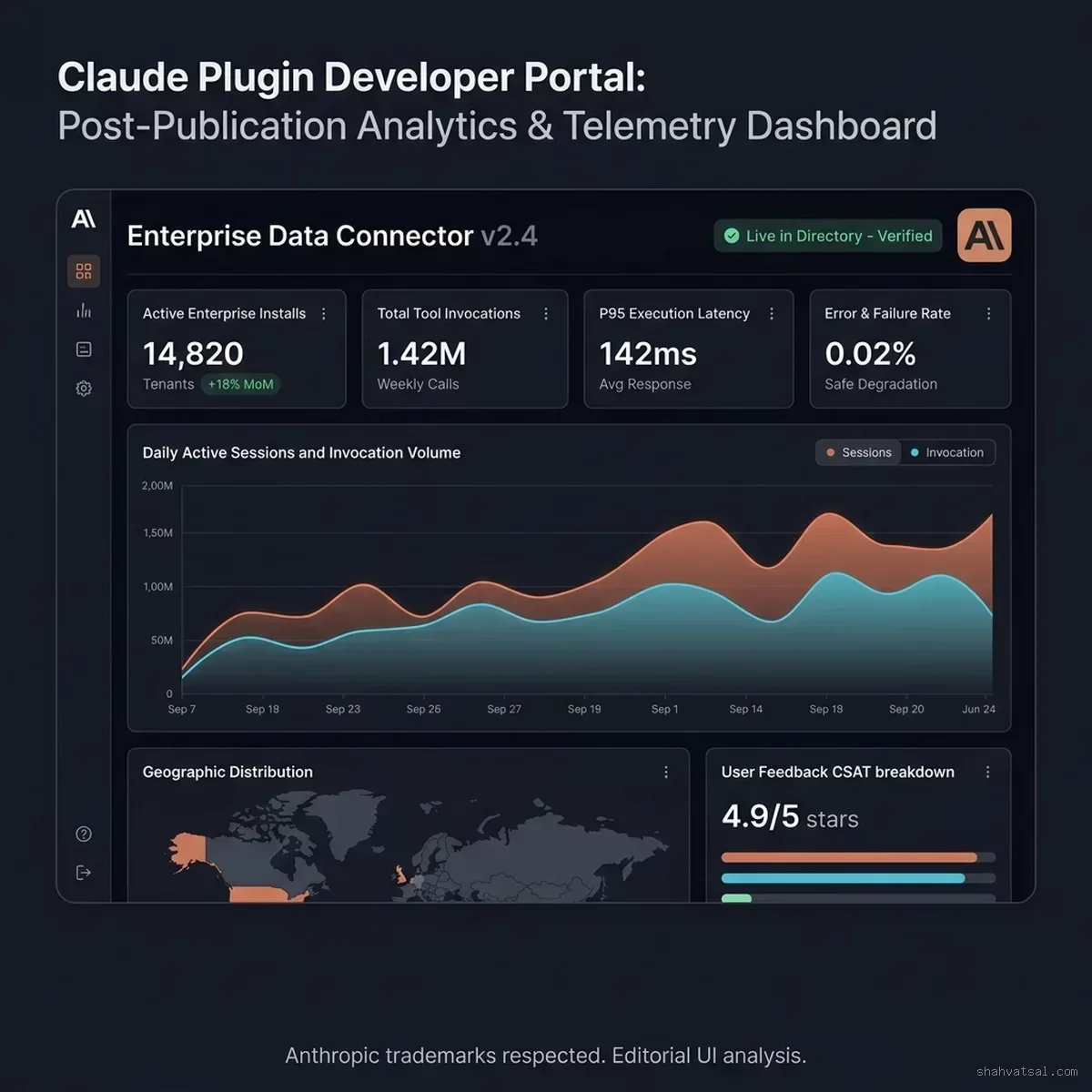
Figure 3: Developer Portal Telemetry and Analytics Dashboard tracking Active Tenants, Execution Latency, and Token Consumption.
The Developer Portal integrates a dedicated analytics engine that surfaces granular metrics without compromising user privacy:
1. Active Tenant & Invocation Volume
Tracks monthly active organizations (MAO), individual seat installations, and gross daily tool calls. Developers can segment usage by enterprise industry verticals, geographic regions, and client types (Web, Desktop, or Claude Code CLI).
2. Execution Latency Profiles (p50, p95, p99)
Model context execution requires ultra-low latency. If a plugin takes 4 seconds to return query results, the conversational experience degrades immediately. The portal monitors:
- Handshake Latency: Time to establish initial SSE connection.
- Tool Execution Latency: Time from Claude issuing
tools/callto the MCP server returningresult. - Serialization Overhead: JSON encoding/decoding duration for large result arrays.
3. Context Window Token Consumption
One of the most innovative features of the Developer Portal telemetry suite is Context Window Accounting. Every time a plugin tool returns data, that payload consumes valuable tokens in Claude's context window.
The dashboard calculates the average tokens ingested per call and alerts developers when tool responses are overly verbose. Developers are provided optimization recommendations, such as adopting pagination or returning markdown summaries instead of raw 5MB JSON dumps.
4. Error Categorization & Circuit Breaking
The portal classifies failures into actionable error buckets:
HTTP_TRANSPORT_ERROR: Gateway timeouts or network disconnects.AUTH_EXPIRED: OAuth refresh token failures.PARAMETER_VALIDATION_ERROR: Claude provided arguments that violated the tool's JSON Schema.RATE_LIMIT_EXCEEDED: The plugin server throttled Claude's incoming requests.
If a plugin's error rate exceeds 5% over a rolling 15-minute window, the portal triggers an automated circuit breaker, temporarily alerting users with a degradation banner while shielding developer infrastructure from cascading failure loops.
6. Architectural Teardown: Claude Skills vs. Claude Plugins
A common point of confusion among engineering teams is understanding the difference between Claude Skills (introduced in earlier releases) and the new Claude Plugins. While both extend Claude's utility, they operate at fundamentally different layers of the software stack.
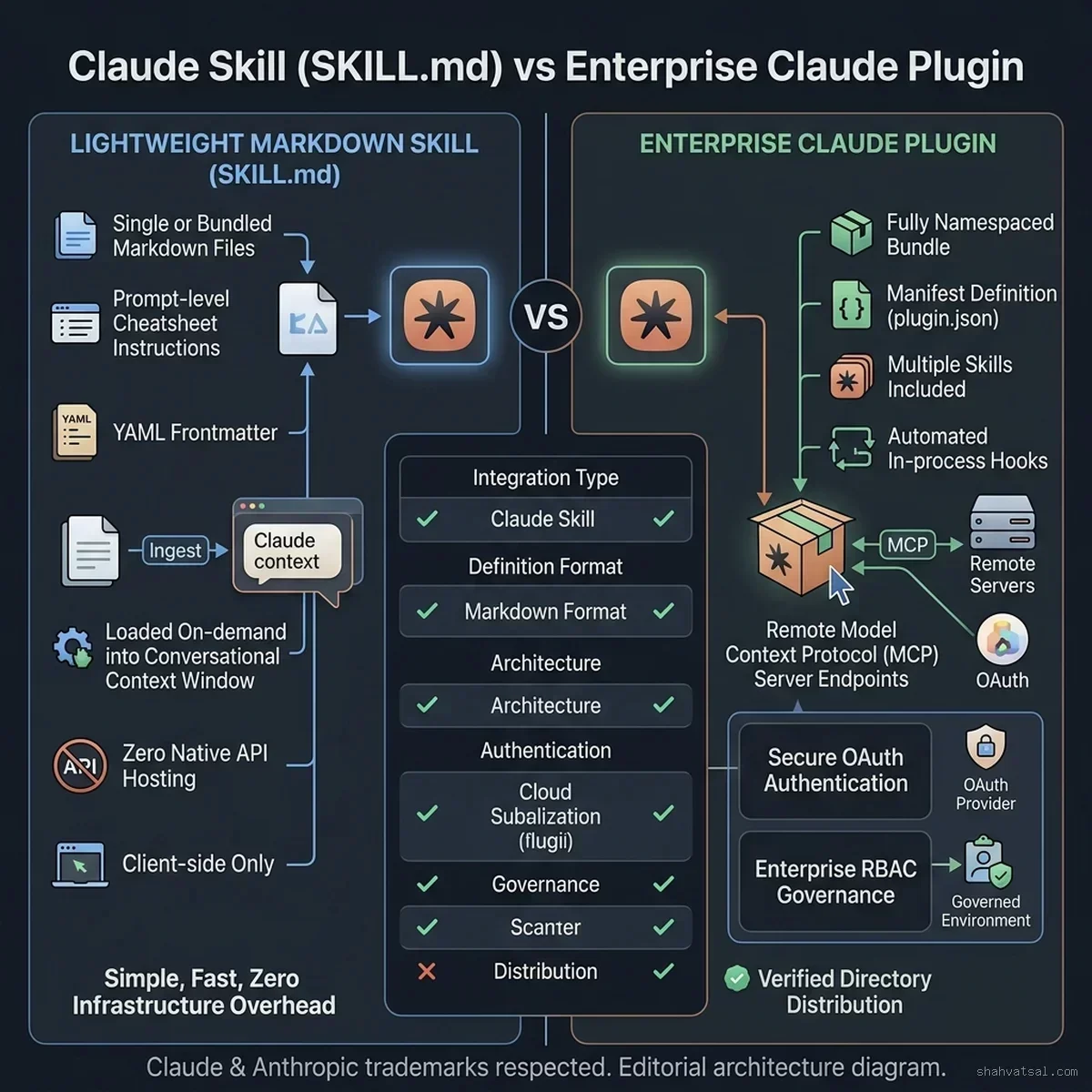
Figure 4: Structural Comparison between Claude Skills (instruction-driven) and Claude Plugins (manifest, protocol, and distribution bundled).
Core Architectural Comparison
| Dimension | Claude Skills (SKILL.md) | Claude Plugins (plugin.json + MCP) |
|---|---|---|
| Primary Artifact | Markdown files, YAML frontmatter, instructional prompts. | JSON manifest, compiled binaries/services, MCP endpoints. |
| Execution Domain | Prompt space / reasoning engine. | Computational runtime / external APIs. |
| Network Capabilities | None (hermetic to prompt and local files). | Outbound HTTP, SSE, database connections, SaaS webhooks. |
| State Management | Ephemeral to conversation thread. | Stateful via remote databases and external sessions. |
| Distribution | Git clones, dotfiles, local workspace directories. | Central Claude Plugin Directory, verified 1-click install. |
| Governance & RBAC | File permissions on local machine. | Enterprise admin portal, SSO scoping, network egress filtering. |
| Primary Use Case | Teaching Claude specific coding conventions, workflows. | Connecting Claude to Salesforce, Postgres, AWS, or Stripe. |
In practice, high-performance systems frequently combine both approaches: an organization installs a Plugin to provide secure, authenticated API access to their cloud infrastructure, and distributes a Skill that instructs Claude on the exact organizational conventions for querying that plugin safely.
7. The Enterprise Architectural Boundary Matrix
Deploying third-party AI extensions into a regulated enterprise environment requires stringent boundary control. The Claude Plugin architecture establishes a four-tier boundary model separating developer tooling, runtime execution, transport protocols, and enterprise backend systems.
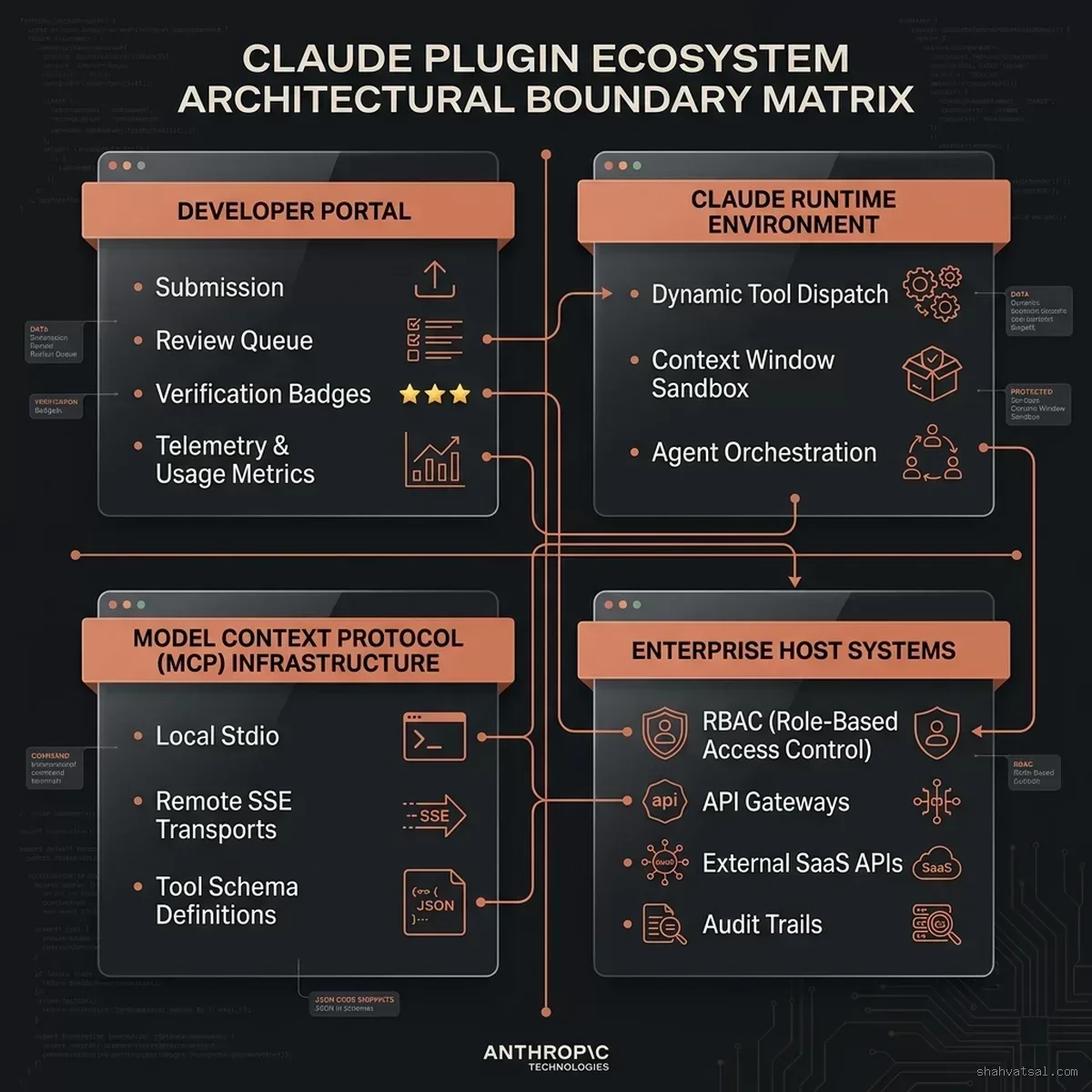
Figure 5: Enterprise Architectural Boundary Matrix governing Claude Plugins across Developer Portal, Cowork Runtime, MCP Infrastructure, and Host Systems.
Quadrant 1: The Developer Portal (Control Plane)
The control plane handles developer registration, cryptographic key signing, manifest authoring, automated security sandboxing, and directory publishing. No end-user enterprise data ever enters or transits Quadrant 1.
Quadrant 2: The Claude Runtime Environment (Execution Plane)
Operates within Anthropic's multi-tenant cloud or customer-dedicated virtual private clouds (VPCs). When a user prompts Claude, the model evaluates available tool definitions.
- The runtime operates a Context Sandbox that isolates plugin execution.
- Tool parameters are validated against declared schemas before network transmission.
- Secret tokens (such as user OAuth credentials) are injected by Anthropic's secure token vault at call time, preventing the LLM weights from directly inspecting raw secret credentials.
Quadrant 3: Model Context Protocol Infrastructure (Transport Layer)
Handles the bidirectional communication between Claude and the plugin service. Supports:
- Local Stdio: Low-latency Unix pipes for tools running directly on developer laptops inside Claude Code CLI.
- Remote SSE: Encrypted TLS 1.3 HTTP/2 streams connecting Claude's cloud runtime to vendor-hosted MCP servers.
Quadrant 4: Enterprise Host Systems (Data Layer)
The destination infrastructure where enterprise data resides: corporate PostgreSQL clusters, Snowflake data warehouses, Salesforce CRMs, and internal microservices. Quadrant 4 systems enforce Role-Based Access Control (RBAC), verify inbound OAuth scopes issued by Anthropic's token broker, and record audit trails into enterprise SIEM platforms (such as Splunk or Datadog).
8. Step-by-Step Walkthrough: Building and Submitting a Verified Plugin
To demonstrate the Developer Portal workflow, we will walk through creating, testing, and submitting a real-world enterprise plugin: Claude Sentry Incident Resolver, which enables Claude Cowork to pull crash telemetry, correlate stack traces, and suggest pull request fixes.
Step 1: Initialize the Plugin Project
Using the Anthropic Developer CLI, scaffold a new plugin directory:
class="tok-cm"># Install the Anthropic Plugin Developer CLI
npm install -g @anthropic-ai/plugin-cli

class="tok-cm"># Initialize a new remote SSE plugin project
claude-plugin init sentry-incident-resolver --runtime=remote_sse
This creates the standard project directory layout:
sentry-incident-resolver/
|-- plugin.json
|-- package.json
|-- src/
|   |-- server.ts
|   |-- tools/
|   |   |-- get_issue.ts
|   |   -- list_unresolved.ts
|   -- auth/
|       -- oauth_handler.ts
|-- assets/
|   |-- icon.png
|   -- banner.png
-- tests/
    -- sandbox_test.ts
Step 2: Implement the MCP Tool Endpoint
In src/tools/get_issue.ts, define the tool handler using the official Model Context Protocol TypeScript SDK:
import { McpServer } from "@modelcontextprotocol/sdk/server/mcp.js";
import { z } from "zod";
import axios from "axios";

export function registerIssueTools(server: McpServer) {
  server.tool(
    "get_sentry_issue",
    "Retrieve full crash details, stack trace, and error breadcrumbs for a given Sentry issue ID.",
    {
      issue_id: z.string().describe("The alphanumeric Sentry issue identifier (e.g., PROD-4091)"),
      include_breadcrumbs: z.boolean().default(true).describe("Whether to include chronological user actions prior to crash")
    },
    async ({ issue_id, include_breadcrumbs }, extra) => {
      // Injected OAuth access token from extra.authContext
      const authToken = extra.authContext?.token;
      if (!authToken) {
        throw new Error("Unauthorized: Missing Sentry OAuth token");
      }

      const response = await axios.get(`https://sentry.io/api/0/issues/${issue_id}/`, {
        headers: { Authorization: `Bearer ${authToken}` }
      });

      const issueData = response.data;

      return {
        content: [
          {
            type: "text",
            text: JSON.stringify({
              title: issueData.title,
              culprit: issueData.culprit,
              first_seen: issueData.firstSeen,
              last_seen: issueData.lastSeen,
              event_count: issueData.count,
              top_stack_frame: issueData.metadata?.value || "N/A"
            }, null, 2)
          }
        ]
      };
    }
  );
}
Step 3: Run the Local Validation Suite
Before uploading to the portal, validate the project against Anthropic's local linter and emulator:
class="tok-cm"># Validate manifest schema and assets
claude-plugin lint

class="tok-cm"># Spin up a local sandboxed emulator to test tool dispatch
claude-plugin dev --port=8080
The output confirms schema compliance and simulates Claude calling get_sentry_issue:
[INFO] Validating manifest plugin.json... OK
[INFO] Checking assets/icon.png (256x256, PNG)... OK
[INFO] Verifying egress domains: sentry.io... OK
[INFO] Testing MCP endpoint http:class="tok-cm">//localhost:8080/sse... Connected!
[PASS] Tool get_sentry_issue schema validated against JSON-Schema Draft 7
Step 4: Submit to the Developer Portal
Once local testing passes, trigger the cloud submission pipeline:
claude-plugin submit --org=vatsal-technosoft --channel=productionThe CLI uploads the bundle to Anthropic's ingest API, signs the package with your developer credential, and returns a tracking URL:
[SUBMIT] Uploading package bundle (2.4 MB)... Complete.
[SUBMIT] Submission ID: sub_01J8M4K89Z2V3W1QTR
[STATUS] Status: VALIDATING -> SANDBOX_SCAN
[PORTAL] Track progress at https:class="tok-cm">//developer.anthropic.com/portal/plugins/sub_01J8M4K89Z2V3W1QTR
Within minutes, the portal completes the automated static analysis, verifies egress restrictions, executes synthetic tool calls in an ephemeral container, and advances the submission to VERIFIED_ACTIVE.
9. Enterprise Governance & CISO Implementation Checklist
For enterprise IT administrators and CISOs, the Claude Plugin Directory Developer Portal provides the control levers necessary to safely deploy generative AI tooling at scale.
+-----------------------------------------------------------------------------------+
|               ENTERPRISE CISO PLUGIN GOVERNANCE CHECKLIST                         |
+-----------------------------------------------------------------------------------+
| [X] Enforce Directory Verification Tier Policy:                                   |
|     -- Restrict corporate workspaces to class="tok-str">"Anthropic Verified" plugins only.      |
|                                                                                   |
| [X] Explicit Egress Domain Whitelisting:                                          |
|     -- Block any plugin requesting egress outside approved corporate SaaS list.   |
|                                                                                   |
| [X] Centralized OAuth2 Token Vault:                                               |
|     -- Prevent user-level credential leaks via corporate IdP / OIDC brokering.   |
|                                                                                   |
| [X] Audit Log Streaming:                                                          |
|     -- Stream all plugin invocation metadata and tool results to corporate SIEM. |
|                                                                                   |
| [X] Rate Limiting & Cost Ceilings:                                                |
|     -- Set per-user daily token budgets on external tool execution.               |
+-----------------------------------------------------------------------------------+
By configuring these policies in the Claude Enterprise Admin Console, organizations can comfortably embrace the power of the plugin ecosystem while maintaining complete compliance with SOC 2 Type II, ISO 27001, and GDPR mandates.
10. Frequently Asked Questions
What is the Claude Plugin Directory Developer Portal announced on September 25, 2026?
The Claude Plugin Directory Developer Portal is Anthropic's official management platform enabling software engineers, enterprise teams, and third-party SaaS vendors to build, package, submit, test, and monitor plugins for the Claude ecosystem. It introduces a standardized manifest specification, automated security sandboxing, structured review workflows, and runtime telemetry.
How does a Claude Plugin differ architecturally from a Claude Skill?
A Claude Skill consists of instruction-oriented Markdown files (such as SKILL.md) that guide agent reasoning and behavioral conventions within a local workspace. In contrast, a Claude Plugin is a distributable package comprising a formal plugin.json manifest, defined Model Context Protocol (MCP) tool endpoints, OAuth2/OIDC authorization schemas, and central directory metadata for one-click installation.
What validation and security gates are enforced during the plugin submission pipeline?
Every submitted plugin undergoes a multi-stage validation pipeline: JSON schema verification, automated static application security testing (SAST), taint analysis on tool call parameters, runtime sandboxing in an isolated ephemeral container to evaluate network egress, and human security reviews for sensitive API access tiers before receiving directory verification.
What telemetry and observability metrics does the Developer Portal provide?
The portal dashboard provides real-time analytics including active tenant installations, invocations per tool endpoint, p50/p95/p99 execution latency, LLM token consumption per session, rate-limiting triggers, and end-to-end error categorization across MCP transports (both local stdio and remote Server-Sent Events).
How does the portal handle enterprise governance, RBAC, and data privacy?
The portal interfaces with Claude Enterprise admin controls, allowing organization administrators to restrict plugin installations by verification tier, enforce tenant-isolated secrets storage, enforce egress domain allowlists, and review comprehensive audit trails for every programmatic action executed by third-party plugins.
11. Conclusion & Next Steps
The release of the Claude Plugin Directory Developer Portal marks the transition of large language models from passive conversational interfaces into robust, distributed computing backbones. By establishing standard packaging, transparent review lifecycles, rigorous automated security sandboxing, and enterprise-grade telemetry, Anthropic has laid the groundwork for an open, secure agentic software economy.
For software organizations, the directive is clear: building an official Claude Plugin is rapidly becoming as essential as authoring a REST API or publishing a mobile application. The teams that master the Model Context Protocol, design tight declarative manifests, and publish into the Claude Directory today will define the automated enterprise workflows of tomorrow.
Author Bio: Vatsal Shah is a Principal Technology Architect and Enterprise AI Consultant specializing in agentic workflows, Model Context Protocol infrastructure, cloud security, and distributed systems. He advises Fortune 500 engineering leaders on deploying governed, high-throughput AI platforms.
Legal Notice: Claude is a trademark of Anthropic PBC. All other product names, logos, and brands mentioned in this article are property of their respective owners. Mention of these trademarks does not imply endorsement or affiliation.