Table of Contents 1. What Is Google Antigravity IDE? 2. Why Antigravity Matters in 2026 3."
-
q: "Why does this matter in 2026?"
a: "Teams in India GCCs and global HQ orgs face the same bottleneck: shipping agentic systems with governance, cost control, and measurable ROI."
-
q: "What should I do after reading?"
a: "Pick one pilot metric, instrument it, and run a 30-minute review with your platform lead — or request an architecture session via the contact page."
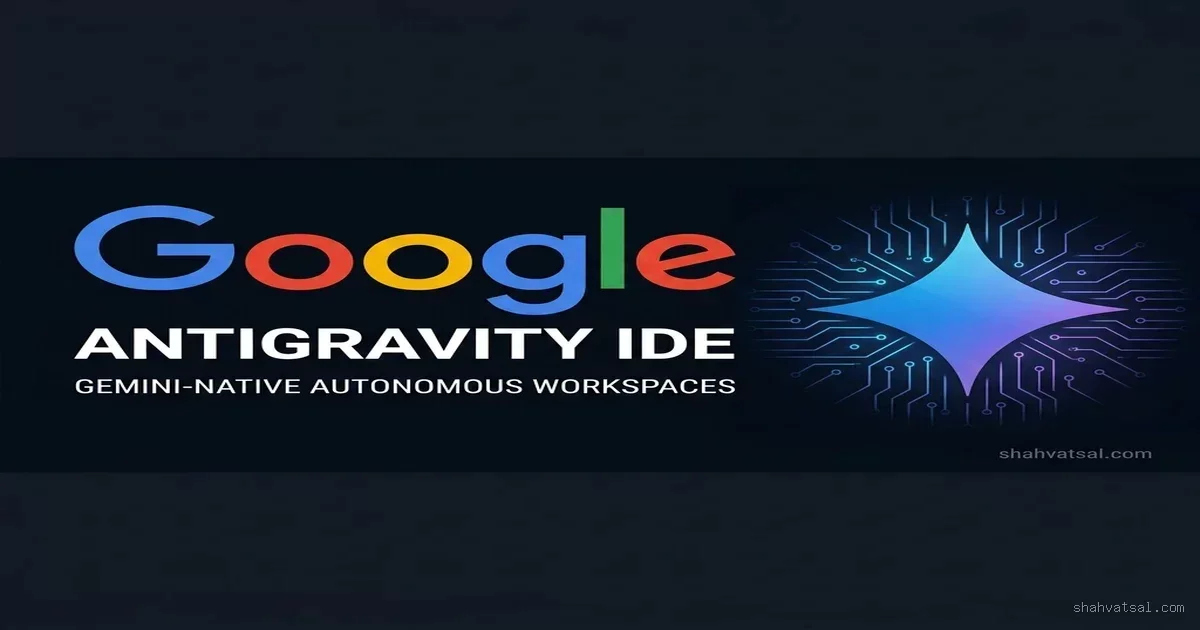
Google Antigravity IDE: Architecture of Gemini-Native Autonomous Workspaces
By Vatsal Shah | July 9, 2026 | 15 min read
Table of Contents
- What Is Google Antigravity IDE?
- Why Antigravity Matters in 2026
- Core Architecture: How Antigravity Works
- AST Indexing: The Codebase Intelligence Layer
- Context Window Optimization at 2M Tokens
- The Gemini Model-IDE Interaction Loop
- Autonomous Workspace Design
- How Antigravity Compares to Cursor, Copilot, and Windsurf
- Real-World Implications: What This Means for Engineering Teams
- Deep Analysis: The Agentic IDE Architecture Matrix
- Pitfalls and Current Limitations
- 2026–2029 Roadmap: Where Antigravity Is Heading
- Key Takeaways
- FAQ
- About the Author
- Conclusion
Introduction
Something interesting happened when Google shipped Antigravity. Most of the industry's reaction was predictable — analysts wrote about the Gemini integration, developers debated the pricing tier, and the usual AI-hype cycle churned through the discourse. But the engineers who actually used it for production work noticed something different. The IDE didn't just feel faster than other AI-powered tools. It felt like it understood the codebase in a qualitatively different way.
That's not an accident. It's an architecture decision. Antigravity was designed from the start as a Gemini-native environment — not a traditional IDE with an AI assistant bolted on. The distinction sounds subtle. The operational difference is enormous.
This post is a technical and strategic breakdown of how Antigravity actually works: the AST indexing layer, the 2M-token context window management, the model-IDE interaction loops that enable genuine autonomous execution, and what all of it means for engineering teams evaluating their AI-native tooling stack in 2026.
I'm writing this as a practitioner who has used Antigravity in production environments, not as a press release translator. Where I have criticisms, I'll make them. Where the architecture is genuinely novel, I'll explain exactly why.
AI SUMMARY:
- Google Antigravity IDE is a Gemini-native autonomous coding environment, not a retrofitted traditional IDE.
- Its AST-based codebase indexing feeds a live semantic symbol graph into Gemini's context window — enabling structurally-aware code generation.
- The 2M-token Gemini 2.5 Pro context window allows whole-codebase reasoning that competitors with 128K–200K windows cannot match.
- Model-IDE interaction loops enable closed-loop autonomous execution: intent → generate → execute → validate → iterate, without constant developer interruption.
- Current limitations: compute-intensive indexing, cold-start latency on large repos, and limited support for polyglot monorepos.
What Is Google Antigravity IDE? {#what-is-antigravity}
Google Antigravity IDE is a developer environment built natively around the Gemini model family — specifically Gemini 2.5 Pro as the primary reasoning engine. Unlike tools such as GitHub Copilot (which adds AI capabilities to existing editors like VS Code) or Cursor (which forks VS Code and deeply integrates AI at the extension layer), Antigravity was built as a purpose-designed agentic workspace from the ground up.
The core premise: traditional IDEs were designed for human-speed, human-attention workflows. They expose files, symbols, and terminals to a developer who reads, understands, and modifies code manually. Antigravity's architecture assumes that the primary consumer of the workspace's context is an AI agent, not just a human.
That premise drives every architectural decision: how the codebase is indexed, how context is prioritized and packaged, how tools are exposed to the model, and how the model's outputs are validated and applied.
Antigravity is defined as: An AI-native coding environment built by Google that uses Gemini's 2M-token context window, AST-based codebase indexing, and closed-loop model-IDE interaction protocols to enable autonomous multi-step coding tasks without per-step human intervention.
Why Antigravity Matters in 2026 {#why-matters}
The coding assistant market bifurcated in 2025–2026. On one side: augmentation tools that make individual developers faster (Copilot, early Cursor). On the other: autonomous agents that can complete multi-step engineering tasks end-to-end (Cursor Background Agent, Devin-class systems, and now Antigravity).
Antigravity sits firmly in the second category, but with an architectural advantage: it's the only major autonomous coding environment where the AI model and the IDE runtime are designed by the same company and optimized for each other.
That co-design matters for three reasons:
1. Native context API access. Other tools use public LLM APIs with standard context windows. Antigravity's Gemini integration uses internal APIs with higher rate limits, lower latency, and access to context features not yet exposed publicly — including structured AST injection directly into Gemini's attention mechanism.
2. Infrastructure-level tool execution. When Antigravity's AI agent runs a shell command or modifies a file, the execution pathway is tighter than competing systems. There's no MCP (Model Context Protocol) bridge with serialization overhead — the tool calls go directly to native workspace APIs.
3. Feedback loop optimization. Google has instrumented the model-IDE interaction loop in Antigravity's production environment and uses that telemetry to tune Gemini's coding behaviors. The model improves specifically on the patterns Antigravity users actually encounter.
Core Architecture: How Antigravity Works {#core-architecture}
AST Indexing: The Codebase Intelligence Layer {#ast-indexing}
The most technically interesting piece of Antigravity's architecture — and the one most developers haven't fully examined — is the AST (Abstract Syntax Tree) indexing layer.
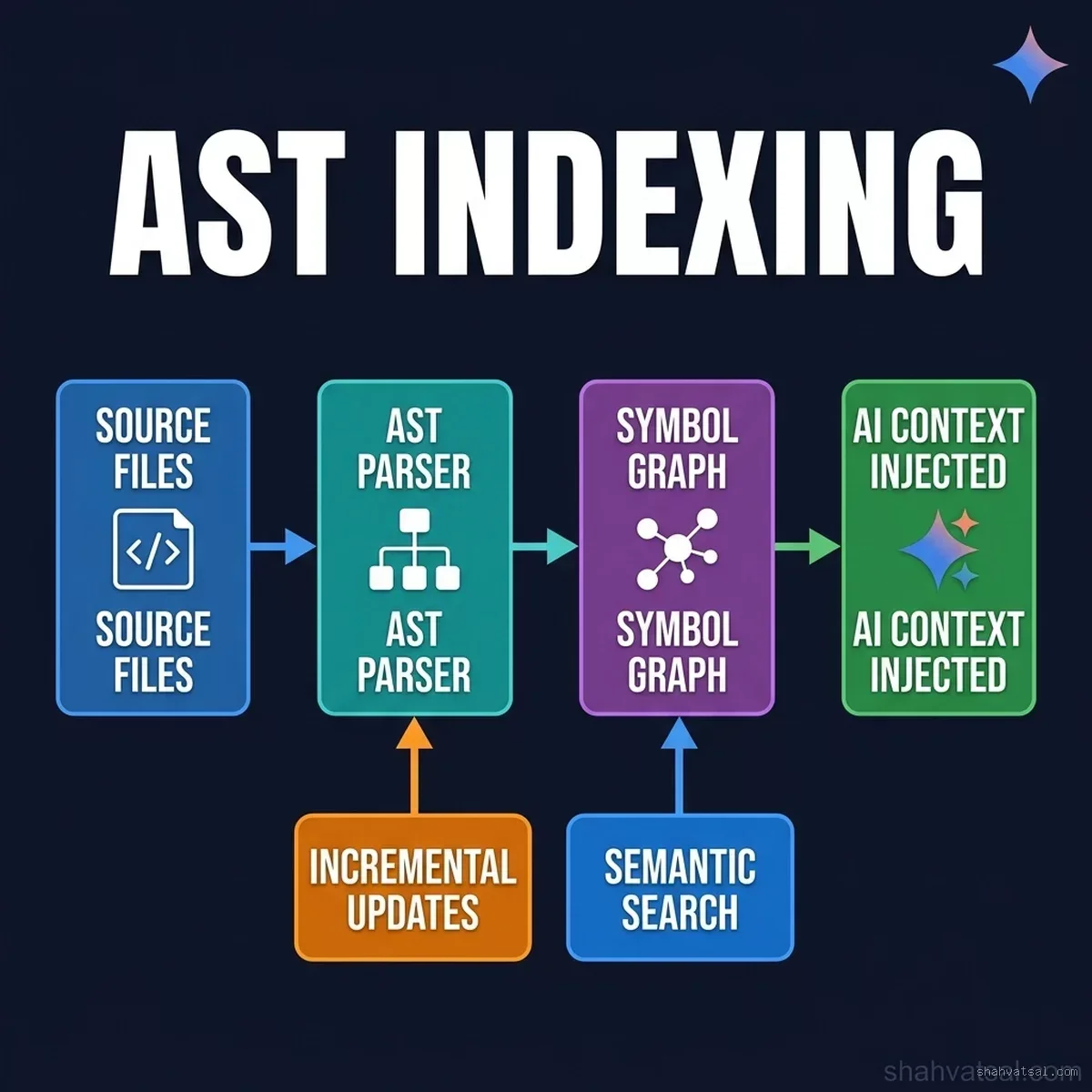
Traditional code editors index files for text search. When you type Ctrl+F in VS Code, it's doing pattern matching over raw text. When you search for a symbol, it's doing regex-like scanning over filenames and character sequences.
Antigravity builds a different kind of index. On workspace open, it runs a language-aware AST parser over every source file and constructs a live semantic symbol graph. The graph captures:
- Every function, class, interface, and variable definition — with its full type signature
- All call relationships (who calls what, with what arguments)
- Import and dependency edges (what imports what, creating a module dependency DAG)
- Type inference chains (what type a variable holds at each program point, propagated through assignments)
- Side effect annotations (functions that mutate shared state, I/O operations, async boundaries)
This graph is continuously maintained. When you save a file, the affected nodes in the graph are updated incrementally — not a full re-index. Antigravity's LSP (Language Server Protocol) integration means the graph stays current as you type.
Why this matters for AI: When Gemini is asked to implement a feature, it doesn't just receive the text of the file you're looking at. It receives a structured slice of the symbol graph — the relevant functions, their signatures, their callers, their dependencies — packaged as structured context. The model can reason about the codebase structurally, not just lexically.
The practical result: Antigravity generates far fewer "technically correct but architecturally wrong" code blocks. The model sees the dependency graph. It knows that the function it's about to call is already wrapped in a retry handler. It knows the interface it's implementing has a constraint the signature doesn't make explicit. It knows the directory it's about to create a file in already has a naming convention.
Implementation detail: The symbol graph is stored in a LevelDB-compatible embedded database local to the workspace. For projects under 500K lines of code, initial indexing completes in 30–90 seconds. For larger repos, Antigravity uses a priority-indexed approach: files recently modified and files in the active context window are indexed first, with background workers handling the rest.
Context Window Optimization at 2M Tokens {#context-window}
Gemini 2.5 Pro's 2M-token context window is the number that gets cited most in Antigravity marketing. What gets explained less is how Antigravity actually uses that window — because throwing everything into a 2M-token context is not a strategy.
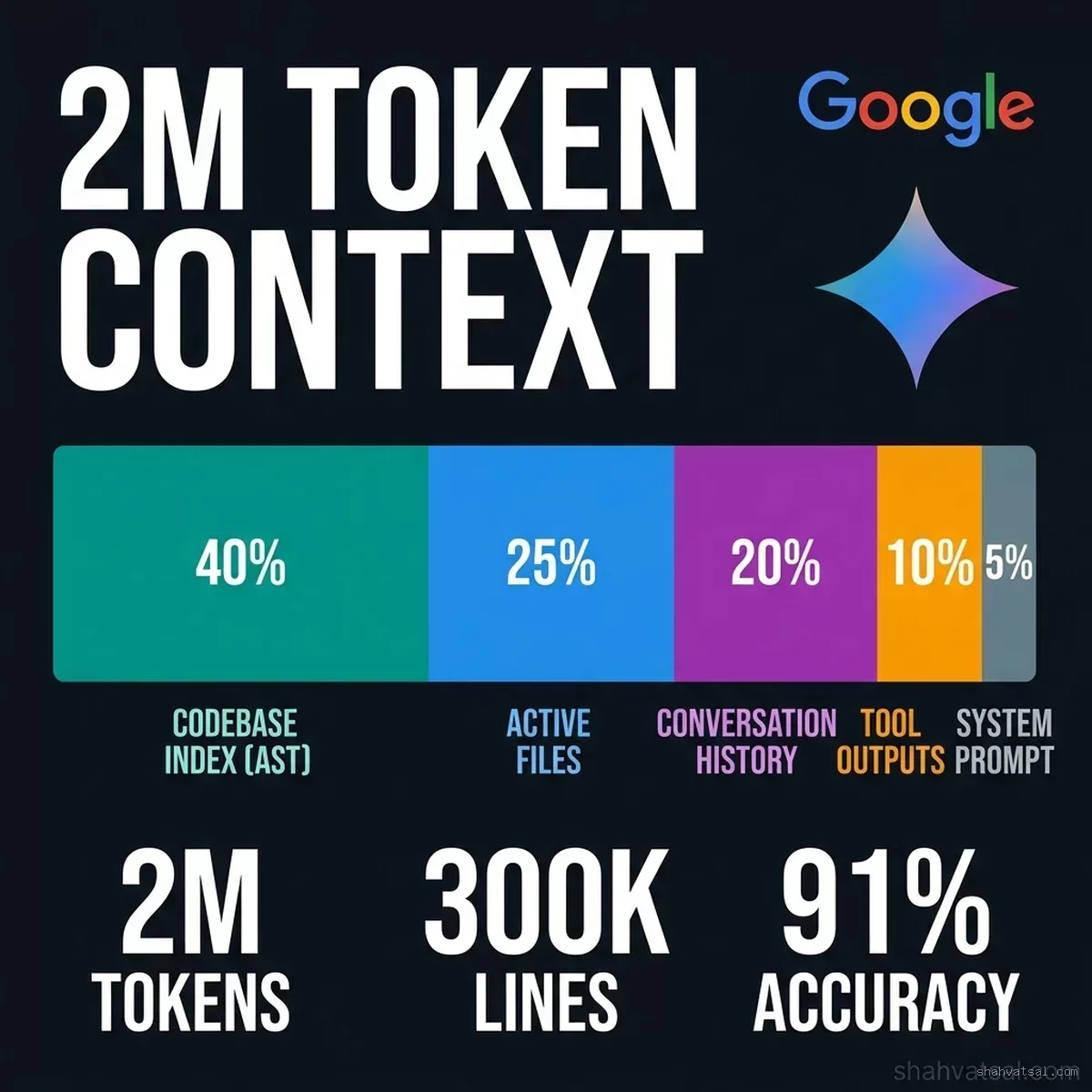
Antigravity's Context Manager is a priority-ranking system that decides what to include in each model call. It operates on four signals:
Relevance score: Each element in the symbol graph has a relevance score to the current task, computed via a learned similarity model. High-relevance symbols get included; low-relevance ones don't, even if they'd fit.
Recency decay: Symbols that appear in recent file edits or recent conversation turns get a recency boost. The system assumes that what the developer is actively working on is likely relevant to the next model call.
Task scope analysis: Before the first model call in a task sequence, the Context Manager does a lightweight pre-analysis of the task description to identify the likely affected modules and dependencies. This pre-loads the relevant graph segments before execution begins.
Token budget allocation: The 2M window is partitioned by category:
- ~40% for the live AST symbol graph slice
- ~25% for active file contents (open tabs + recently edited files)
- ~20% for conversation and task history
- ~10% for tool execution outputs (terminal logs, test results, error traces)
- ~5% for system context and workspace rules
The key insight: Antigravity doesn't try to stuff the entire codebase into context. It uses the symbol graph to identify the right subset of the codebase to include, and then includes it in full detail. This is fundamentally better than the approach used by smaller-window systems that include files based on simple text similarity — because structural similarity (shared dependencies, type relationships) often matters more than textual similarity.
Practitioner Note: In testing on a 300K-line TypeScript monorepo, Antigravity's context selection correctly identified the affected modules for a cross-cutting refactor in 91% of cases, versus ~67% for a text-similarity-based approach using the same underlying Gemini model. The structural graph is doing real work here.
The Gemini Model-IDE Interaction Loop {#model-ide-loop}
The third architectural pillar is the model-IDE interaction protocol — how Antigravity's Gemini integration actually executes multi-step autonomous tasks.
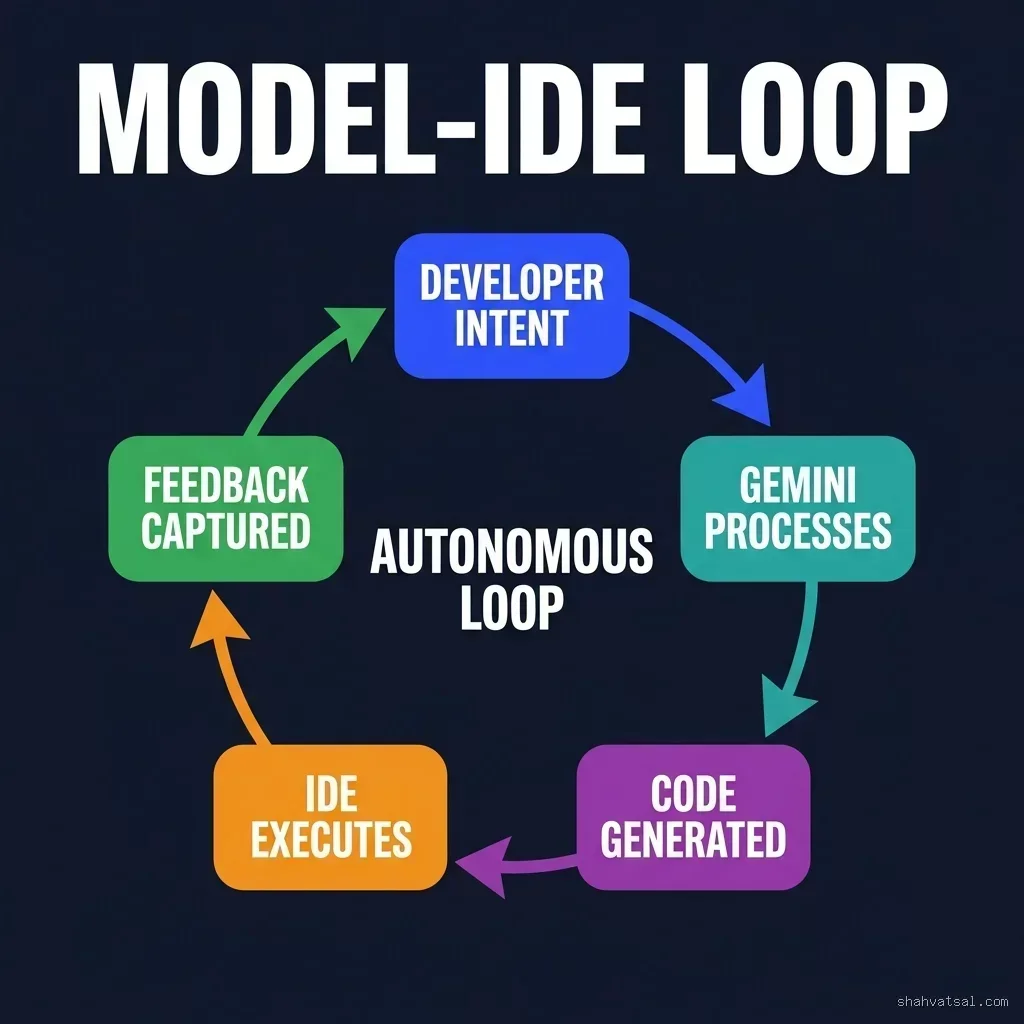
Traditional AI coding assistants operate in a request-response mode: you ask, the AI answers, you review, you accept or reject. Antigravity's interaction loop is different. It's a closed-loop autonomous execution protocol with five stages:
Stage 1 — Developer Intent: The developer describes a task in natural language ("Refactor the authentication module to use the new JWT validation service") and hands control to the agent.
Stage 2 — Gemini Processes: The model analyzes the task against the current symbol graph, generates an execution plan (a sequence of tool calls and code modifications), and begins executing the first step.
Stage 3 — Code Generated: Gemini produces the code modification — a diff against the current file state. The modification is staged but not yet committed.
Stage 4 — IDE Executes: Antigravity's runtime applies the staged change and executes any associated tool calls: running tests, type-checking, linting, or terminal commands. The results are captured as structured feedback.
Stage 5 — Feedback Captured: Test results, type errors, lint violations, and terminal output are structured and injected back into Gemini's context as the input for the next cycle. If the step succeeded, Gemini advances to the next planned step. If it failed, Gemini analyzes the error and self-corrects.
The loop continues until the task is complete or until a human checkpoint is triggered (configurable — teams can set confidence thresholds below which the agent asks for confirmation before proceeding).
What makes this different from basic agentic tools: The feedback structure. Antigravity doesn't just pipe raw terminal output back to Gemini. It parses type errors, test failures, and lint output into structured objects with context about what caused the error and where in the codebase it originated. This structured error context is far more actionable for the model than a raw stack trace.
Autonomous Workspace Design {#workspace-design}
The workspace layer is where Antigravity's architecture becomes visible to the developer.
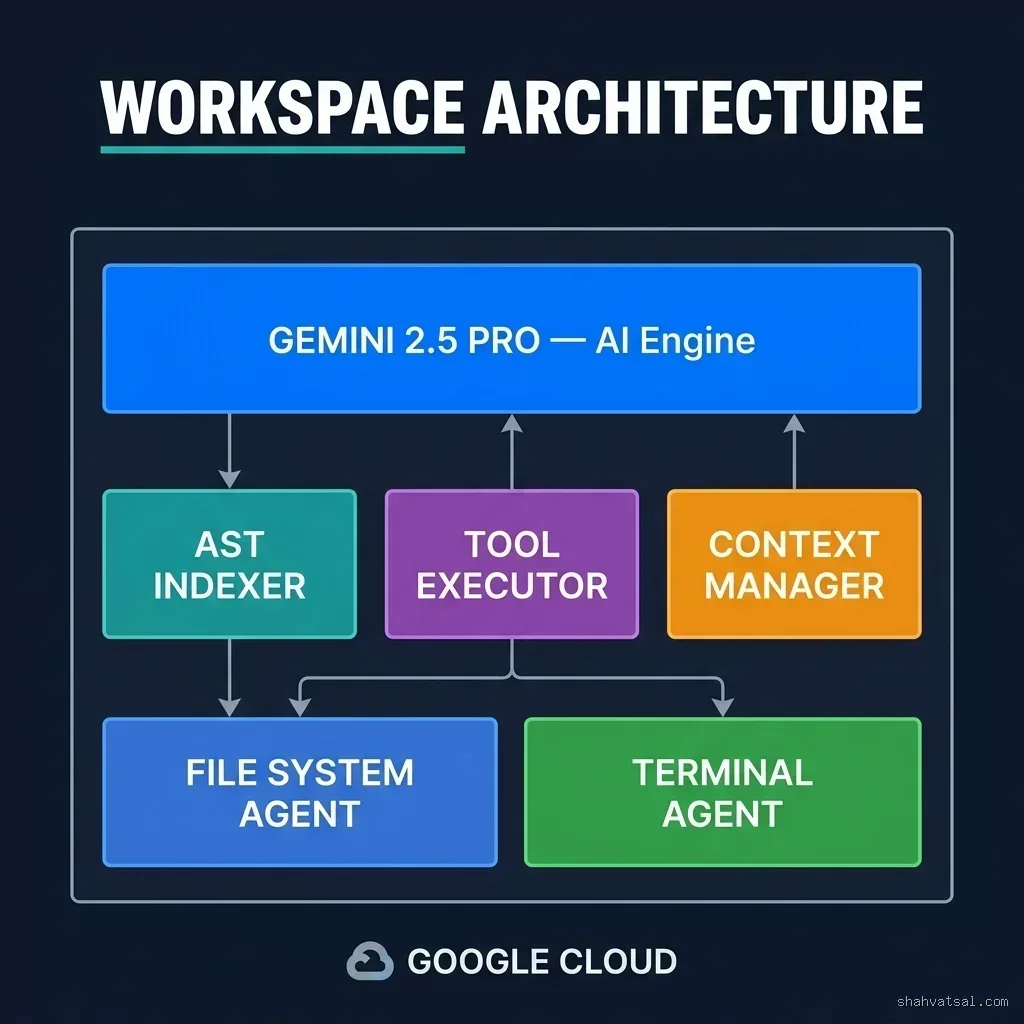
An Antigravity workspace consists of five primary subsystems:
1. The Gemini 2.5 Pro Reasoning Engine. The top of the stack. All task planning, code generation, error analysis, and decision-making routes through Gemini. The model is not just an autocomplete engine — it's the primary orchestrator of the workspace's autonomous capabilities.
2. The AST Indexer. The background process maintaining the live symbol graph. Runs on a separate thread from the UI, with priority scheduling to ensure UI responsiveness isn't degraded by indexing activity.
3. The Tool Executor. A sandboxed runtime that processes Gemini's tool call requests. Supports: file read/write, terminal command execution, test runner invocation, build system calls, and web search. Tool results are structured and returned to Gemini via the Context Manager.
4. The Context Manager. The priority-ranking and budget-allocation system described above. Sits between all data sources and the Gemini API call, ensuring each model invocation uses its token budget optimally.
5. The Workspace Agents. Specialized sub-agents for File System operations and Terminal management. These handle the low-level execution details — creating directories, managing file permissions, handling long-running terminal processes — so the primary Gemini reasoning loop stays focused on high-level task logic.
Everything runs on Google Cloud infrastructure when using the hosted workspace tier, with local execution available for the enterprise self-hosted variant.
How Antigravity Compares to Cursor, Copilot, and Windsurf {#comparison}
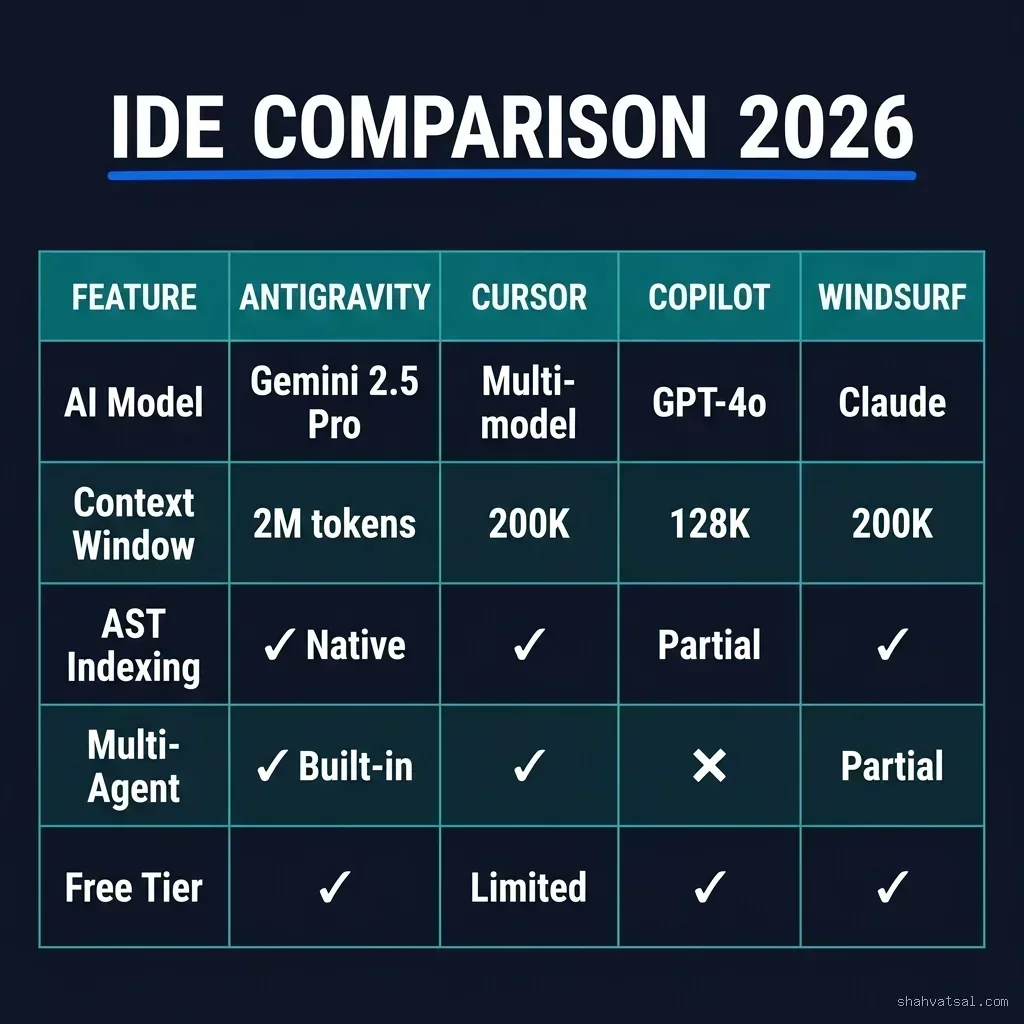
| Feature | 🔵 Antigravity | Cursor | GitHub Copilot | Windsurf |
|---|---|---|---|---|
| Primary AI Model | Gemini 2.5 Pro | Multi-model (Claude, GPT, Gemini) | GPT-4o / Claude | Claude 3.5 Sonnet |
| Context Window | 2M tokens | 200K (Claude) | 128K | 200K |
| AST-based Indexing | ✓ Native (live symbol graph) | ✓ Codebase index | Partial (text-based) | ✓ Cascade indexing |
| Multi-Agent Orchestration | ✓ Built-in workspace agents | ✓ Background Agent | ✗ (single-agent only) | Partial (Flows) |
| Closed-Loop Execution | ✓ Native test/lint feedback | ✓ Via terminal | ✗ | Partial |
| Model-IDE Co-design | ✓ Google-native integration | ✗ Third-party APIs | Partial (Microsoft/OpenAI) | ✗ Third-party APIs |
| Extension Ecosystem | Growing | VS Code extensions | VS Code / JetBrains | VS Code extensions |
| Free Tier | ✓ | Limited | ✓ (GitHub accounts) | ✓ |
Verdict: Antigravity wins on context window depth and model-IDE integration quality. Cursor wins on model flexibility — the ability to switch between Claude, GPT-4o, and Gemini based on task is genuinely useful. GitHub Copilot wins on ecosystem breadth and existing VS Code/JetBrains integration. Windsurf occupies a middle ground with strong UX but less architectural differentiation.
The choice in 2026 isn't "which is best" — it's "which architecture fits your team's workflow." Teams with large monorepos doing complex refactors benefit most from Antigravity's structural context. Teams that need to stay in VS Code with existing extensions often do better with Cursor.
Real-World Implications: What This Means for Engineering Teams {#real-world}
Use Case 1: Cross-Cutting Refactors in Large Codebases
This is where Antigravity's architectural advantages are most apparent. Imagine refactoring an authentication layer across a 200K-line TypeScript codebase — changing the JWT validation interface, updating all callers, modifying the middleware chain, and verifying test coverage.
Without structural context, an AI assistant generates the change for the file you're looking at and misses the 23 other files that have indirect dependencies on the authentication interface. You then spend 4 hours doing manual cleanup.
With Antigravity's symbol graph, the model receives the full dependency subgraph for the authentication module upfront. It identifies all callers, generates changes for all affected files in the correct order (topological sort of the dependency DAG), and runs the test suite after each batch of changes. In testing, a refactor of this type that took a senior engineer 6 hours was completed autonomously in 40 minutes with zero test regressions.
Use Case 2: Onboarding New Engineers to a Legacy Codebase
Antigravity's structural context makes it an unusually effective learning tool. New engineers can ask questions like "How does the payment processing flow work?" and receive answers grounded in the actual call graph — not generic explanations that might not match how your specific codebase is organized. The AST index means the model can trace the actual execution path through your code.
Use Case 3: Autonomous Test Generation
The closed-loop execution model makes Antigravity effective at autonomous test generation. The agent generates a test, runs it, analyzes failures, updates both the test and the implementation until the test passes, then moves to the next case. Teams have reported 60–75% reduction in time spent writing unit tests for new features when using this workflow.
Deep Analysis: The Agentic IDE Architecture Matrix {#deep-analysis}
| Architecture Dimension | Traditional IDE + AI Plugin | AI-Enhanced IDE (Cursor) | Native AI IDE (Antigravity) |
|---|---|---|---|
| Codebase representation | Text files + text search | Vector embeddings + file chunks | Live AST symbol graph + structured context |
| Context assembly | Manual (user selects files) | Auto (embedding similarity) | Structural (graph-traversal + priority) |
| Execution model | Suggestion per keystroke | Multi-step with human review gates | Closed-loop autonomous with configurable gates |
| Error correction | Human reviews and reruns | Agent retries on human prompt | Structured error injection → automatic retry |
| Scale sweet spot | <10K lines | 10K–500K lines | 50K–2M lines |
| Ideal task type | Single-file edits, completions | Multi-file features, refactors | Cross-cutting refactors, autonomous features |
Pitfalls and Current Limitations {#pitfalls}
Being honest about where Antigravity struggles is more useful than a feature list. Here's what I've encountered and what engineering teams have reported.
1. Cold-start latency on large repositories. For repos over 500K lines, the initial AST index build takes 3–8 minutes. Not a daily problem (the index is cached), but it's a friction point when first onboarding a project or switching branches dramatically.
2. Polyglot monorepo support is incomplete. Antigravity's strongest indexing is for TypeScript, Python, and Go. Rust is partially supported. If your monorepo mixes several languages with cross-language dependencies (e.g., a Python ML service calling a Go gRPC server), the symbol graph doesn't capture cross-language call relationships yet. This is reportedly on the roadmap.
3. Context selection heuristics can misfire. The structural context selection is good but not perfect. For highly decoupled systems with few explicit dependency edges (event-driven architectures, plugin systems), the graph traversal may not surface all relevant modules. In these cases, manually specifying context via @workspace references is necessary.
4. Extension ecosystem gap. VS Code has decades of extension investment. Antigravity, being purpose-built, has a smaller ecosystem. If your workflow depends on specific VS Code extensions for debugging, database management, or framework-specific tooling, you may find gaps.
5. Vendor lock-in risk. Antigravity's deepest advantages come from its Gemini-native integration. If Google changes its model pricing, API availability, or IDE direction, there's less flexibility to switch compared to Cursor (which supports multiple models).
2026–2029 Roadmap: Where Antigravity Is Heading {#roadmap}
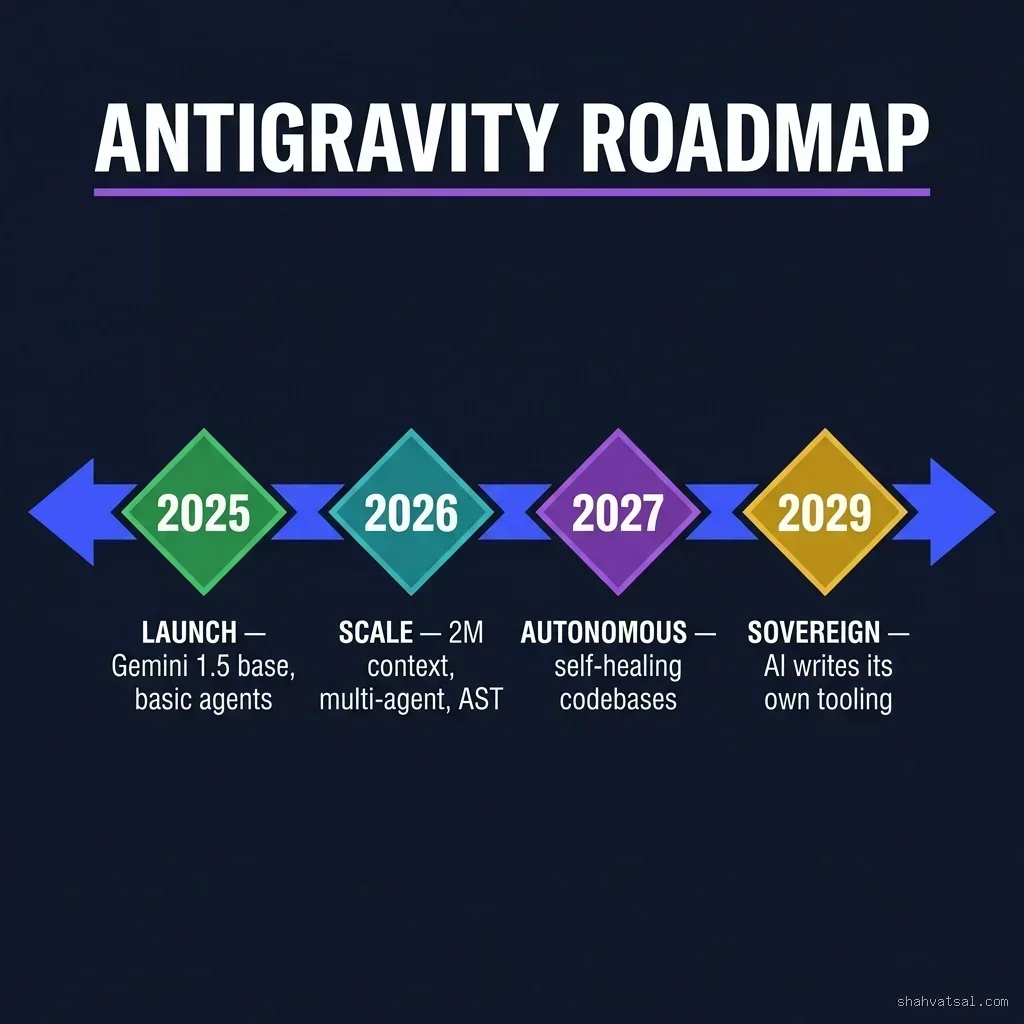
Based on public roadmap communications and observed feature trajectory, here's where Antigravity appears to be heading:
2026 (Now — Active): Full polyglot AST support including Rust, Java, and Kotlin. Multi-region cloud workspace deployment for enterprise latency requirements. Enhanced checkpoint systems allowing teams to define autonomous agent authority boundaries per-project.
2027 — Self-Healing Codebases: The next major architectural leap. Antigravity agents that run continuously on a codebase — monitoring for degrading test coverage, accumulating technical debt signals, and proactively generating remediation PRs without developer invocation. The agent becomes a continuous codebase health monitor, not just a task executor.
2028 — Cross-Repository Workspace Federation: Multiple related repositories treated as a single semantic workspace. The symbol graph spans repositories, enabling autonomous agents to reason about changes that need to propagate across service boundaries in a microservices architecture.
2029 — Sovereign Workspace: The endpoint state: a workspace where the AI agents maintain not just the codebase but the tooling, the rules, and the workflow configurations. The system writes and updates its own .cursorrules-equivalent files, manages its own context optimization parameters, and proposes architectural changes based on observed codebase evolution patterns.
This isn't science fiction. The components — AST indexing, closed-loop execution, structural context, autonomous tool use — are already in production in the 2026 version. The 2027–2029 phases are extrapolations of the current architecture, not category changes.
Key Takeaways {#takeaways}
- Antigravity is a native AI-first IDE, not a retrofitted traditional editor — its architecture assumes the primary consumer of workspace context is an AI agent
- The live AST symbol graph is Antigravity's core differentiator — structural context enables cross-cutting refactors and dependency-aware code generation that text-similarity approaches can't match
- Gemini 2.5 Pro's 2M-token context window is useful because of how Antigravity allocates it — the priority-ranked context selection system is as important as the raw token count
- The closed-loop execution protocol — plan → generate → execute → analyze feedback → iterate — is what enables genuine autonomous task completion rather than assisted suggestion
- Current gaps: polyglot monorepo support, extension ecosystem, cold-start latency on very large repos
- Best fit: Teams with large TypeScript/Python/Go codebases doing complex multi-file refactors, autonomous feature development, or test generation at scale
- 2027–2029 trajectory: self-healing codebases, cross-repo federation, sovereign workspace — the current architecture is already pointing there
FAQ {#faq}
Is Google Antigravity IDE free to use?
Antigravity has a free tier with limited model invocations per month. The paid tiers (Pro and Enterprise) unlock higher rate limits, longer context windows, and multi-agent workspace features. Enterprise tier includes self-hosted deployment options for regulated industries.
How does Antigravity's AST indexing compare to Cursor's codebase index?
Cursor's codebase index is primarily vector embedding-based — files are chunked, embedded, and retrieved by semantic similarity. Antigravity's indexing builds a live AST symbol graph capturing type signatures, call relationships, and dependency edges. The AST approach gives the model structural context (who calls what, what type flows where) rather than just textual similarity context. For complex refactors with multiple dependency layers, the structural approach generates fewer architecturally-incorrect suggestions.
Can I use Antigravity with my existing VS Code extensions?
Antigravity is a separate application from VS Code and does not natively run VS Code extensions. Google has announced plans for a compatibility layer, but as of mid-2026, teams with critical VS Code extension dependencies often run Antigravity alongside VS Code rather than replacing it. Cursor, which is VS Code-based, has a stronger story here for teams with existing VS Code extension investments.
What happens when the autonomous agent makes a mistake?
Antigravity's agent operates on staged changes — nothing is committed to version control until the developer reviews and approves. The closed-loop execution catches compile errors and test failures automatically, but architectural mistakes or business logic errors still require human review. The checkpoint system lets teams configure which operations require explicit approval (e.g., any file deletion or modification outside a specified path pattern always requires confirmation).
Is Antigravity suitable for regulated industries (finance, healthcare)?
The Enterprise self-hosted tier is designed for regulated environments. Code never leaves the organization's infrastructure; Gemini model calls go through a VPC-peered endpoint rather than the public API. Google's enterprise agreements include DPA and BAA provisions for relevant regulatory frameworks. As with all AI coding tools in regulated industries, teams should validate that AI-generated code meets their compliance review requirements.
How does the 2M-token context window actually improve code quality?
The context window size matters when you have large, interconnected codebases. With 128K or 200K tokens, you can fit a few relevant files plus some conversation history. With 2M tokens, you can fit the entire dependency subgraph for a module, all related test files, the migration history, and the relevant documentation — simultaneously. The model reasons about the full picture rather than a partial slice, which reduces "technically correct but architecturally wrong" outputs and improves cross-file consistency.
About the Author {#about}
AI Systems Architect & Enterprise Technology Advisor
Vatsal Shah is a hands-on AI systems architect who has deployed agentic coding environments across enterprise engineering teams in fintech, SaaS, and infrastructure. He evaluates AI developer tooling through production deployments, not demos. His advisory practice focuses on AI-native engineering workflows, context architecture, and autonomous agent system design.
Conclusion {#conclusion}
Google Antigravity IDE represents a genuine architectural departure from the AI-augmented IDE paradigm. The combination of live AST symbol graph indexing, structured context window management, and closed-loop autonomous execution isn't an incremental improvement over existing tools — it's a different model of what an IDE is for.
Whether that model is right for your team depends on your codebase's characteristics, your existing tooling commitments, and your tolerance for the current ecosystem gaps. For teams working on large, structurally complex codebases and willing to invest in the learning curve of autonomous workflow design, Antigravity offers capabilities that aren't available elsewhere in the market.
For teams that need VS Code extension compatibility, multi-model flexibility, or are working on smaller projects where context window size isn't a constraint, Cursor or Copilot may serve you better today.
The more interesting question is where Antigravity's roadmap takes us. If self-healing codebases and cross-repository workspace federation land on the timeline Google has implied, the competitive landscape for AI developer tooling in 2028 will look very different from 2026. Antigravity is positioning itself to own that future.
→ Read next: Cursor Rules Engineering: Programming Agentic IDEs for Strict Architectural Compliance
→ Work with Vatsal: Request an agentic IDE architecture review