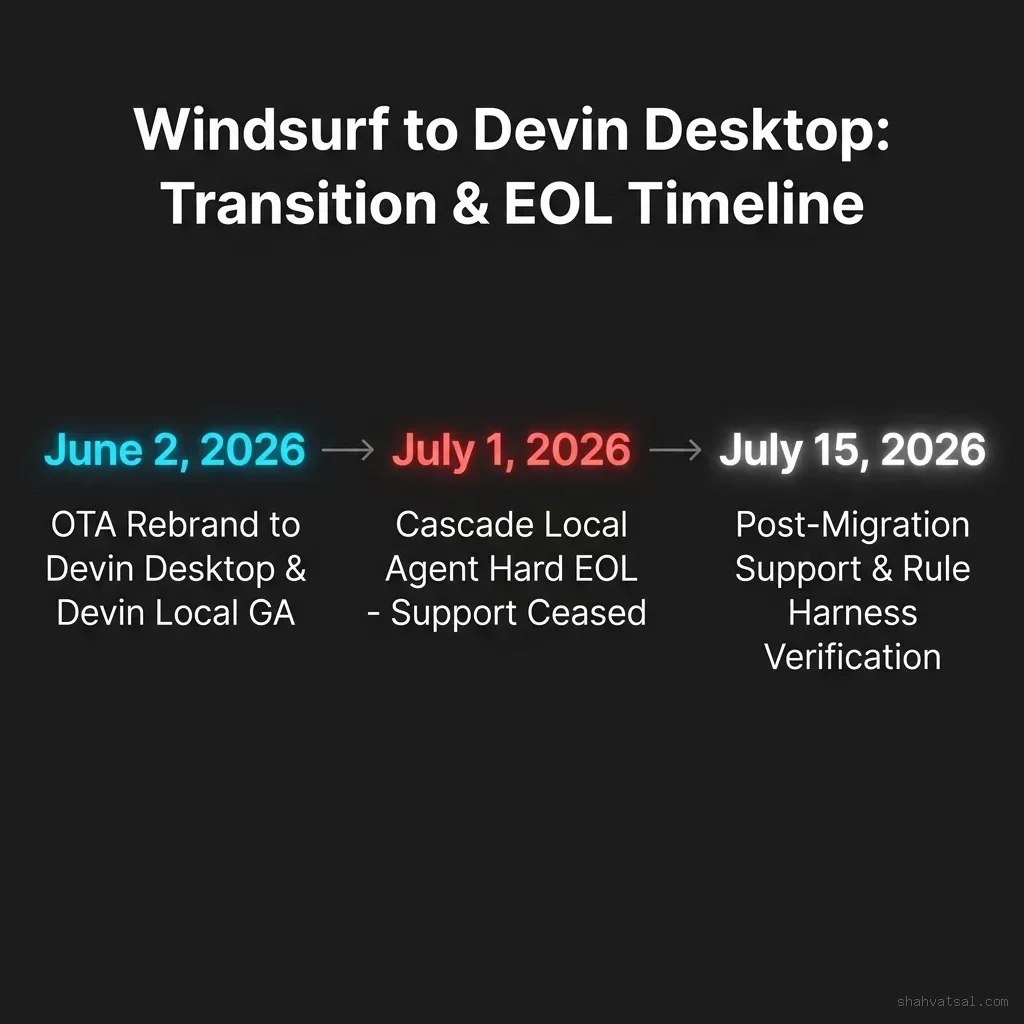
Cognition has officially retired the Windsurf brand, transforming the popular developer tool into Devin Desktop via an over-the-air update. The rebrand, which began on June 2, 2026, was followed by the complete sunset of Cascade—the legacy local execution agent—on July 1, 2026. Developers who relied on Windsurf's local automation are now required to migrate to Devin Local, a new Rust-powered agent designed for increased token efficiency and parallel execution.
The Evolution: From Code Editor to Agent Command Center
Windsurf entered the market as a high-performance editor that integrated agentic chat closely with a VS Code-based code editor. It allowed developers to toggle between tab-completion (copilot style) and agentic edits (Cascade style).
With the transition to Devin Desktop, Cognition has pivoted the core user interface. While the traditional code editor remains accessible, the default workspace has been replaced with the Agent Command Center. This interface features a Kanban-style dashboard where developers can monitor, configure, and orchestrate multiple local and cloud-based AI agents simultaneously.
The rebrand has been rolled out as a seamless update. For existing Windsurf users, accounts, pricing plans, extensions, keybindings, and local configurations are carried over automatically. However, the underlying execution engine has undergone a complete rewrite, forcing developers to adapt their custom workflows to a new local-first model.
The Sunset of Cascade and Rise of Devin Local
The most significant change in this transition is the end-of-life (EOL) of Cascade, which occurred on July 1, 2026. Cascade served as the local agent loop for Windsurf, reading files, running terminal commands, and modifying code under user supervision.
Devin Local replaces Cascade as the default engine for local operations. Written entirely in Rust, Devin Local represents a substantial architectural departure from its predecessor.
Key technical improvements in Devin Local include:
Token Efficiency: Cognition reports that Devin Local achieves up to 30% greater token efficiency compared to Cascade. By optimizing how files are chunked and using a more compact system prompt architecture, Devin Local reduces the number of tokens required to complete complex refactoring tasks.
Subagent Orchestration: Unlike Cascade's single-threaded reasoning loop, Devin Local features native support for subagents. For instance, when a developer assigns a feature request, Devin Local can spawn a secondary subagent to run background test suites, analyze logs, or fetch external documentation while the primary agent continues editing code.
Rust Execution Harness: Written in Rust, the local runtime is lighter, faster to initialize, and less prone to resource leaks when scanning large code repositories compared to the previous Node-based Cascade harness.
The Agent Client Protocol (ACP) Multi-Agent Roster
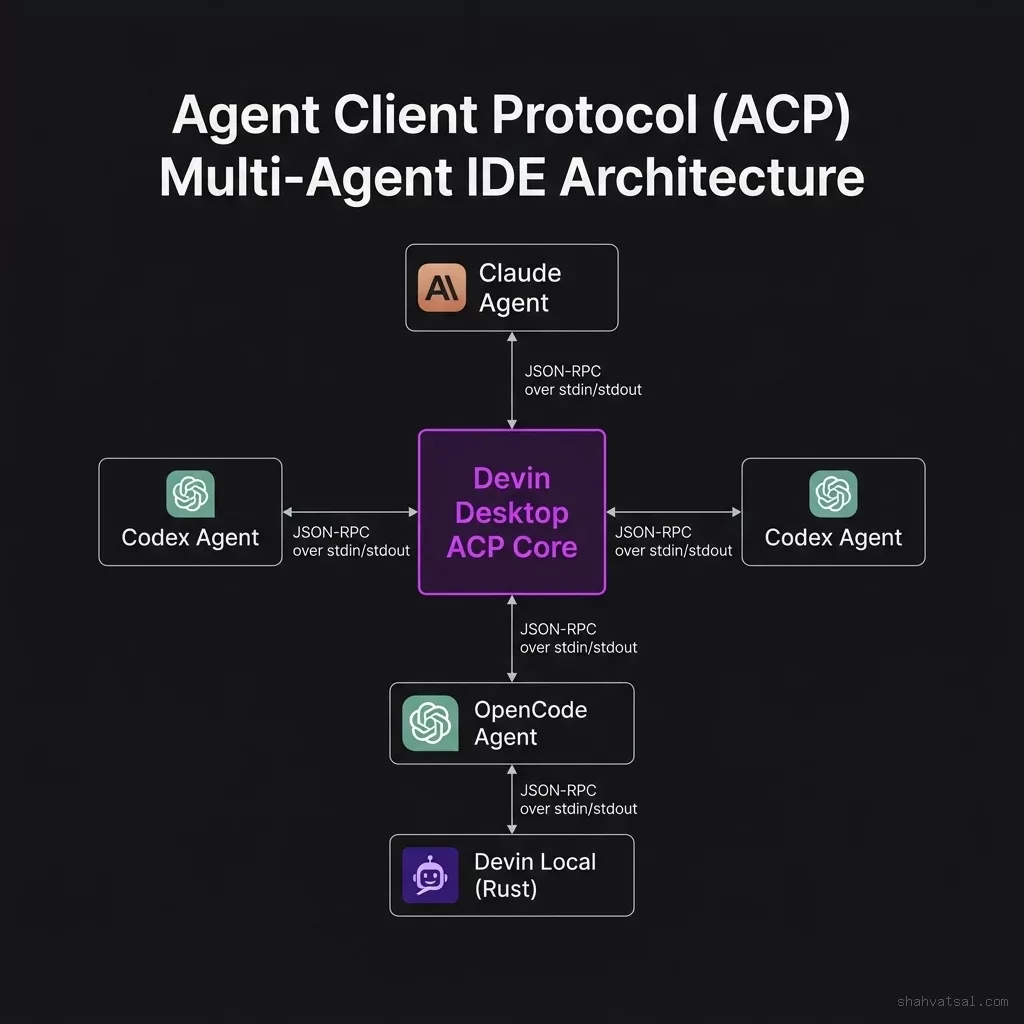
Devin Desktop introduces support for the Agent Client Protocol (ACP), an open-standard communication protocol designed to standardise how AI agents interact with development environments.
ACP allows Devin Desktop to operate as a neutral host for multiple agent models. Instead of locking developers into a single model, the IDE can run different agents side-by-side. The current roster supported via ACP includes:
- Claude Agent: Specialized in complex refactoring and prose-heavy explanations.
- Codex Agent: Optimized for high-speed, localized code generation and autocomplete.
- OpenCode Agent: An open-source model optimized for local execution without sending data to external APIs.
- Devin Local (Rust): The default local coordinator that manages the terminal, file writes, and subagent spawning.
By decoupling the IDE interface from the underlying model, Devin Desktop positions itself as a control plane for multi-agent software engineering.
Migrating Custom Rules: From Windsurf to Devin
For development teams with established AI workflows, the migration from Cascade to Devin Local requires updating custom prompt files. Windsurf used a local configuration model—typically structured in .windsurf/rules or project-level instructions—to guide the Cascade agent's behavior.
Under Devin Desktop, this configuration has been unified under .devin rules. The migration requires translating old files to the new format:
- System Prompt Overrides: Old Windsurf rules containing custom styling guides must be relocated to
.devin/system_prompt_overrides.json. - Task-Specific Prompts: Custom execution templates (such as TDD workflows or deployment steps) are now configured inside
.devin/tasks/. - Execution Context: The
.devin/config.tomlfile manages local permissions, specifying which shell commands the Rust agent can run autonomously and which require explicit developer sign-off in the UI.
Failure to migrate these rules before the July 1 EOL resulted in agents ignoring custom project guidelines, falling back to default Cognition settings.
Industry Context: The Battle for the Developer Desktop
The transformation of Windsurf into Devin Desktop is a direct response to the escalating battle for the developer's local environment.
AI coding is shifting from cloud-based PR agents to local, agentic IDEs. Developers are reluctant to upload massive, proprietary codebases to cloud services. Furthermore, local execution allows agents to run unit tests, compile code, and verify changes in real-time, resulting in higher-quality outputs.
This shift has created intense competition. Google is expanding its local capabilities via the Antigravity IDE, while Cursor has gained substantial market share by introducing background execution and autonomous PR generation, as analyzed in the Cursor background agents overview.
At the same time, security concerns are rising. As local agents gain the ability to execute terminal commands, edit local files, and run code, they become attractive vectors for security exploits. For a detailed breakdown of these risks, see the Wiz GhostApproval security analysis.
By rebranding Windsurf and introducing a Rust-based, token-efficient local agent, Cognition aims to capture the local developer workflow, positioning Devin Desktop as the primary interface for the next generation of software engineering.
Recommendations for Engineering Teams
For engineering organizations navigating this transition, the following steps are recommended:
Complete the Cascade Sunset Audit: Review all internal repositories, scripts, and documentation. Remove references to Cascade and update them to specify Devin Local.
Migrate and Validate .devin Rules: Translate legacy Windsurf configuration rules into the new .devin format. Validate that project-specific formatting, style guides, and testing rules are active and respected by the Rust agent.
Configure Local Permissions: Audit the .devin/config.toml permissions. Ensure that highly sensitive commands (such as database migrations or production deployments) require explicit developer approval, while low-risk commands (like running local tests or starting development servers) are granted automated execution rights to maximize development velocity.
Sources: Devin Local Docs · Vibe Coder · DigitalApplied
Frequently Asked Questions
What is Devin Desktop?
Devin Desktop is the rebranded successor to the Windsurf IDE, developed by Cognition. It shifts the primary development interface from a traditional code editor to an Agent Command Center designed to orchestrate local and cloud-based AI agents.
When did Cascade reach End-of-Life (EOL)?
Cascade, the legacy local agent for Windsurf, reached its End-of-Life on July 1, 2026. It is no longer supported or available, requiring developers to migrate to Devin Local.
What is Devin Local?
Devin Local is the successor to Cascade. It is a new agent rewritten from scratch in Rust, offering up to 30% greater token efficiency and native support for parallel subagent execution.
What is the Agent Client Protocol (ACP) supported by Devin Desktop?
The Agent Client Protocol (ACP) is an open-standard communication protocol that allows Devin Desktop to run multiple AI models (such as Claude, Codex, and OpenCode) side-by-side within the same IDE.
How do I migrate my Windsurf rules to Devin Desktop?
Developers must migrate their legacy configuration rules from the .windsurf/rules folder to the new .devin rules folder, placing prompt overrides in system_prompt_overrides.json and task templates in the tasks/ directory.