Cursor Cloud Agents, /multitask, and Parallel Worktrees: Running 8 Agents Simultaneously in 2026
By Vatsal Shah | August 3, 2026 | 16 min read
Table of Contents
- The Single-Agent Bottleneck
- Understanding Cursor's Agent Triad
- The
/multitaskCommand Architecture - Git Worktree Architecture: Running 8 Parallel Agents
- Cloud VMs with Browser & Terminal Access (Cursor v3.5)
- Optimal Task Scoping & Prompt Structuring
- Cost Management & Token Economics
- Real-World Workflow: Branch & PR per Agent
- Deep Analysis: Local vs. Background vs. Cloud Agents
- Pitfalls & Anti-Patterns
- 2027–2030 Roadmap: The Evolution of Autonomous IDEs
- Key Takeaways
- FAQ
- About the Author
- Conclusion & Strategic Call to Action
The Single-Agent Bottleneck {#problem}
For the past two years, developer productivity tools focused on a single interaction loop: one developer chatting with one AI model inside one active editor buffer. You typed a prompt, waited 20 seconds for autocomplete or inline edits, reviewed the code, fixed typos, and repeated the process.
While that model doubled individual coding speed, it created an unexpected ceiling: the human attention bottleneck. You were still babysitting an AI model line-by-line while it generated code in front of your eyes.
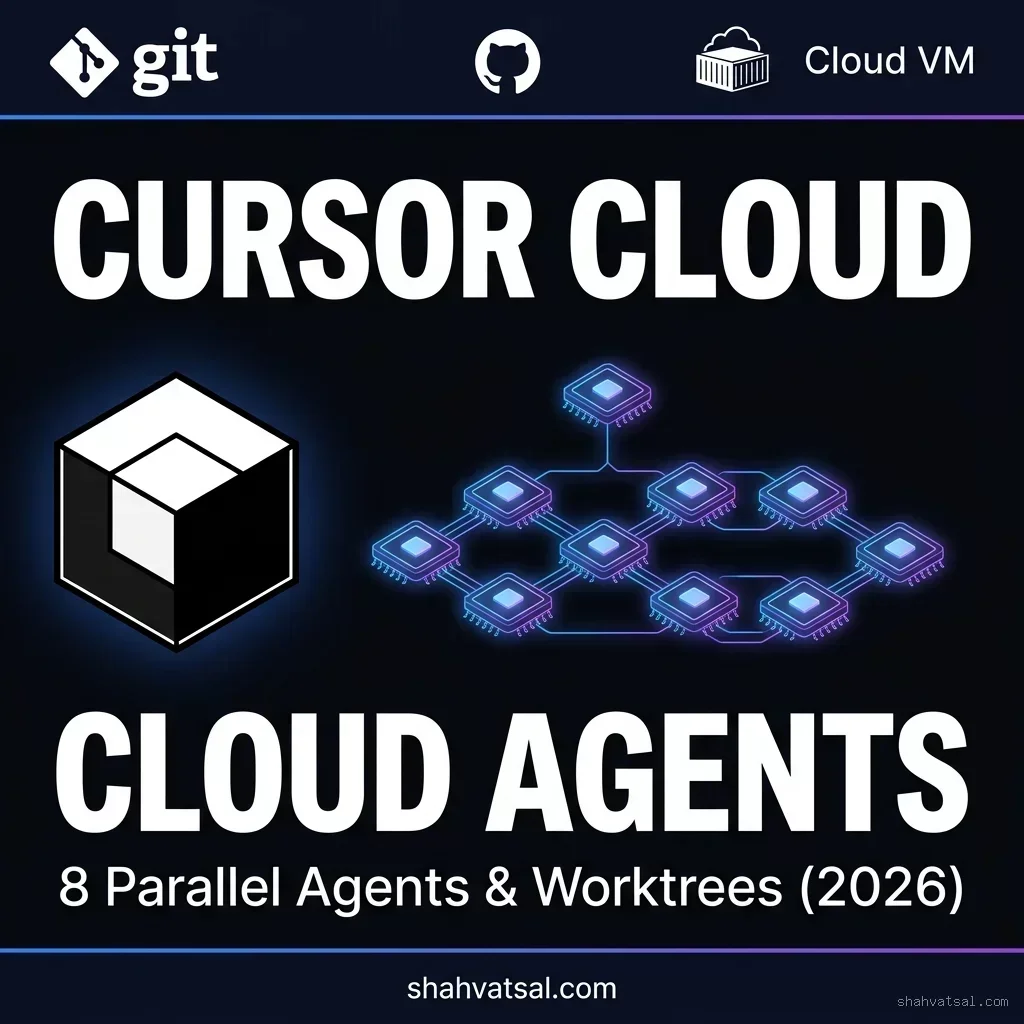
With the release of Cursor v3 and v3.5 in mid-2026, Anysphere fundamentally shattered that paradigm. Instead of pairing with a single assistant, senior engineers now operate as Agent Orchestrators — dispatching up to 8 autonomous Cloud Agents simultaneously across isolated Git worktrees.
While you are conducting an architecture review or writing a system RFC, three background Cloud Agents are refactoring legacy authentication controllers, two are writing Playwright E2E tests for a new API route, and three are upgrading dependency types across microservices. Each agent runs inside an isolated Cloud VM with full terminal and browser access, creating pull requests automatically upon completion.
This guide provides the complete, practitioner-tested playbook for configuring Cursor Cloud Agents, leveraging the /multitask command, and managing parallel Git worktree topologies without merge conflicts or token budget blowouts.
AI SUMMARY — This comprehensive guide breaks down Cursor's 2026 parallel execution system: (1) the architecture differences between Local, Background, and Cloud VM Agents, (2) how to use the /multitask command to decompose monolithic prompts into parallel async subagents, (3) Git worktree topology for zero-conflict parallel execution across 8 simultaneous agents, (4) Cloud VM browser and terminal automation in Cursor v3.5, and (5) token cost management for enterprise teams.
Understanding Cursor's Agent Triad {#agent-triad}
Definition — Cursor's Agent Triad refers to the three distinct execution tiers available in Cursor v3.5: Local Agent Mode (synchronous in-editor execution), Background Agents (asynchronous local background workers bound to separate git branches), and Cloud VM Agents (fully autonomous remote micro-virtual machines with dedicated bash terminals, headless Chrome browsers, and automated GitHub PR creation).
To build an efficient parallel workflow, you must understand when to deploy each tier of the Cursor Agent Triad:
- Local Agent Mode (Interactive): Runs directly inside your current VS Code/Cursor window. It shares your exact file system state and active editor buffer. Best for immediate, small refactors (1–3 files) where you want to observe live diffs.
- Background Agents (Local Async): Spawned on your local machine but detached from your main editor view. They check out separate Git feature branches in the background and notify you via desktop toasts upon completion. Best for medium tasks (e.g., generating unit tests) while you continue working in the main branch.
- Cloud VM Agents (Remote Autonomous): Spin up ephemeral, isolated Linux micro-VMs in Cursor's cloud infrastructure. Each VM receives a fresh clone of your repository branch, a dedicated bash terminal, a headless Chromium browser for UI testing, and full access to language server protocol (LSP) indexers. Upon completion, the Cloud Agent commits changes and opens a GitHub Pull Request.
The /multitask Command Architecture {#multitask-command}
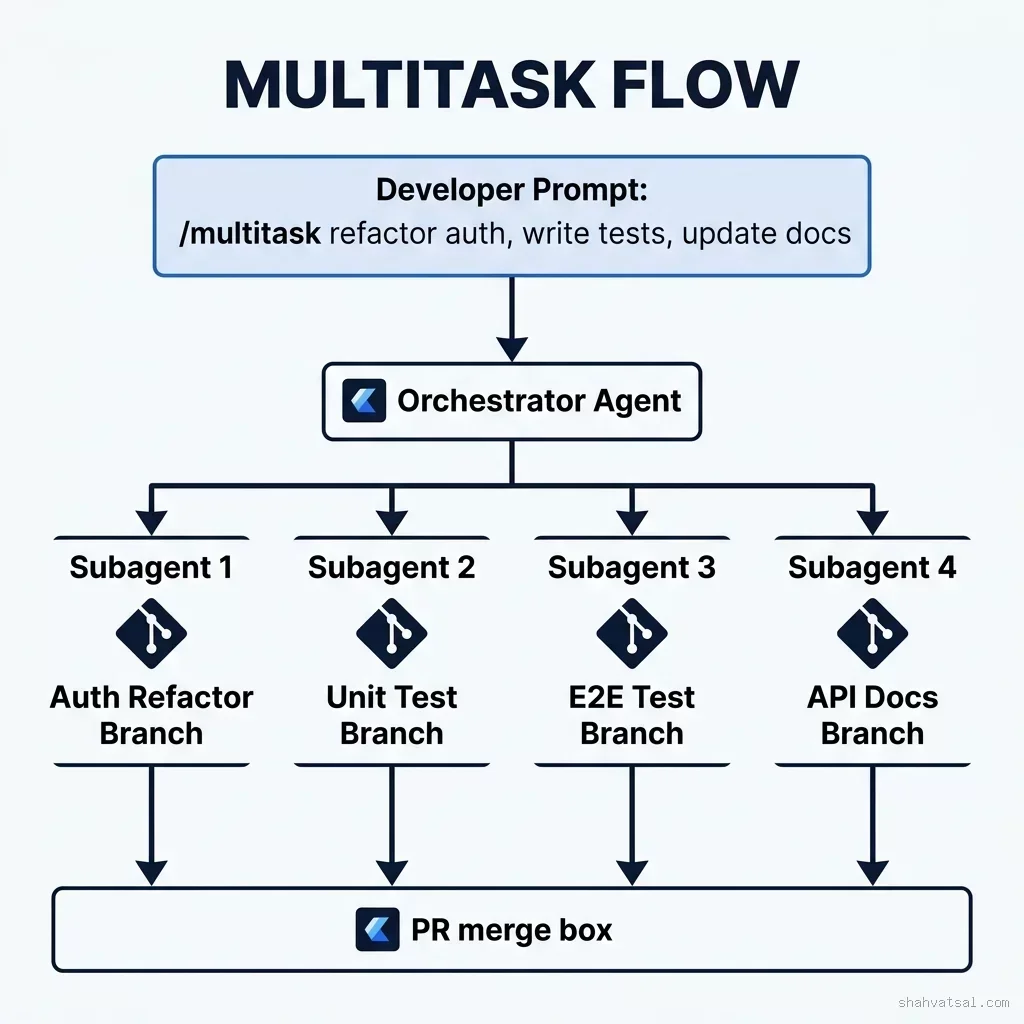
The core mechanism for parallelizing work in Cursor v3.5 is the /multitask command.
When you prefix a prompt with /multitask, Cursor's orchestration layer does not attempt to solve the prompt in a single linear turn. Instead, it executes a three-phase decomposition pipeline:
[Developer Prompt] -> /multitask
     |
     v
Phase 1: Task Decomposition Engine (Scans codebase AST & dependency graphs)
     |
     +---> Subagent 1: class="tok-str">"Refactor Auth Middleware to RS256 JWT"
     +---> Subagent 2: class="tok-str">"Write Vitest Unit Tests for Auth Service"
     +---> Subagent 3: class="tok-str">"Update OpenAPI 3.1 Swagger Docs"
     +---> Subagent 4: class="tok-str">"Add E2E Playwright Smoke Tests"
     |
Phase 2: Worktree Allocation (Assigns each subagent an isolated Git Worktree)
     |
Phase 3: Asynchronous Parallel Execution (Cloud VMs execute tasks & push PRs)
By decoupling these tasks into isolated branches, subagents cannot overwrite each other's active file buffers or cause workspace file lock crashes.
Git Worktree Architecture: Running 8 Parallel Agents {#git-worktree-architecture}
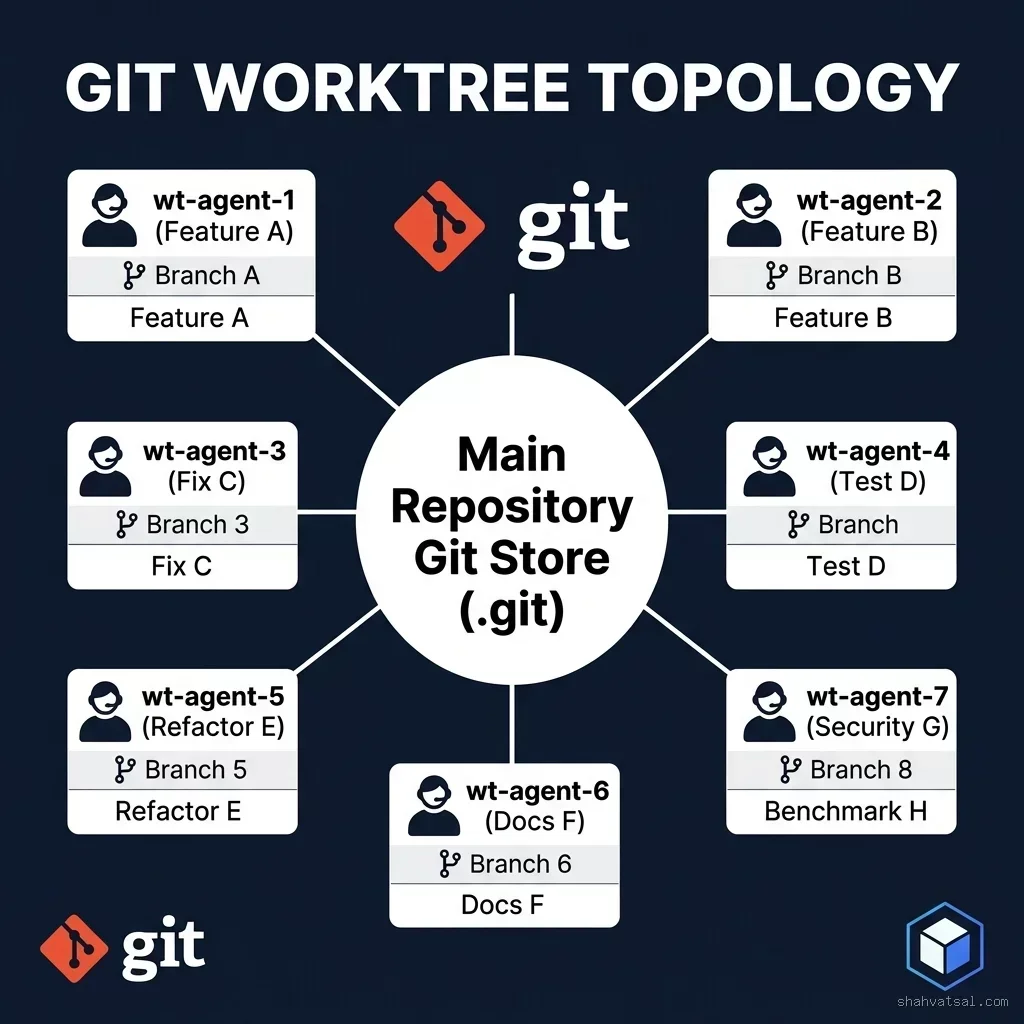
The most common failure mode when running multiple AI coding agents is file access contention. If two agents attempt to modify files in the same working directory, git index locks fail, or uncommitted changes get corrupted.
The solution is Git Worktree Isolation. Unlike git clone (which duplicates the entire .git history folder), Git Worktrees share a single central .git directory while checking out independent working trees into separate filesystem directories.
Creating the 8-Agent Worktree Topology
Here is the exact terminal setup used to orchestrate an 8-agent parallel sprint:
class="tok-cm">#!/bin/bash
class="tok-cm"># setup-8-agent-worktrees.sh
class="tok-cm"># Initializes 8 isolated Git Worktrees for parallel Cursor Cloud Agents

REPO_ROOT=$(pwd)
WORKTREE_BASE=class="tok-str">"../worktrees-session-$(date +%Y%m%m)"

mkdir -p class="tok-str">"$WORKTREE_BASE"

echo class="tok-str">"[+] Initializing 8 parallel Git Worktrees..."

for i in {1..8}; do
  BRANCH_NAME=class="tok-str">"agent/task-0$i-feature"
  WORKTREE_PATH=class="tok-str">"$WORKTREE_BASE/wt-agent-0$i"

  class="tok-cm"># Create new branch and link to isolated worktree
  git worktree add -b class="tok-str">"$BRANCH_NAME" class="tok-str">"$WORKTREE_PATH" main
  echo class="tok-str">"    - Created Worktree: $WORKTREE_PATH on branch $BRANCH_NAME"
done

echo class="tok-str">"[SUCCESS] 8 Worktrees ready for Cursor Agent assignment."
git worktree list
When you launch Cursor Cloud Agents across these 8 worktrees, each agent operates in total isolation. Agent 1 can install new npm packages in wt-agent-01 while Agent 4 runs database migrations in wt-agent-04 — with zero cross-contamination.
Cloud VMs with Browser & Terminal Access (Cursor v3.5) {#cloud-vm-engine}
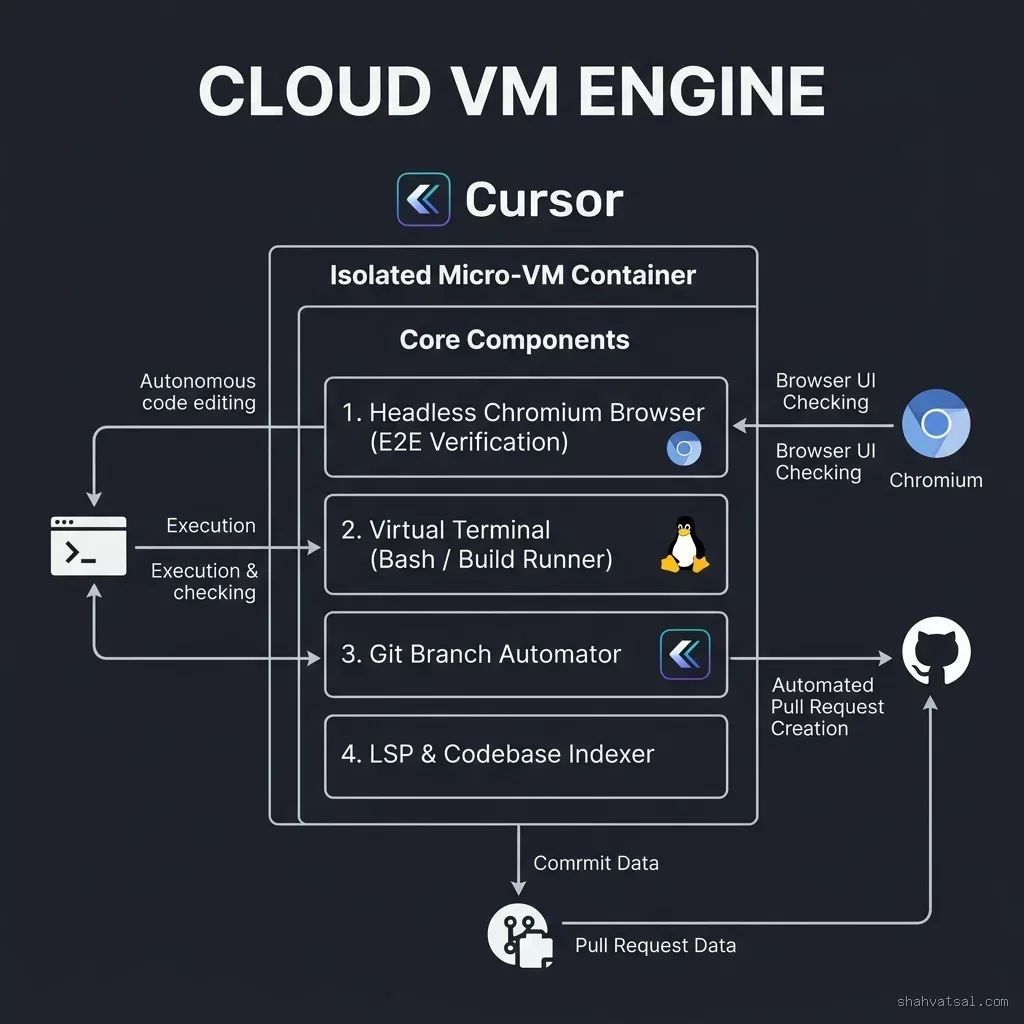
What elevates Cursor v3.5 Cloud Agents beyond basic code generators is their autonomous environment integration:
- Virtual Terminal Execution: Cloud Agents do not just write code; they run
npm test,pytest, orgo testinside their Linux VM. If a unit test fails, the agent reads the stdout log, fixes its code, and re-runs the test suite until green. - Headless Chromium Browser (E2E Verification): For frontend and web application tasks, the Cloud Agent launches a headless Chromium browser. It renders the component, takes DOM screenshots, verifies visual layout, and tests user interactions before declaring the task complete.
- Automated Language Server Protocol (LSP): The VM compiles type graphs in real time. If a TypeScript error or Rust borrow-checker error occurs, the agent detects the exact diagnostic line and auto-corrects signature mismatches.
Optimal Task Scoping & Prompt Structuring {#task-scoping}
Not all tasks should be assigned to Cloud Agents. Sending a vague, multi-page vague request like "Make the dashboard better" to 8 parallel agents will result in chaos and burned API tokens.
The Rule of Atomic Scoping
To achieve 100% completion rates across parallel agents, adhere to the Atomic Scoping Framework:
- Good Cloud Agent Task: "Refactor
/app/Services/PaymentService.phpto use the new Stripe v2 SDK. Update all 8 unit tests in/tests/Unit/PaymentTest.phpto match. Ensurephp artisan testpasses." (Clear boundary, verifiable completion test). - Bad Cloud Agent Task: "Fix all bugs in backend and improve performance." (Unclear boundaries, overlapping file touchpoints).
The Standardized Agent Prompt Skeleton
class="tok-cm"># TASK SCOPE: [Module Name]
- **Target Files**: `app/Controllers/Api/V2/UserController.php`, `tests/Feature/UserApiTest.php`
- **Objective**: Add rate-limiting middleware and update OpenAPI documentation.
- **Constraints**:
  - Do NOT modify any files outside `app/Controllers/Api/V2/` or `tests/Feature/`.
  - Must use `Redis::throttle()` with a 60-req/min cap per IP.
- **Verification Command**: `vendor/bin/phpunit --filter UserApiTest`
- **Completion Output**: Commit changes with message `feat(api): rate-limit user endpoints` and open PR.
Cost Management & Token Economics {#token-economics}
Operating 8 simultaneous Cloud Agents consumes significant compute resources. Managing token spend requires understanding the cost structure between interactive and background sessions:
| Agent Tier | Compute Location | Context Overhead | Avg Cost / Task | Efficiency Rating |
|---|---|---|---|---|
| Local Interactive | Developer Laptop | High (Full active session history) | $0.05 – $0.15 | High (for quick edits) |
| Background Local | Local Daemon process | Medium (File AST context) | $0.10 – $0.30 | Very High |
| Cloud VM Agent | Remote Micro-VM (Linux) | Isolated Clean Context Window | $0.40 – $1.20 | Maximum (Hands-free automation) |
Cost Optimization Tip: Use Cloud VM Agents for tasks that take >5 minutes of human coding time (refactoring, unit test suites, migration scripts). For one-line fixes or single-variable updates, stick to local interactive shortcuts to avoid VM spin-up overhead.
Real-World Workflow: Branch & PR per Agent {#real-world-workflow}
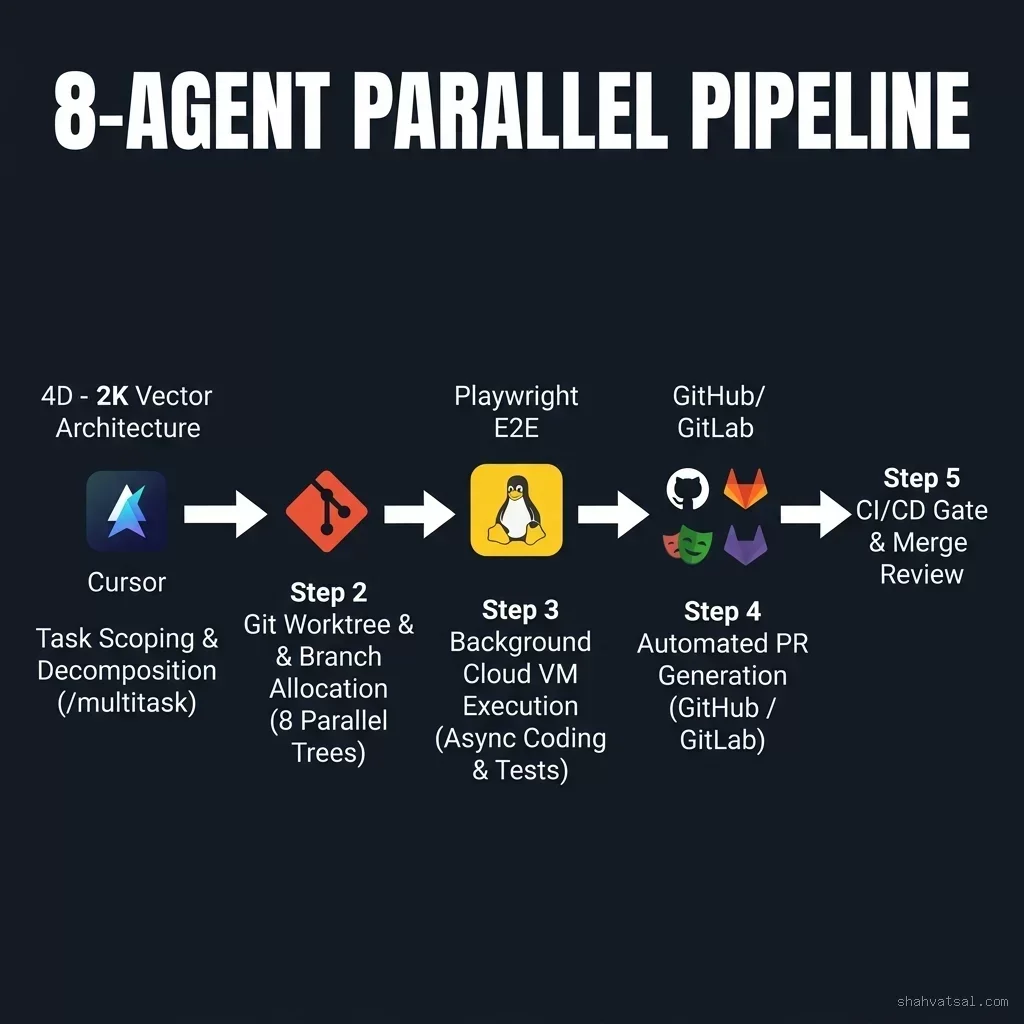
Here is the exact 5-step workflow used by elite AI engineering teams in 2026:
- Sprint Planning: Identify 4–8 modular backlog items that touch independent subdirectories.
- Worktree Allocation: Run
setup-8-agent-worktrees.shto generate 8 isolated worktrees. - Dispatch Prompt Spawning: Open Cursor, trigger
/multitask, and assign each task prompt to its corresponding worktree branch. - Asynchronous Execution: Switch your local editor back to your primary feature branch. Continue architectural design or high-level writing while the 8 Cloud VMs execute in parallel.
- PR Review & Merge: As GitHub notifications arrive (
PR #102 opened by Cursor-Agent-01), open the PR, review the automated Playwright DOM screenshots and green test logs, and hit Merge.
Deep Analysis: Local vs. Background vs. Cloud Agents {#comparison-matrix}
To select the right tool for every coding job, consult this feature-by-feature decision matrix:
| Capability Vector | Local Interactive Agent | Local Background Agent | Cloud VM Agent (v3.5) |
|---|---|---|---|
| Concurrency Limit | 1 Active Task | 2–3 Background Processes | 8+ Cloud VMs Parallel |
| Terminal Control | Prompts user for bash permission | Restricted sandboxed commands | Full Autonomous Bash Terminal |
| Browser UI Testing | No Browser Access | No Browser Access | Headless Chromium DOM Screenshots |
| Git Branch Management | Edits active working directory | Autosaves to local feature branch | Automatic Git Push & GitHub PR Creation |
| Context Isolation | Polluted by long chat buffer | Isolated to task files | Pristine Ephemeral VM State |
Pitfalls & Anti-Patterns {#pitfalls}
Even with Cursor v3.5, engineers run into specific failure modes if they skip foundational git discipline:
- Anti-Pattern 1: Launching Parallel Agents in the Same Working Directory: Without Git Worktrees, Agent 1 and Agent 2 will fight over
.git/index.lock, leading to corrupted file commits. Always assign 1 worktree directory per agent. - Anti-Pattern 2: Overlapping File Scopes: If Agent 1 is modifying
User.tswhile Agent 2 is also refactoringUser.tsin another branch, you will encounter painful merge conflicts at PR time. Scope tasks so each agent owns distinct file boundaries. - Anti-Pattern 3: Ignoring Cloud VM Timeouts: Cloud Agents running complex builds can get stuck in infinite retry loops if a dependency fails to install. Always define explicit verification commands with timeouts.
2027–2030 Roadmap: The Evolution of Autonomous IDEs {#roadmap}
Looking forward, the agentic IDE landscape is evolving toward total background autonomy:
- 2027: Multi-Repo Cloud Orchestration: Agents will operate across multi-repository dependencies — modifying a backend microservice in Repo A and updating the React client in Repo B within a single
/multitaskcommand. - 2028: Automated PR Self-Healing: Cloud Agents will automatically monitor CI/CD failures on GitHub Actions, read the test failure logs, push fix commits to the PR, and re-trigger deployment without developer intervention.
- 2029: Voice-Driven Agent Operations: Engineering managers will delegate full sprint backlog epics via voice prompts, with IDEs spawning 20+ ephemeral cloud VM agents to deliver feature branches.
- 2030: Zero-Latency Spec-to-Production Pipelines: Software creation will transition almost entirely to architecture specification, code review, and automated compliance auditing.
Key Takeaways {#key-takeaways}
- Shift to Orchestration: Stop watching AI write code line-by-line. Deploy background Cloud VM agents to handle async coding tasks.
- Master
/multitask: Break down complex features into independent subagent tasks that execute concurrently. - Isolate with Git Worktrees: Use
git worktreeto give each parallel agent a dedicated working directory and branch. - Leverage Cloud VMs: Take advantage of Cursor v3.5's headless Chromium and virtual terminal execution for automated test verification and PR generation.
- Define Strict Boundaries: Scope every agent prompt with explicit target files and deterministic verification commands.
FAQ {#faq}
About the Author {#about}
Vatsal Shah is an AI engineering strategist, full-stack architect, and digital growth advisor. He specializes in helping enterprise development teams adopt modern agentic IDE workflows, AI-native CI/CD pipelines, and high-velocity software engineering practices. Explore more technical frameworks at shahvatsal.com.
Conclusion & Strategic Call to Action {#conclusion}
The era of single-stream AI pair programming is coming to a close. By mastering Cursor Cloud Agents, the /multitask command, and Git Worktree topologies, you can scale your development output by an order of magnitude without sacrificing code quality or architecture control.
Ready to transform your development team's workflow with parallel AI agents? Schedule a Technical Strategy Review →