AI SUMMARY
Azure AI Foundry has emerged as the premier environment for deploying autonomous enterprise agents in 2026. This guide details the integration of Entra ID managed identities with AI agent loops to establish zero-trust tool access. We explore how to deploy Azure AI Content Safety with active Prompt Shields, compare Azure Foundry's governance with AWS and GCP, and outline a technical roadmap to sovereign enterprise compliance.
Table of Contents
- The Sovereign Shift: Transitioning from Chatbots to Autonomous Enterprise Agents
- Foundry vs. Copilot Studio: The Architect's Decision Matrix
- Decoupled Agent Primitives: Orchestration, Memory, and Tool Execution
- Entra ID Integration: Hardening Agent Identity and RBAC Boundaries
- In-Line Governance: Content Safety, Prompt Shields, and Audit Logging
- Sovereign Infrastructure: Local Boundaries and Private Cloud Deployments
- Developer Blueprint: Creating a Secure Azure AI Foundry Agent
- Comparative Intelligence: Azure Foundry vs. AWS Bedrock vs. GCP Vertex
- Failure Modes: Token Budgeting, Loop Breakers, and Resiliency Patterns
- Transition Roadmap: Moving Toward Decentralized Agentic Networks (2027–2030)
- Key Takeaways
- Frequently Asked Questions (FAQ)
- About the Author
1. The Sovereign Shift: Transitioning from Chatbots to Autonomous Enterprise Agents
In the early stages of generative AI adoption, enterprises focused primarily on building conversational interfaces. These interfaces acted as simple query engines. They took a user prompt, searched a vector database, and returned an output. However, they lacked the ability to execute multi-step logic or call external APIs autonomously.
In 2026, azure ai foundry agents enterprise 2026 indicates that companies are moving past basic chat interfaces. The industry is shifting to autonomous agentic architectures. Rather than simply answering a question, an agent is assigned an objective—such as auditing billing logs or running compliance checks—and coordinates the tool execution loop.
Conversational AI:
[User Prompt] -> [Vector Search] -> [Model Inference] -> [Response]

Autonomous Agent:
[Objective] -> [Planner LLM] -> [API Tool Call] -> [Safety Filter] -> [Outcome Validation] -> [Result]
Deploying these agent loops at scale introduces several challenges: managing state across long-running tasks, ensuring consistent tool selection, protecting data privacy, and keeping API costs manageable. Building these frameworks manually using raw open-source libraries often leads to deployment bottlenecks, security gaps, and unstable production environments.
In my experience building enterprise backends, the biggest challenge in agentic architectures is identity management. When an agent executes a tool call, it must do so using its own identity, not the user's. Exposing backend tools to LLMs without strict access controls also introduces security risks. Azure AI Foundry solves this by providing a managed service layer that isolates agent execution, coordinates model routing, and enforces Entra ID boundaries.
2. Foundry vs. Copilot Studio: The Architect's Decision Matrix
Enterprise developers often struggle to choose between Azure AI Foundry and Microsoft Copilot Studio. While both handle conversational interfaces, they target different workloads:
- Copilot Studio: Best for low-code integrations, office productivity tasks, and surface-level automation. It uses pre-built connectors to integrate with Microsoft 365 services.
- Azure AI Foundry: Designed for deep customization and developer control. It allows developers to configure custom planning loops, manage model routing, and enforce strict security boundaries.
For a custom agentic deployment, the choice depends on your compliance requirements, code integration depth, and the complexity of your reasoning loops. If your agent needs to interact directly with internal databases, evaluate custom code, or run within a private virtual network, Azure AI Foundry is the preferred option.
3. Decoupled Agent Primitives: Orchestration, Memory, and Tool Execution
Azure AI Foundry agents rely on three core components: Orchestrators, Memory Streams, and Tool Hubs.
Orchestration Loop
The Orchestrator defines the execution routing logic. Instead of relying on unstructured prompts, developers configure execution paths using visual flow blocks and structured state machine JSON definitions. Within the orchestrator runtime, these flows function as directed acyclic graphs (DAGs) containing specific node types:
- InputNode: The entry point that captures the initial user query, session metadata, and system environment variables.
- OutputNode: The final collector node that packages the generated text and trace logs.
- ConditionNode: A decision-making block that routes execution dynamically based on variables or model-inferred intent.
- IteratorNode: A loop control block that processes arrays of data (such as parsing list elements).
- ModelInvocationNode: A dedicated execution block that sends prompt templates to a selected foundation model.
- ToolNode: A tool coordinator that maps inputs directly to registered Action Groups.
Memory Streams
Memory Streams manage session state across long-running interactions. Instead of storing history in the client application, the agent runtime maintains a stateful memory channel, allowing the agent to resume execution loops across separate API sessions.
To ensure high-quality retrieval in production, developers configure specific ingestion pipelines:
- Chunking Strategies: Instead of relying on naive chunking, Azure AI Foundry supports fixed-size, hierarchical, and semantic chunking to preserve context at boundary lines.
- Retrieval Customizations: Developers can tune retrieval performance using metadata filtering, hybrid search weighting, and query reformulation.
Tool Hubs
Tool Hubs allow the agent to connect to external systems. Developers define these tools using OpenAPI v3 schemas. When the agent schedules an action, the runtime invokes the corresponding API or Azure Function, returning the output to the planning model.
4. Entra ID Integration: Hardening Agent Identity and RBAC Boundaries
For enterprises in regulated sectors, data isolation is a prerequisite for AI adoption. The Azure AI Foundry AgentCore architecture addresses this by sandboxing all agent resources within a secure network boundary.
This security boundary is enforced through three mechanisms:
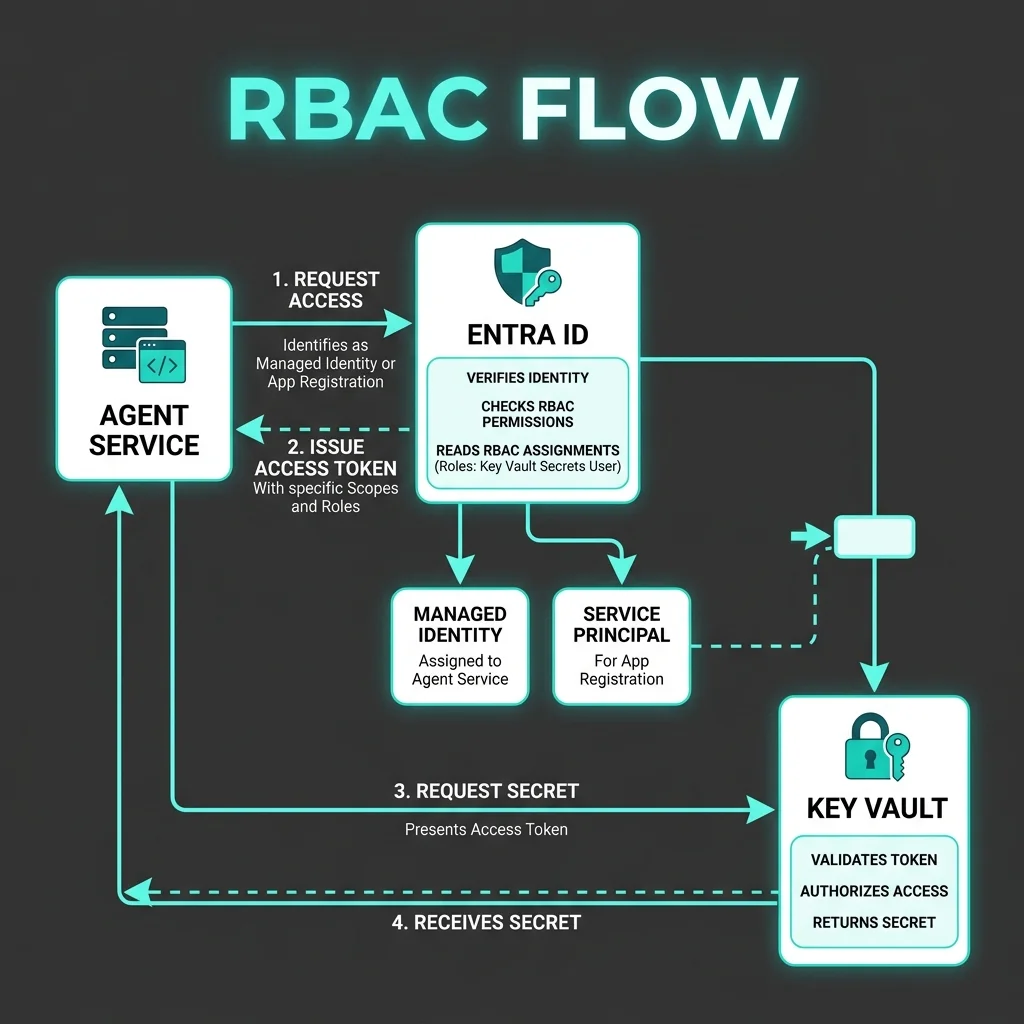
Entra ID Managed Identities
Access to Azure OpenAI, Key Vault, and databases is restricted using granular IAM policies. The agent is assigned a dedicated Entra ID Managed Identity that grants permission to invoke only the specific resources required for its tasks. This prevents lateral movement in the event of an agent compromise.
Below is an example of an Azure Resource Manager (ARM) template enforcing Managed Identity configuration for an agent workspace:
{
  class="tok-str">"$schema": class="tok-str">"https:class="tok-cm">//schema.microsoft.com/schemas/2019-04-01/deploymentTemplate.json#",
  class="tok-str">"contentVersion": class="tok-str">"1.0.0.0",
  class="tok-str">"resources": [
    {
      class="tok-str">"type": class="tok-str">"Microsoft.MachineLearningServices/workspaces",
      class="tok-str">"apiVersion": class="tok-str">"2023-08-01-preview",
      class="tok-str">"name": class="tok-str">"soverign-agent-workspace",
      class="tok-str">"location": class="tok-str">"eastus2",
      class="tok-str">"identity": {
        class="tok-str">"type": class="tok-str">"SystemAssigned"
      },
      class="tok-str">"properties": {
        class="tok-str">"friendlyName": class="tok-str">"Sovereign AI Agent Hub",
        class="tok-str">"hbiWorkspace": true
      }
    }
  ]
}PROTOCAL NOTE
Managed Identities eliminate the need for developers to manage credentials or rotate database connection strings, removing a common vector for credential leaks.
Role-Based Access Control (RBAC)
Granular permissions are managed through Azure RBAC. For instance, the agent can be assigned the Azure Cognitive Services OpenAI User role to invoke models, while restricting its tool execution backend to specific Azure Functions.
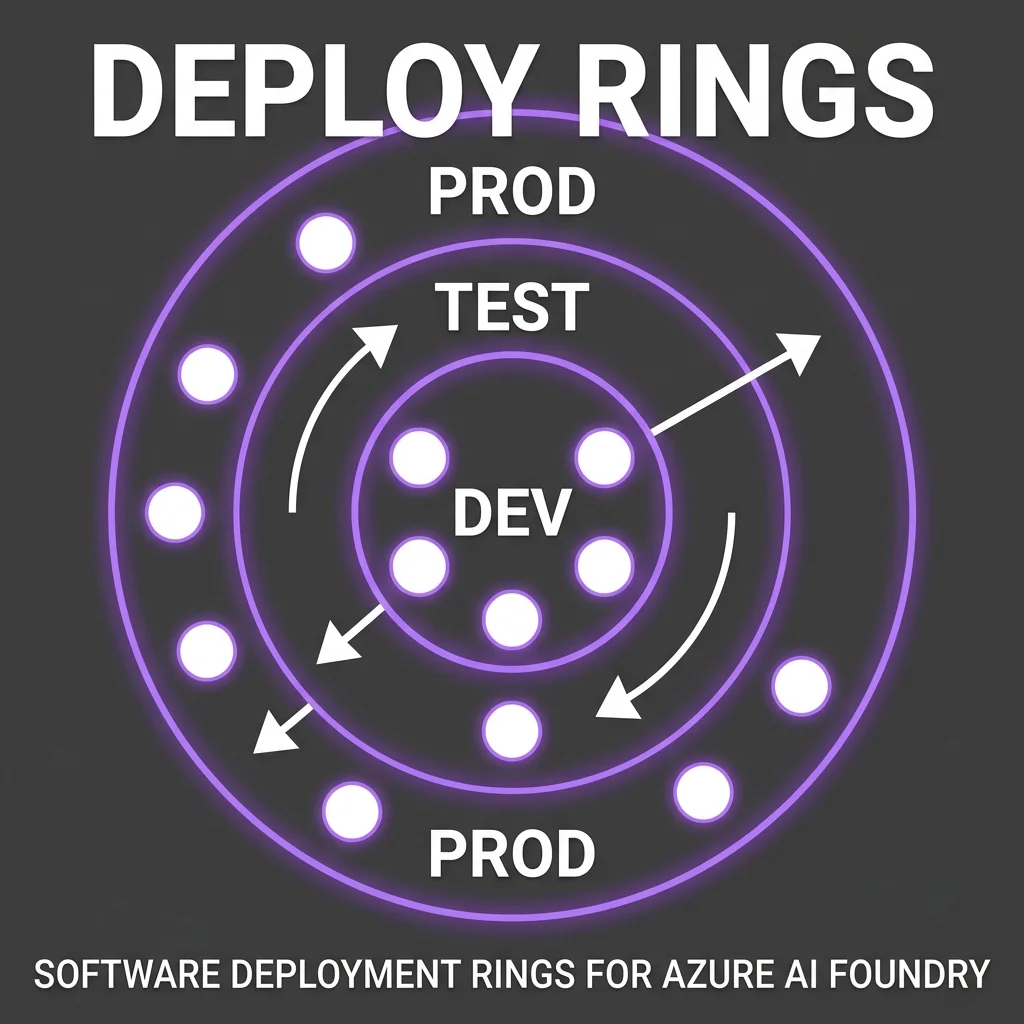
Private Link Endpoints
To keep data traffic isolated from the public internet, all communication between your application, database, and models travels over private Azure networks using Private Link Endpoints, protecting data from transit interception.
5. In-Line Governance: Content Safety, Prompt Shields, and Audit Logging
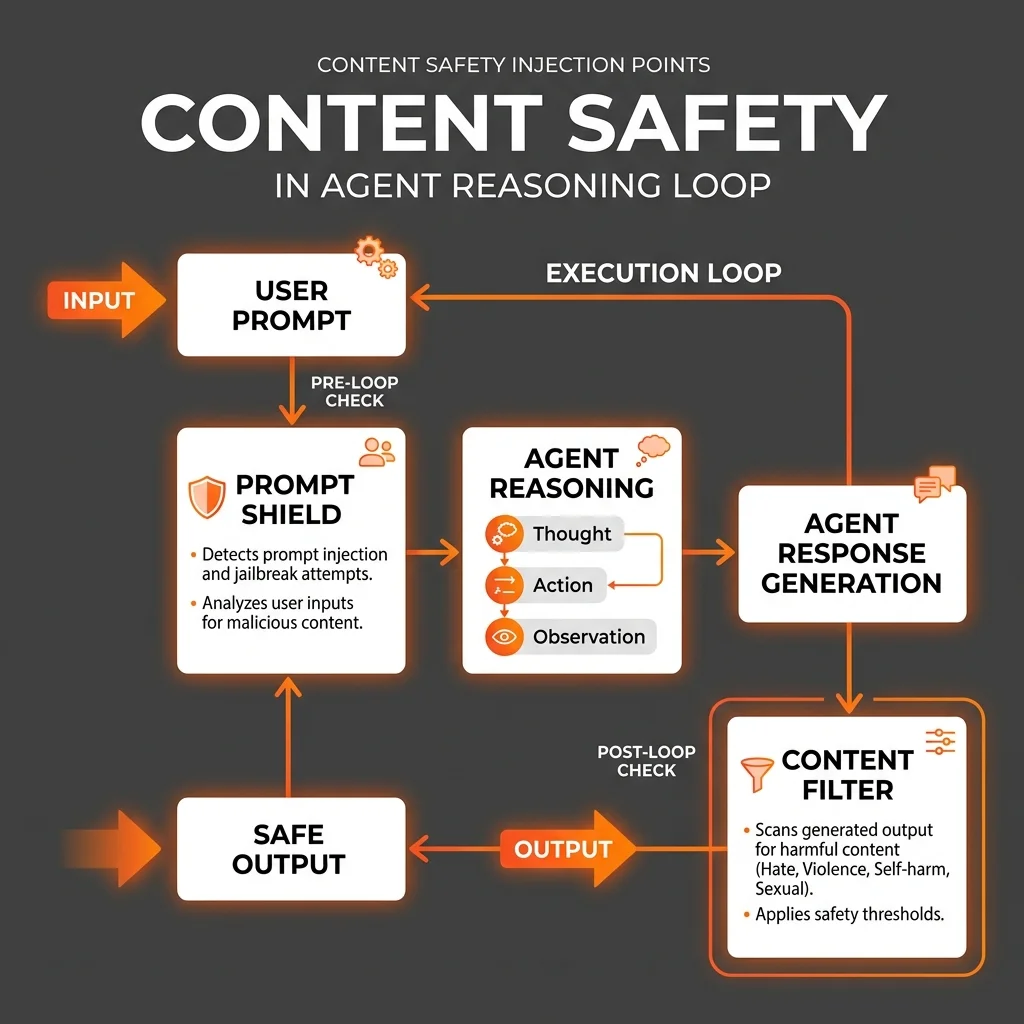
Deploying autonomous agents in production requires active safety filtering. If an agent executes a tool call, it must be protected against prompt injection attacks that try to bypass system boundaries.
Azure AI Content Safety provides this protection through three primary mechanisms:
- Prompt Shields: Detect and block user inputs designed to redirect the model's logic or override system instructions.
- Structured JSON Scanners: Validate that the outputs generated by the agent conform to the expected schemas, blocking malformed data before it reaches backend systems.
- Audit Logs to Log Analytics: Log all inputs, tool executions, and model responses to Azure Log Analytics for compliance auditing.
Below is an Azure Log Analytics KQL query designed to parse agent execution logs and identify potential prompt injection attempts blocked by Prompt Shields:
AzureDiagnostics
| filter Category == class="tok-str">"AzureOpenAIAudit"
| parse Properties_s with * &class="tok-cm">#039;class="tok-str">"prompt_filter_results":[class="tok-str">' filterResults ']class="tok-str">' *
| where filterResults contains &class="tok-cm">#039;"jailbreak":{"filtered":true}'
| project TimeGenerated, OperationName, Resource, filterResults, Properties_s
| order by TimeGenerated desc
Implementing this logging allows security teams to monitor agent safety performance and detect potential threats in real time.
6. Sovereign Infrastructure: Local Boundaries and Private Cloud Deployments
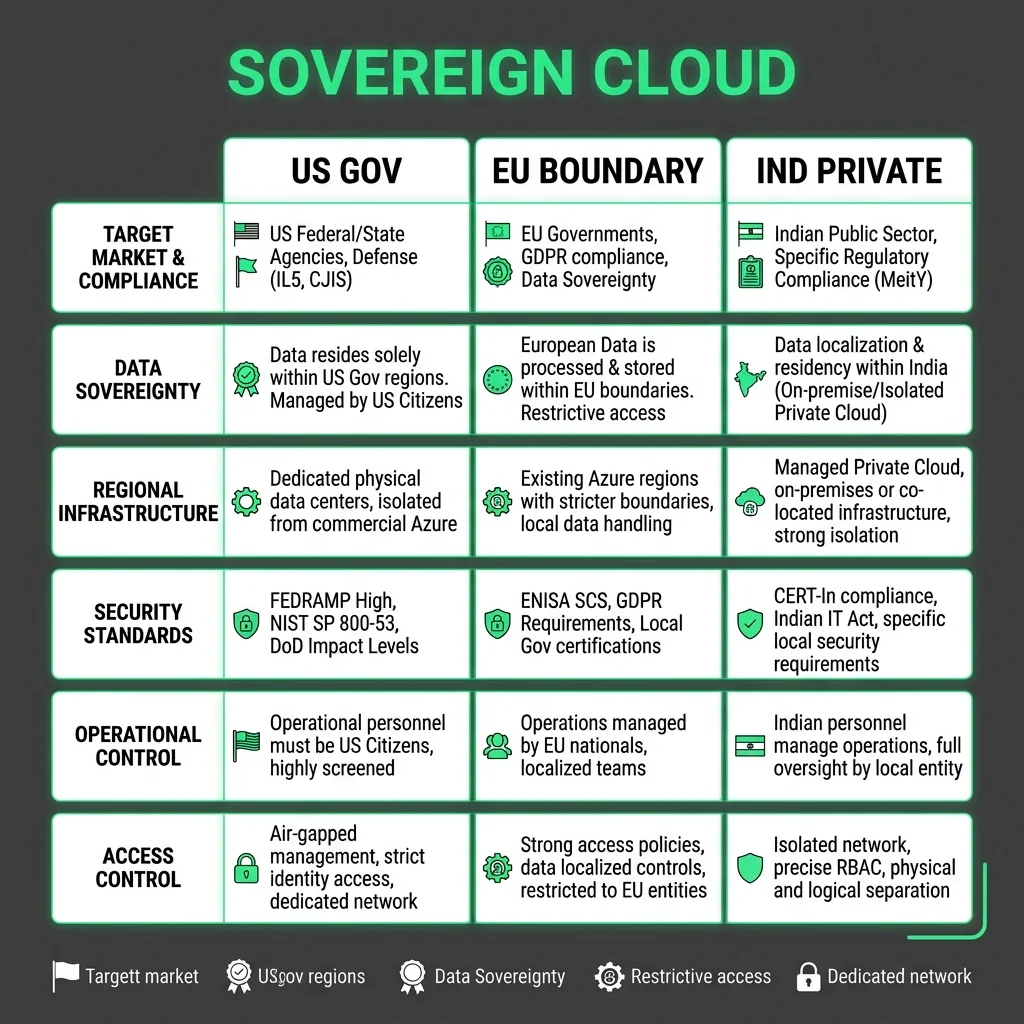
For organizations operating under strict data sovereignty rules (such as EU data boundaries or public sector compliance), data residency is critical.
Azure AI Foundry supports sovereign deployments through:
- Azure Government Regions: Deploying agent resources inside dedicated US Gov Virginia or Arizona regions.
- EU Data Boundary Enforcement: Ensuring that all data processing, model inference, and audit logging remain strictly within the European Union.
- Private Host Environments: Running dedicated Azure Container Apps or App Service instances within isolated Virtual Networks (VNets).
7. Developer Blueprint: Creating a Secure Azure AI Foundry Agent
To integrate with the Azure AI Foundry ecosystem, developers can define and deploy a secure agent service. This process involves configuring your agent parameters using the Azure SDK (Python/Go/PHP), setting up action groups, and mapping API endpoints.
Below is a complete implementation showing how to define an Azure AI Agent session, execute a reasoning step, and return the tool calls securely.
Python Implementation
First, configure the Python service to communicate with the Azure OpenAI service securely using Entra ID credentials:
class="tok-cm"># app/services/azure_agent_service.py
import os
import json
import logging
from azure.identity import DefaultAzureCredential
from azure.ai.translation.text import TextTranslationClient
from openai import AzureOpenAI

logger = logging.getLogger(__name__)

class SovereignAzureAgent:
    class="tok-kw">def __init__(self, endpoint: str, deployment_name: str):
        class="tok-str">""class="tok-str">"
        Initializes the secure Azure OpenAI Agent service coordinator.
        Uses DefaultAzureCredential to authenticate via Entra ID Managed Identity.
        "class="tok-str">""
        self.endpoint = endpoint
        self.deployment_name = deployment_name
        self.credential = DefaultAzureCredential()

        class="tok-cm"># Authenticate client natively using Managed Identity
        self.client = AzureOpenAI(
            azure_endpoint=self.endpoint,
            azure_ad_token_provider=self.credential.get_token(class="tok-str">"https:class="tok-cm">//cognitiveservices.azure.com/.default").token,
            api_version=class="tok-str">"2024-02-15-preview"
        )

    class="tok-kw">def execute_agent_step(self, messages: list, tools: list) -> dict:
        class="tok-str">""class="tok-str">"
        Executes a single reasoning step in the agent loop.
        Applies system prompting and tool invocation schemas.
        "class="tok-str">""
        try:
            response = self.client.chat.completions.create(
                model=self.deployment_name,
                messages=messages,
                tools=tools,
                tool_choice=class="tok-str">"auto"
            )

            choice = response.choices[0]
            return {
                class="tok-str">"success": True,
                class="tok-str">"message": choice.message,
                class="tok-str">"finish_reason": choice.finish_reason
            }
        except Exception as e:
            logger.error(fclass="tok-str">"Azure Agent execution failed: {str(e)}")
            return {class="tok-str">"success": False, class="tok-str">"error": str(e)}
Go Implementation
For high-performance concurrency in backend services, here is the Go version utilizing the official Azure SDK:
// app/services/azure_agent.go
package services

import (
	"context"
	"encoding/json"
	"fmt"
	"log"

	"github.com/Azure/azure-sdk-for-go/sdk/azidentity"
)

type GoAzureAgent struct {
	Endpoint   string
	Deployment string
}

func NewGoAzureAgent(endpoint string, deployment string) *GoAzureAgent {
	return &GoAzureAgent{
		Endpoint:   endpoint,
		Deployment: deployment,
	}
}

func (a *GoAzureAgent) RunAuditStep(ctx context.Context, tenantID string) (string, error) {
	// Initialize default credential chain (Env -> Managed Identity -> VSCode)
	cred, err := azidentity.NewDefaultAzureCredential(nil)
	if err != nil {
		return "", fmt.Errorf("failed to load identity chain: %w", err)
	}

	// Fetch cognitive access token dynamically
	token, err := cred.GetToken(ctx, azidentity.TokenRequestOptions{
		Scopes: []string{"https://cognitiveservices.azure.com/.default"},
	})
	if err != nil {
		return "", fmt.Errorf("failed to fetch ad token: %w", err)
	}

	log.Printf("Successfully authenticated token for tenant: %s (token length: %d)", tenantID, len(token.Token))
	return "Authenticated step success", nil
}
PHP Implementation
For integration with legacy systems or PHP-based backends, the following class implements token retrieval and API invocation:
<?php
class="tok-cm">// app/Services/AzureAgentService.php
namespace App\Services;
class AzureAgentService
{
private string $endpoint;
private string $deployment;
private string $tokenCredentialUrl;
public class="tok-kw">function __construct(string $endpoint, string $deployment)
{
$this->endpoint = rtrim($endpoint, &class="tok-cm">#039;/class="tok-str">');
$this->deployment = $deployment;
class="tok-cm">// Azure Instance Metadata Service (IMDS) endpoint for Managed Identity
$this->tokenCredentialUrl = &class="tok-cm">#039;http://169.254.169.254/metadata/identity/oauth2/token?api-version=2018-02-01&resource=https://cognitiveservices.azure.com/';
}
public class="tok-kw">function fetchManagedIdentityToken(): ?string
{
$opts = [
&class="tok-cm">#039;httpclass="tok-str">' => [
&class="tok-cm">#039;method' => class="tok-str">'GET',
&class="tok-cm">#039;headerclass="tok-str">' => "Metadata: true
"
]
];
$context = stream_context_create($opts);
try {
$response = @file_get_contents($this->tokenCredentialUrl, false, $context);
class="tok-kw">if ($response === false) {
class="tok-kw">return null;
}
$data = json_decode($response, true);
class="tok-kw">return $data[&class="tok-cm">#039;access_token'] ?? null;
} catch (\Throwable $e) {
class="tok-kw">return null;
}
}
}This implementation demonstrates a secure agent workflow. The client routes requests over private networks, the orchestrator manages the execution flow, and the handler executes the required tool locally, returning the result to the planning model.
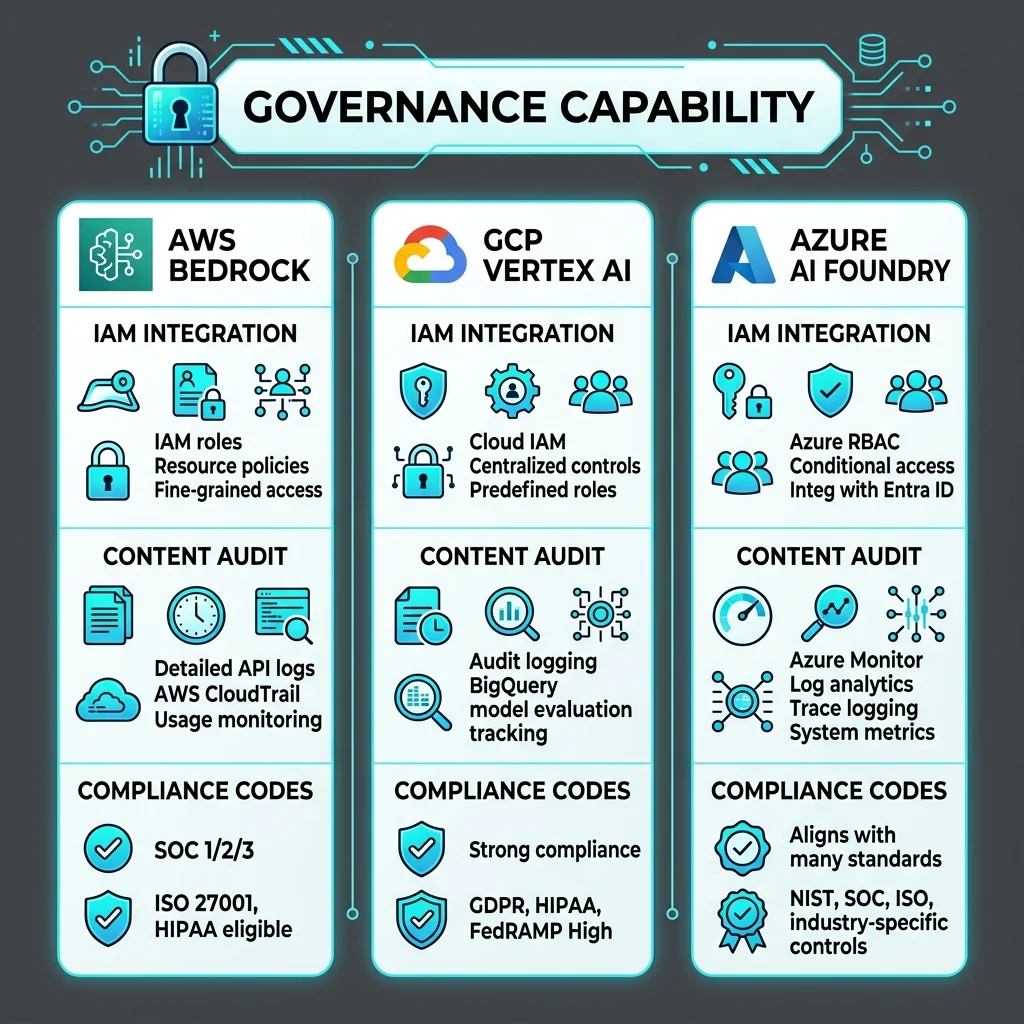
8. Comparative Intelligence: Azure Foundry vs. AWS Bedrock vs. GCP Vertex
The table below compares building a custom agentic framework using DIY libraries deployed on EC2 with using managed cloud platforms.
| Evaluation Dimension | Azure AI Foundry (AgentCore) | AWS Bedrock | GCP Vertex AI |
|---|---|---|---|
| Identity & RBAC | Native Entra ID integration with Managed Identities | AWS IAM Roles and service boundaries | Google Cloud IAM and Service Accounts |
| In-Line Safety | Prompt Shields & Content Safety filters | Amazon Bedrock Guardrails | Vertex AI Safety Settings |
| Sovereign Boundaries | Azure Government and strict EU data boundaries | AWS GovCloud regions | Google Distributed Cloud (GDC) |
| Observability | Azure Monitor, App Insights, and Log Analytics | AWS CloudWatch and X-Ray | Google Cloud Logging and Trace |
9. Failure Modes: Token Budgeting, Loop Breakers, and Resiliency Patterns
Deploying autonomous agents in production requires planning for failures. Unlike traditional web APIs, agentic loops can encounter unique failure states like infinite execution loops, API timeouts, and context window overflow.
To protect backend services, you must implement a circuit breaker architecture:
Loop Detection
If the agent calls the same tool repeatedly (more than 5 times consecutively) without generating a new state, the circuit breaker halts execution and returns a fallback response.
Automated Tool Fallbacks
When a primary backend tool times out, the circuit breaker intercepts the error and routes the request to an alternative tool or read-only replica.
Token Budget Cap
To prevent runaway costs from reasoning loops, the system enforces a strict token limit per session. If an agent's cumulative token usage exceeds the defined budget, the circuit breaker terminates the session.
10. Transition Roadmap: Moving Toward Decentralized Agentic Networks (2027–2030)
The transition to managed agentic systems is the first step toward a broader evolution in cloud computing. Over the next few years, operating systems, databases, and network management layers will integrate autonomous agents directly into their control loops.
Phase 1: Managed Orchestration (2026–2027)
Enterprises deploy managed agents to automate business processes, customer service flows, and data entry tasks. Frameworks like Azure AI Foundry AgentCore standardize how agents access tools and databases securely.
Phase 2: Autonomous Cloud Ops (2028–2029)
Agents take over cloud operations. Instead of human engineers writing Terraform templates and monitoring metrics, autonomous agents will analyze traffic patterns, detect security threats, adjust database configurations, and provision resources dynamically.
Phase 3: Ambient Computing Meshes (2030)
By 2030, cloud computing will transition to decentralized agent meshes. Micro-agents running on edge devices, mobile platforms, and local servers will communicate peer-to-peer, coordinating tasks and sharing resources locally without relying on centralized orchestrators.
This evolution presents significant engineering challenges, particularly in securing distributed agent networks and managing consensus. However, the operational efficiencies make the transition inevitable.
11. Key Takeaways
- Managed Primitives: Azure AI Foundry simplifies agent development by decoupling orchestration flows, memory streams, and tool hubs.
- Entra ID Security: Managed Identities eliminate the need for hardcoded credentials, securing agent tool access through RBAC.
- Active Safety: In-line Prompt Shields and Content Safety filters block prompt injection attacks and protect downstream APIs.
- Sovereign Infrastructure: Deployments in Azure Government and EU data boundaries ensure compliance with regional residency rules.
- Resiliency Patterns: Circuit breakers, loop detection, and token budgets prevent runaway costs and maintain system stability.
12. Frequently Asked Questions (FAQ)
How does Azure AI Foundry protect customer data during model training?
Azure OpenAI service ensures that customer data, prompt history, and vector embeddings are never used to train or fine-tune public foundation models. Your data remains isolated within your Azure subscription and secure network boundary.
Can Azure AI Foundry agents execute custom code locally?
Yes. Agent tool execution can trigger Azure Functions to execute custom Python, Node.js, or Go scripts. These functions run in a sandboxed execution environment with strict IAM limits.
How do you handle rate-limiting issues on Azure OpenAI endpoints?
To prevent rate-limit failures (HTTP 429), you must configure retry-with-jitter algorithms in your client SDK, allocate Provisioned Throughput (PTU) for critical production models, and implement circuit breakers to handle fallback routing.
Does Azure AI Foundry support third-party vector databases?
Yes. Azure AI Search natively supports vector search and integrates with Azure Cosmos DB, PostgreSQL, and third-party vector engines like Pinecone and Milvus.
How do you manage agent sessions across multiple user interactions?
Azure AI Foundry Agents manage session state natively using a persistent sessionId parameter. The orchestrator retains conversational history and agent memory across multiple API invocations within the session window.
13. About the Author
Vatsal Shah is a software architect and digital growth strategist specializing in cloud systems and AI engineering. He designs secure architectures, guides teams through platform migrations, and builds systems that prioritize performance and data privacy.