Next.js 16.3 Turbopack Cuts Dev Memory 90% and Adds Rust React Compiler
By Vatsal Shah · June 29, 2026 · Open Source
- Memory Eviction: Dev memory usage drops up to 90% on large dashboards by evicting older compilation results to disk.
- Build Caching: Persistent file-system caching is now supported for
next build, delivering up to 5.5x faster cached compile times. - Native Rust Compiler: Integrating the Rust React Compiler into Turbopack yields 20-50% compile speed improvements compared to Babel.
- API Additions: Full support added for
import.meta.globAPI, plus faster hot module replacement (HMR).
What Happened
Development tool memory bloat is a persistent problem for modern web developers. IDEs, linters, types Checkers, and bundlers all fight for limited system memory. On June 29, 2026, the Next.js team addressed this head-on, sharing details on the performance-focused Turbopack updates coming in Next.js 16.3.
The stable release focus for Turbopack in 16.3 is compiler efficiency. The headline improvement is a new development cache eviction system that slashes dev server memory usage by up to 90% on complex dashboards. Additionally, Next.js 16.3 introduces persistent file system caching for production builds and experimental support for the native Rust React Compiler.
A public preview is available today under the @preview npm tag, with a stable release expected in the coming weeks.

Slashing Dev Server Memory by 90%
Turbopack relies on incremental compilation: caching intermediate results in memory to avoid compiling unchanged files. While this keeps compiler speed high, it creates a trade-off: high RAM usage that expands as developers click through different routes in long sessions.
In Next.js 16.3, Turbopack resolves this by introducing cache eviction. By leveraging the development disk persistence cache introduced in v16.1, Turbopack can now evict older, unused compilation entries from system memory and swap them to disk. When a developer returns to an evicted route, Turbopack reads the cache from disk instead of recompiling.
The memory savings are significant.

Memory eviction and dev cache are enabled by default in 16.3. Developers who need to disable it for benchmarking can set the experimental turbopackMemoryEviction config to false:
const nextConfig = {
  experimental: {
    turbopackMemoryEviction: false, // Disables memory eviction
  },
};
Persistent File System Caching for Builds
The persistent disk cache, which has sped up cold starts for next dev since 16.1, has been hardened in production and is now available for production builds (next build).
By caching intermediate build data to the .next directory on disk, consecutive builds can skip redundant compilation of static assets. This is especially useful in CI/CD pipelines: by preserving the .next folder between runs, build runners can tap into previous cache states.
According to Next.js benchmarks, compiling static assets with a populated cache is up to 2.3x faster on nextjs.org (dropping from 21s to 9.2s) and up to 5.5x faster on vercel.com/geist (dropping from 30s to 5.5s).
Persistent build caching can be enabled via next.config.js:
const nextConfig = {
  experimental: {
    // Enable filesystem caching for `next build`
    turbopackFileSystemCacheForBuild: true,
  },
}
Experimental Rust React Compiler Support
React Compiler support has been stable in Next.js since 16.0. However, the compiler has run exclusively as a Babel transform. On large codebases, this Babel compilation pass runs in a separate JavaScript process, consuming valuable CPU resource and slowing build execution.
Recently, the React team published a native Rust port of the compiler. Next.js 16.3 integrates this Rust React Compiler directly into Turbopack's native pipeline.
Early testing on Vercel's v0.app dashboard shows 20% to 50% compilation speed wins compared to the Babel transform, leading Vercel to release it as an experimental feature.
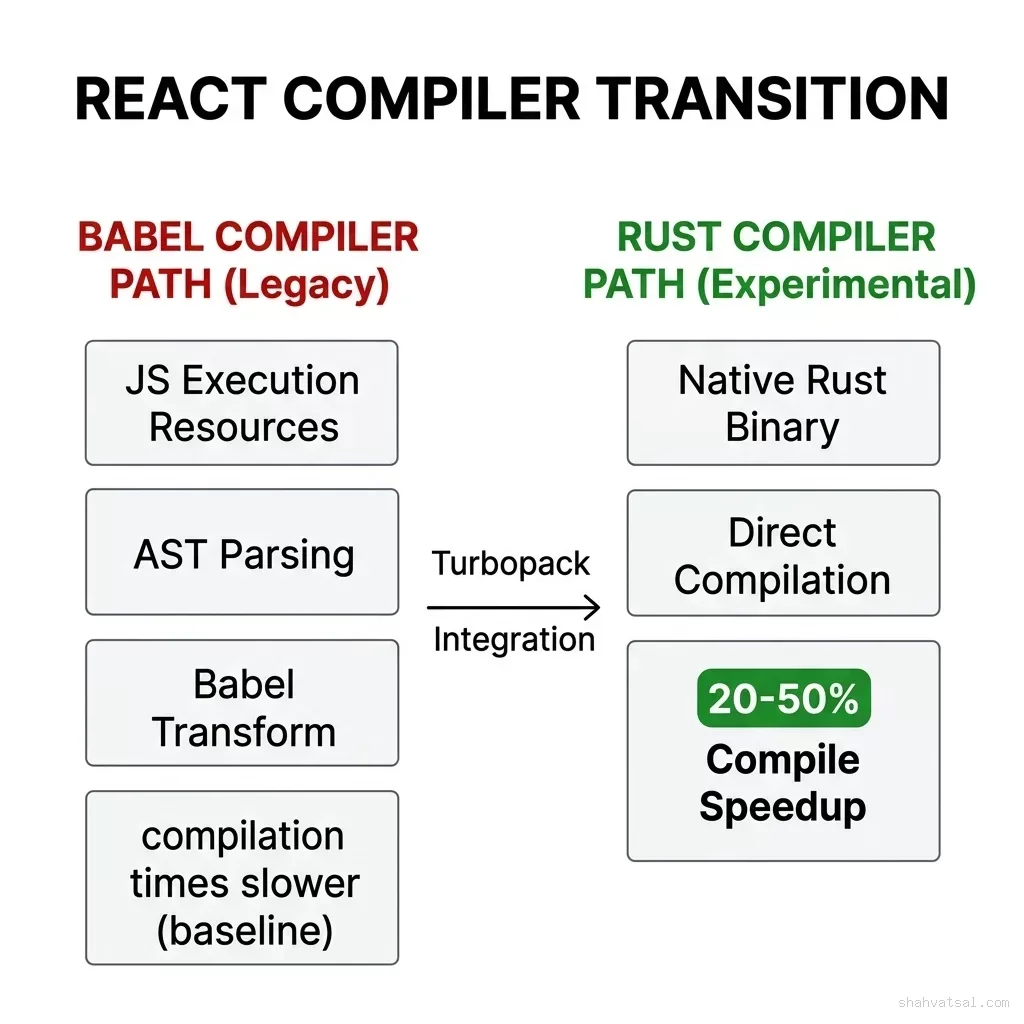
To test out the native version, enable the React compiler and set the experimental flag in your config:
const nextConfig = {
  experimental: {
    reactCompiler: true,
    turbopackRustReactCompiler: true, // Uses native Rust compiler
  },
};
What This Means for Your Next.js Setup
If you plan to upgrade to Next.js 16.3, the immediate developer experience wins are clear:
- Lower local resource footprint: If you've had to restart your
next devserver because your laptop was crawling or ran out of RAM, the new memory eviction engine should resolve this. - Speed up CI pipelines: Populating the persistent build cache in your deployment pipelines will shave seconds off your build times. Save the
.nextfolder across build steps. - Opt-in to the Rust React Compiler: If you are already using the React Compiler, switching to
turbopackRustReactCompiler: trueis a zero-effort way to reduce build time overhead.
Sources
- Next.js Blog: Turbopack — What's New in Next.js 16.3
- ByteIota: Next.js 16.3 Turbopack Memory & Build Cache Analysis
Frequently Asked Questions
What is new with Turbopack in Next.js 16.3?
Turbopack in Next.js 16.3 introduces a development memory eviction system that reduces dev server memory usage by up to 90%. It also adds persistent file system caching for next build, experimental support for the native Rust React Compiler, and import.meta.glob API compatibility.
How does Turbopack reduce dev server memory usage by 90%?
Next.js 16.3 leverages file-system persistence to evict cached compilation results from memory when they are no longer actively needed. This prevents memory usage from growing bounds-free during long development sessions, especially on projects with many routes.
What is the persistent build cache in Next.js 16.3?
The persistent file-system cache, previously used to speed up next dev starts, is now available for next build. By persisting Turbopack's memory cache to disk under the .next directory, consecutive builds can compile static assets much faster (e.g., up to 2.3x faster for nextjs.org).
What is the experimental Rust React Compiler in Next.js 16.3?
Previously, the React Compiler was only executed as a Babel transform, which could bottleneck compilation. Next.js 16.3 integrates a native Rust port of the React Compiler into Turbopack. Early benchmarks show compilation speed wins of 20-50% on large applications.
How do I enable the native Rust React Compiler in Next.js?
To test the native compiler, make sure you have the React Compiler enabled in your next.config.js and set the experimental turbopackRustReactCompiler flag to true. You can also configure memory eviction and persistent build caching in the experimental section of your config.