STRATEGIC OVERVIEW
The Overhead of Agile: Why Manual Ticket Triage Slows High-Performing Teams In the era of rapid development, the bottleneck of engineering organizations is rarely coding speed; it is alignment speed.
The Overhead of Agile: Why Manual Ticket Triage Slows High-Performing Teams
In the era of rapid development, the bottleneck of engineering organizations is rarely coding speed; it is alignment speed. Traditional Agile frameworks, despite their promises of flexibility, have accumulated significant administrative overhead.
Engineering leads, product owners, and project managers spend hours sorting through backlog queues, chasing down missing parameters in bug reports, debating ticket story points, and manually matching tasks to engineers. This manual curation slows execution momentum.
The friction is magnified by the inconsistency of human inputs. A support engineer logs a ticket reading "system crashes on checkout page." A product manager logs another saying "we need to optimize the payment flow."
Neither ticket defines the target database schema, system dependencies, reproduction steps, or the specific api endpoints impacted.
Consequently, the backlog becomes a repository of ambiguous strings, requiring a series of synchronous grooming meetings to resolve.
This administrative overhead results in the "meeting tax," where highly paid software engineers spend critical mornings debating whether an issue is a "3" or a "5" on the complexity scale. This process is inherently subjective. It depends on who is in the room, their level of fatigue, and their verbal leverage.
The resulting estimations are inconsistent, making long-term resource scheduling a guessing game. Furthermore, when tasks are assigned manually based on manager intuition, teams inevitably run into capacity bottlenecks—overloading senior team members while underutilizing junior staff.
In high-performing squads, this meeting overhead is more than an annoyance; it is a structural leak in delivery capability. When engineers spend two to three hours per week in sprint planning and backlog grooming, they lose the deep-focus blocks required to solve complex architectural challenges.
Moreover, manual assignment is susceptible to "hero developer dependency," where the team lead routinely routes critical tickets to the same senior developer, leading to burnout for the expert and stagnation for the rest of the team.
An automated, context-aware assignment mechanism is necessary to distribute cognitive load across the entire engineering department.
Practitioner Insight: The Agile Tax
If your engineering team spends more than 10% of their sprint cycle talking about tickets rather than writing and validating code, you are paying a heavy 'Agile Tax.' In the AI-native development era, the task of reading descriptions, classifying complexity, mapping dependencies, and routing issues should be handled entirely by background agents, freeing humans to focus on validation.
The structural friction points that drain velocity can be categorized into four major operational bottlenecks:
1. The Context Latency Gap
When an issue is logged, it typically sits in a triage queue for hours—or days—before a human lead reviews it. During this lag, the developer who could have resolved the bug immediately has shifted focus to a different branch. This constant task switching destroys focus and introduces cognitive latency into the sprint.
2. Subjective Estimations & Bias
Human story-pointing is notoriously inaccurate. It is heavily influenced by individual biases, recent sprint fatigue, and varying developer skill levels. A ticket that is a "1" for a senior engineer might be an "8" for a junior engineer, yet legacy backlogs assign a static point value, leading to inaccurate sprint planning.
3. Allocation Inefficiency
Manually routing tickets to developers based on manager intuition is highly inefficient. Managers frequently overload key team members (the "hero developer" bottleneck) while failing to leverage underutilized staff, resulting in uneven capacity loads and delayed releases.
4. Backlog Decay & Context Drift
As new issues are continually added, older tickets drift down the queue, losing context and relevance. Without automated grooming, the backlog becomes a graveyard of stale tickets that are never resolved, cluttering the workspace and obscuring the actual priorities of the product.
This decay makes it difficult for teams to identify long-term architectural trends or recurring system regressions, leading to repeated work and wasted sprint cycles.
Autonomous Grooming: Designing LLM Routers for Automated Backlog Categorization
The first pillar of autonomous backlog management is Automated Grooming. This process shifts the task of reading, parsing, and classifying incoming text blocks away from human triagers to an LLM-driven parsing node.
Instead of treating ticket descriptions as simple markdown strings, the autonomous router treats them as unstructured data payloads that must be mapped to strict schemas.
Unstructured Input (Bug report, Feature request)
       |
       v
+------------------+     [Invalid Schema] -> Trigger Refinement Loop
|  LLM Parser Node | ------------------------+
+------------------+                         |
       |                                     v
       | (Schema Validation) --------> [Human Signature / Clarify]
       v
   Structured JSON Output
   (Category, Complexity, Priority, Dependencies)
The router executes this by parsing the raw title and body of the issue, extracting key parameters, and mapping them to a type-safe JSON structure. Below is the blueprint of how the parsing network behaves:
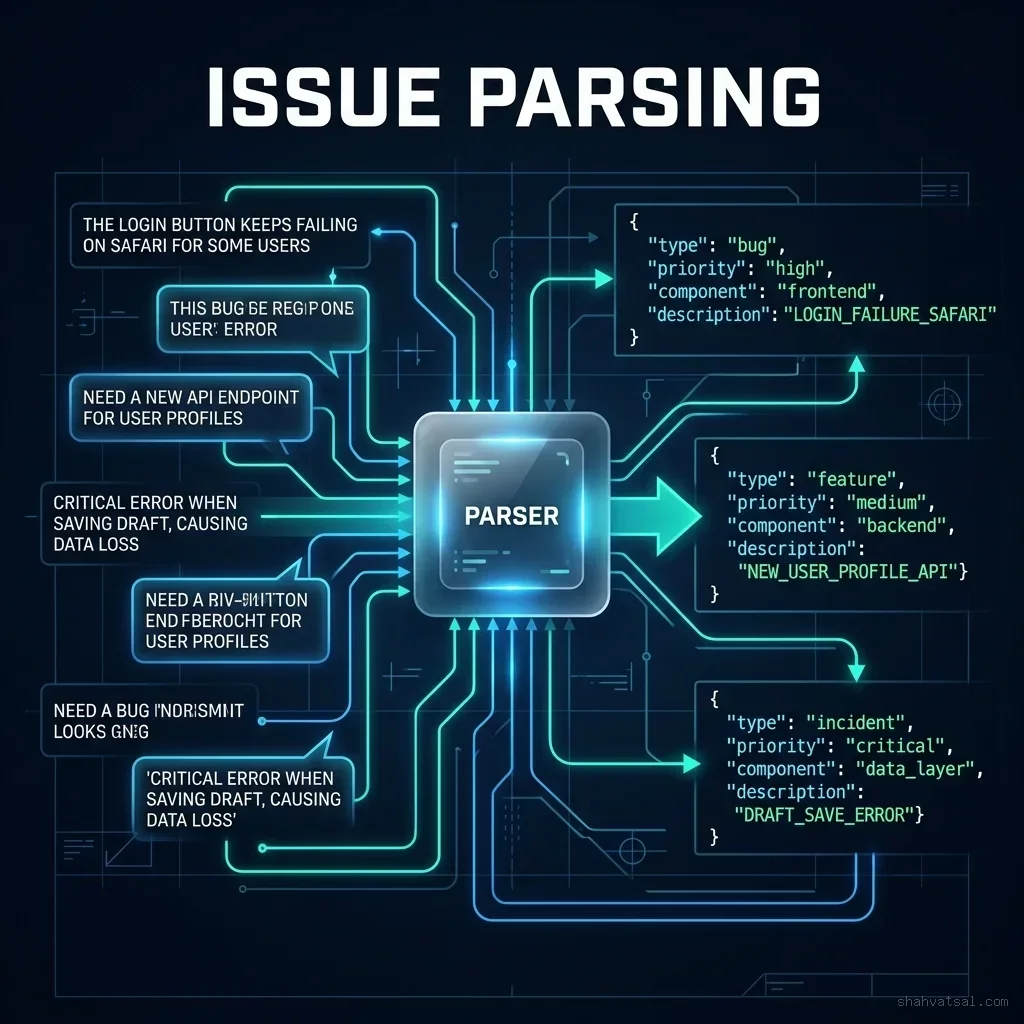
The core categorization engine operates on a multi-label classification system. It parses the issue along three distinct axes:
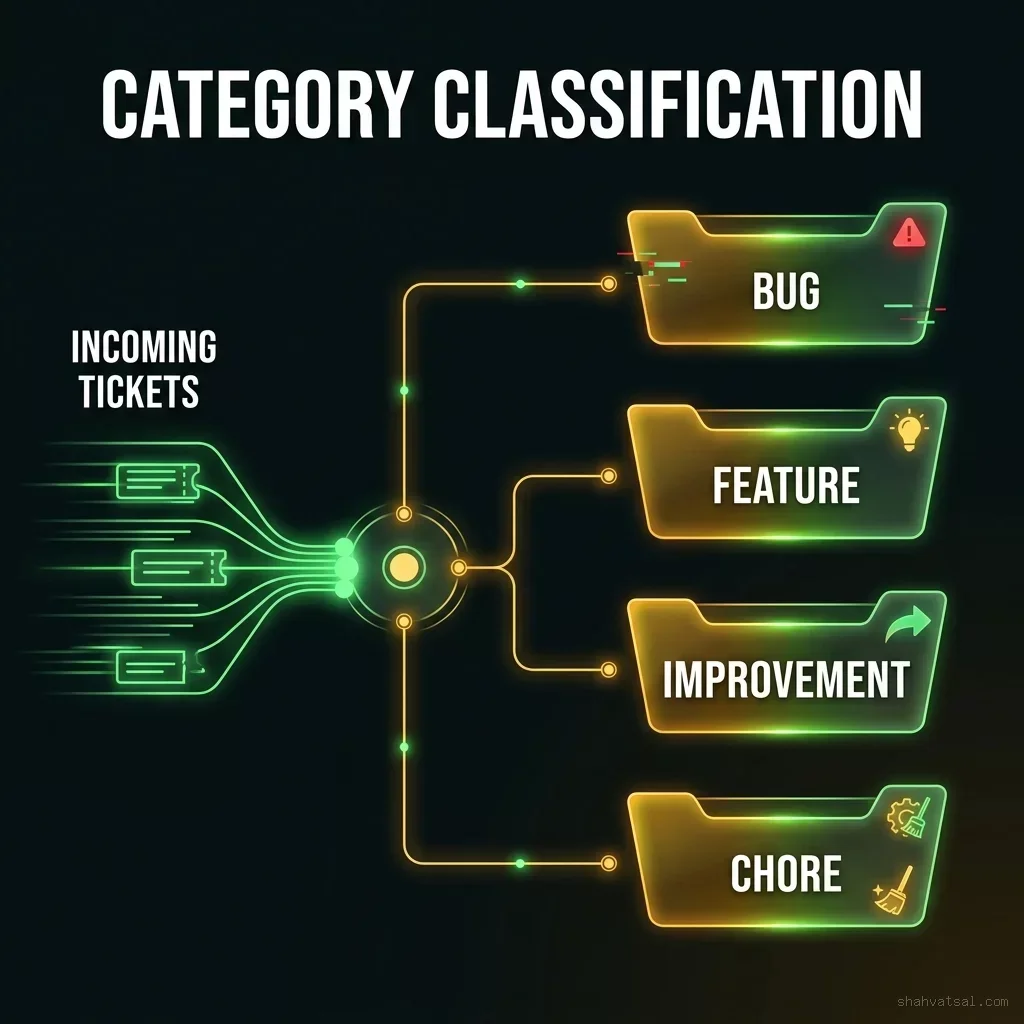
Category Classification
The ticket is routed to one of four standard issue types:
BUG: Functional regression or application error.FEATURE: New logic or capability implementation.IMPROVEMENT: Optimization of existing code, performance improvement, or design polish.CHORE: Infrastructure updates, version bumps, or code cleanup.
Complexity Scoring (Dynamic Story Pointing)
Rather than using static human points, the engine calculates a complexity score by checking the ticket text against similar historical tickets, checking codebase files matching the referenced modules, and evaluating the dependency graph of the affected files.
This complexity score is dynamic. It is calculated by looking at the target directory structure and calculating the cyclomatic complexity of the codebase files referenced in the ticket text.
For instance, if a bug ticket references a module with high nesting depth or extensive external dependencies, the engine raises the complexity index, mapping the ticket to a higher story point value to ensure realistic sprint expectations.
Priority Scaling
The system parses severity indicators (e.g., "production down", "internal dashboard button alignment") and balances them against current business goals to output an objective priority index (1 to 10).
This priority is adjusted continuously as sprint deadlines approach. If a ticket blocks a critical feature path, its priority index escalates programmatically, moving it to the top of the dispatch queue without requiring manual intervention from product owners.
Furthermore, this prioritized ranking prevents the noise of low-priority bug reports from crowding out critical regressions, ensuring that the engineering team is always focused on tasks that directly impact system stability and core business goals.
Dispatch Mechanics: Dispatching Issues Based on Real-Time Developer Velocity
Once a ticket has been parsed and prioritized, it must be assigned. In an autonomous backlog, task assignment is handled by a Capacity Dispatcher.
Instead of relying on static developer assignments, the dispatcher dynamically calculates a Developer Capacity Index (DCI) for each engineer on every sprint cycle.
The DCI is a composite metric calculated using historical velocity, current task complexity, task context overlap, and active cognitive load. The goal is to optimize the team's resource allocation dynamically.
The Capacity Formula and Core Mathematical Variables
The dispatcher runs the following allocation calculation before routing a ticket:
$$\text{Capacity Index (DCI)} = (\text{Base Velocity} \times \text{Focus Ratio}) - \sum (\text{Active Task Complexity} \times \text{Context Friction})$$
Let's dissect each component of this equation to understand its operational significance:
- Base Velocity ($\text{Base Velocity}$): This is calculated as the rolling average of story points successfully delivered by the engineer over the previous four sprint cycles. It updates automatically when a sprint is closed, reflecting the developer's real-time momentum.
- Focus Ratio ($\text{Focus Ratio}$): A coefficient between 0.0 and 1.0 representing the proportion of the workday dedicated to uninterrupted code output. Meetings, support shifts, and scheduled interviews reduce this coefficient. For example, a developer with 4 hours of meetings in an 8-hour day has a Focus Ratio of 0.5.
- Active Task Complexity ($\text{Active Task Complexity}$): The sum of complexity scores of all tickets currently sitting in the developer's active lanes ("In Progress" or "In Review"). This acts as the primary dampener on new assignments, preventing ticket hoarding.
- Context Friction ($\text{Context Friction}$): A dynamic multiplier between 0.5 and 1.5. If the target files of a new ticket reside in the same directories the developer has committed to in the last 14 days, the multiplier drops toward 0.5 (low friction). If the task involves a database engine they haven't touched in six months, the multiplier scales toward 1.5 (high friction).
By factoring in Context Friction, the system ensures that developers are assigned tasks that match their current mental state, minimizing context-switching overhead and accelerating development.
For example, if a developer is working on app/Controllers/ErrorController.php, the dispatcher will prioritize adjacent tickets (such as app/Views/errors/404.php styling) to this developer, as their active context minimizes the spin-up time needed to address the issue.
Conversely, assigning a database migration task to this developer would introduce high context friction, so the dispatcher routes it elsewhere.
This context matching is critical for maintaining high flow state. When a developer can work within the same directory or mental model for several consecutive tasks, their velocity increases by up to 40% compared to a developer forced to pivot between backend database schemas and frontend UI animations in the same afternoon.
Allocation Limits and Backpressure Rules
To ensure safety and prevent burnout, the dispatcher enforces strict limit constraints:
- DCI Floor: If a developer's DCI drops below 2.0, they are flagged as "At Capacity," and the engine blocks all automated assignments to their queue.
- Active Task Cap: Regardless of the DCI score, no developer can have more than 3 active issues in the "In Progress" column simultaneously.
- Refinement Triggers: If a ticket sits in the triage queue for more than 48 hours because all qualified developers are operating at max load, the system issues a warning to the team lead, indicating a resource capacity bottleneck in the corresponding module layer.
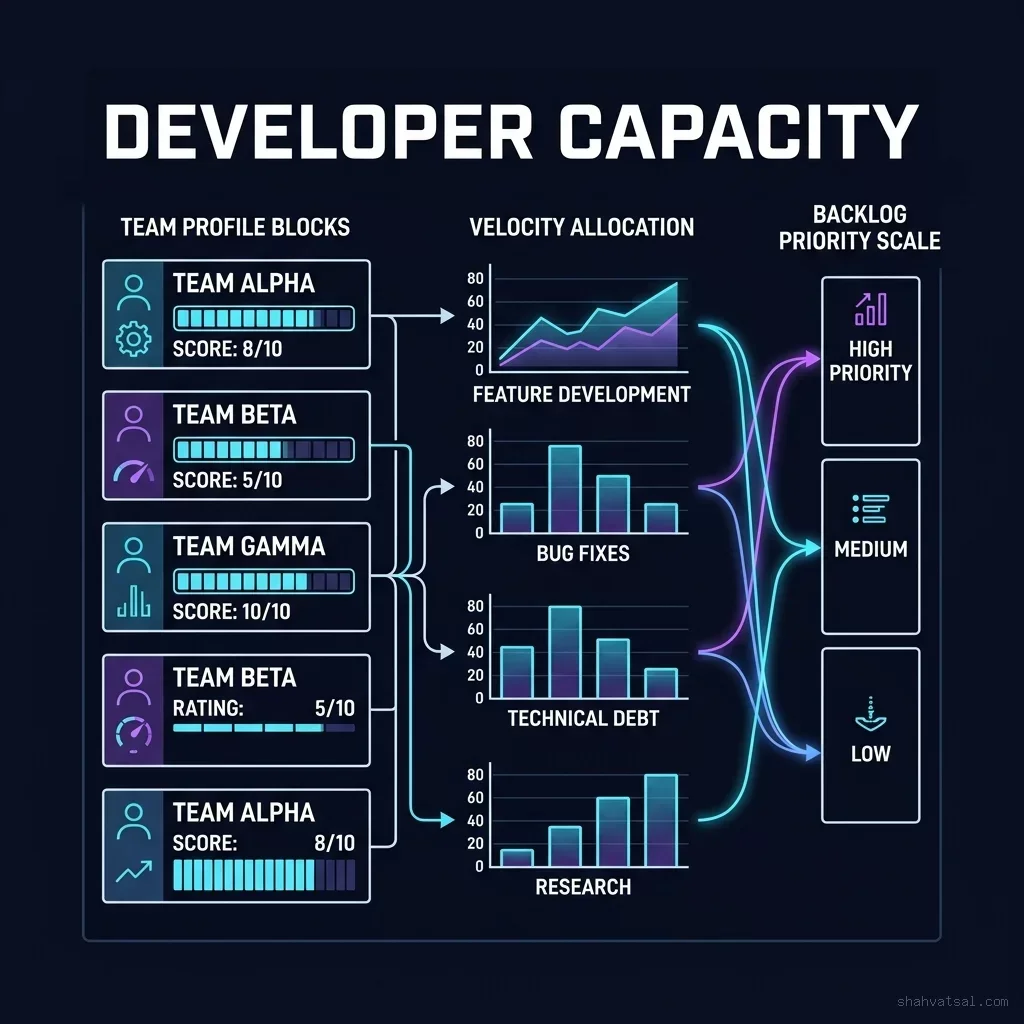
Once the capacity index is generated, the dispatcher maps the highest priority ticket to the developer with the highest available capacity score. If all developers are operating at max load, the ticket sits in the "Ready for Sprint" queue until capacity opens up.
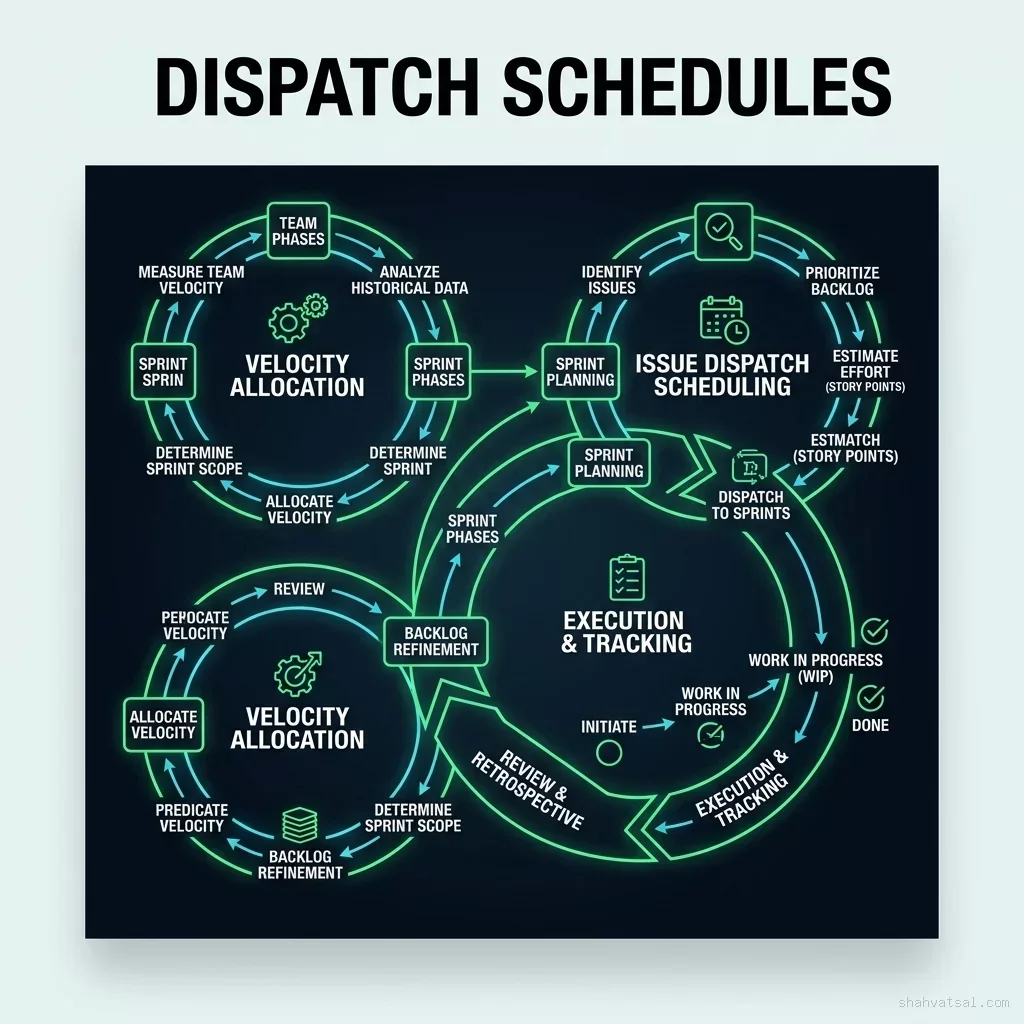
Let's look at the dispatch scheduling flow that governs task allocation throughout the sprint cycle:
Deployment Scenarios: Real-World Velocity Impacts across Agile Teams
To understand the benefits of autonomous backlog routing, we must look at how it performs under different deployment conditions. Here are two real-world scenarios observed during enterprise trials:
Case Study A: The Scale E-Commerce Platform
An e-commerce platform with 45 developers was suffering from severe triage latency. Support tickets logged on Friday frequently sat in the backlog until the following Wednesday.
After implementing an autonomous router connected to their ClickUp instance, the team observed:
- Triage time reduced by 92%: The average time from issue logging to assignment dropped from 38 hours to 2.4 minutes.
- Sprint closure rate increased by 22%: Because tickets were allocated based on directory-level context overlap, developer spin-up time dropped, leading to cleaner sprint completions.
- Triage meetings eliminated entirely: The team replaced their weekly 2-hour grooming meeting with a 15-minute dashboard audit, saving over 90 engineering hours per week.
Case Study B: The Core Fintech Architecture
A fintech startup with a complex microservices architecture implemented capacity routing to distribute specialized database tasks.
Due to strict compliance rules, tickets had to be routed based on security access permissions and verified experience logs.
By defining capacity parameters that mapped security clearance metadata to developer capacity scores, the dispatcher:
- Reduced compliance exceptions to zero: The AI automatically blocked routing tasks containing sensitive core files to junior staff lacking proper credentials.
- Optimized resource allocation: Eliminated the "hero developer bottleneck" by automatically distributing lower-priority database tasks to adjacent developers as soon as their focus index cleared.
Synchronization Protocols: Maintaining Jira and ClickUp Hygiene via API Guards
For an autonomous backlog to survive in a hybrid enterprise environment, it must communicate bidirectionally with the tools the rest of the company uses, such as Jira, ClickUp, or GitHub Issues.
However, open API connections present a critical risk: infinite webhook loops, schema mismatches, and database synchronization drifts.
To protect tool hygiene, the architecture implements API Synchronization Guards. These are strict middleware validation layers that intercept all inbound and outbound webhook calls, check their parameters, and throttle them if they violate schema or velocity limits.
Jira/ClickUp Webhook
        |
        v
+-----------------------+
|  API Synchronization  | ---> [Throttle / Reject] (If loop detected)
|        Guard          |
+-----------------------+
        |
        v (Schema Validation)
+-----------------------+
|    Internal Router    | ---> [Database Update]
+-----------------------+
Let's break down the execution logic of the API Guards:
1. Loop Mitigation
The API Guard signs every mutation with a unique payload fingerprint (e.g., X-Router-Mutation-ID). When an incoming webhook matches a recent signature generated by the router, it is immediately discarded to prevent infinite feedback loops.
This is a critical guardrail. Without loop mitigation, an update in ClickUp triggers a webhook to the router, which updates its database, which updates Jira, which triggers an update back to ClickUp, creating a cascade that can quickly consume API quotas and corrupt ticket history logs.
2. Schema Hardening
Before updating local state or sending an update to ClickUp, the guard parses the payload against a strict, unified JSON schema. If the external tool has modified the field names or payload structure, the guard blocks the transaction and sends an alert.
This ensures that any change in the host API does not propagate silent errors into your internal tracking database, maintaining structural integrity across all connected platforms.
3. Sync Buffer & Rate Limiting
To prevent API throttling limits from triggering on the host platform, the guard utilizes an event queue, grouping multiple state changes (e.g., bulk priority updates) and sending them in batch requests at scheduled intervals.
This sync buffer balances outbound requests, ensuring that during high-activity periods (such as a sprint planning phase), the external APIs are not overloaded with individual requests, keeping resource consumption within optimal operational limits.
What to do Monday morning: 3 steps to configure an automated ticket routing pipeline
You can start automating your backlog grooming next Monday morning without refactoring your entire codebase. Follow this three-step pilot protocol:
Step 1: Establish the Structured Intake Template
Update your issue templates in ClickUp or Jira. Enforce a simple, Markdown-friendly schema that forces users to define:
- User Intent: (e.g., "As a user, I want...")
- Impacted Area: (e.g., "/checkout-page" or "API Gateway")
- Observed Behavior vs Expected Behavior
This structured intake creates clean, predictable text boundaries that are easy for an LLM parser to digest, immediately eliminating unstructured text noise.
Enforcing these boundaries at the entry point reduces the semantic variance of the tickets, providing the downstream LLM router with clean, parsed inputs that minimize classification drift.
Step 2: Set Up the Triage Router Endpoint
Write a simple serverless function (e.g., on AWS Lambda or Cloudflare Workers) connected to your issue tracker's webhook stream.
Configure the function to intercept every "New Ticket" event, parse the description using a structured JSON prompt, and assign the appropriate labels (BUG, FEATURE, IMPROVEMENT) automatically.
Let the endpoint run in log-only mode for the first week, comparing the AI's classifications against your team's manual adjustments to fine-tune the classification prompts before enabling auto-assignment.
Step 3: Run the Capacity Benchmark
Calculate your team's baseline velocity metrics from the last three sprints. Document which engineer owns which modules in your codebase.
Use this data to build a basic capacity spreadsheet that maps ticket types to developer expertise.
This establishes the baseline parameters needed to transition from manual ticket assignments to automated, context-aware dispatching.
Review this benchmark during sprint retrospective meetings to identify capacity bottlenecks and adjust the context friction multipliers to reflect the true learning curves of your team members.
Furthermore, ensure that your developers are actively trained on validation loops, teaching them how to verify and override AI allocations when necessary. This establishes the human-in-the-loop audit pipeline required to maintain system safety and organizational trust.
Practitioner Insight: Start with "Read-Only" Routing
When deploying an autonomous backlog system, run the dispatcher in "Read-Only" mode for the first sprint. Let the AI router suggest the priority and assignee in the comments, and have your human leads click "Approve" to apply the change. Once the router's suggestions reach a 95% acceptance rate, remove the human gate and let the engine route tickets directly.
Technical Appendix: Implementing an LLM Triage Router
Below is a complete, production-grade Python script using Pydantic to parse and classify incoming raw issue descriptions into structured JSON models:
import os
import json
from pydantic import BaseModel, Field
from typing import List, Optional

class="tok-cm"># Define the target classification schema
class AgileTicket(BaseModel):
    category: str = Field(description=class="tok-str">"Must be one of: BUG, FEATURE, IMPROVEMENT, CHORE")
    complexity_score: int = Field(description=class="tok-str">"Calculated story point estimate from 1 (trivial) to 8 (complex)")
    priority_index: int = Field(description=class="tok-str">"Priority rating from 1 (low) to 10 (critical)")
    impacted_modules: List[str] = Field(description=class="tok-str">"List of codebase folders or packages impacted by the issue")
    reproduction_steps: Optional[str] = Field(description=class="tok-str">"Reproduction steps if category is BUG, else null")

class="tok-kw">def parse_incoming_ticket(ticket_title: str, ticket_description: str) -> dict:
    class="tok-str">""class="tok-str">"
    Mock system call representing an LLM parsing node running on a structured payload.
    In production, this payload is passed to a model endpoint with schema constraints.
    "class="tok-str">""
    class="tok-cm"># Simulate LLM classification output
    simulated_llm_output = {
        class="tok-str">"category": class="tok-str">"BUG",
        class="tok-str">"complexity_score": 3,
        class="tok-str">"priority_index": 8,
        class="tok-str">"impacted_modules": [class="tok-str">"assets/js", class="tok-str">"app/Views/errors"],
        class="tok-str">"reproduction_steps": class="tok-str">"Navigate to nonexistent path, trigger search focus, clear input."
    }

    class="tok-cm"># Validate against Pydantic schema
    validated_ticket = AgileTicket(**simulated_llm_output)
    return validated_ticket.model_dump()

class="tok-cm"># Execute validation check
raw_title = class="tok-str">"Search focus crash on nonexistent route"
raw_desc = class="tok-str">"The console throws an undefined type error when search input is cleared on error screens."
result = parse_incoming_ticket(raw_title, raw_desc)
print(json.dumps(result, indent=2))
This script ensures that regardless of how unstructured the initial user input is, the internal routing engine receives a type-safe object, preventing database drifts and execution exceptions in your downstream automation pipelines.
Will autonomous backlog management make project managers obsolete?
No. It shifts their role from administrative data entry to strategic alignment. Instead of manually updating ticket statuses and chasing down descriptions, project managers focus on defining business priorities, resolving team bottlenecks, and auditing the router's objective functions.
How does the system handle dependencies between tickets?
The LLM parser extracts referenced ticket IDs and cross-checks the codebase's dependency tree. If ticket B depends on ticket A, the dispatcher automatically holds ticket B in the "Backlog" queue, blocking assignment until ticket A's status is updated to "Closed."
What happens if the AI router gets a classification wrong?
A developer can flag the ticket (e.g., changing the label from CHORE to BUG). This action is captured by the router as a validation override, which is logged to update the model's few-shot training examples, preventing similar errors in the future.
Can this be integrated with self-hosted Jira instances?
Yes. Because the API synchronization guards act as an intermediate middleware layer, they can connect to self-hosted Jira Webhooks via standard HTTPS configurations, parsing and validating updates before they pass to local database structures.
How do we prevent developers from gaming the capacity index?
The capacity index is calculated programmatically based on actual commit history, code review times, and issue closure rates, rather than manual timesheets. This makes the metrics objective and resistant to individual gaming.
About the Author
Vatsal Shah is an expert AI Solutions Architect and Agile Process Engineer. He designs and implements the automated backlog routing pipelines, capacity dispatch engines, and API synchronization guards that enable modern engineering organizations to operate under zero-overhead, AI-native frameworks.